BrizoConsol Academy: Levels 1 & 2 Now Live — 24 Video Tutorials Covering Setup Through to Month-End Close
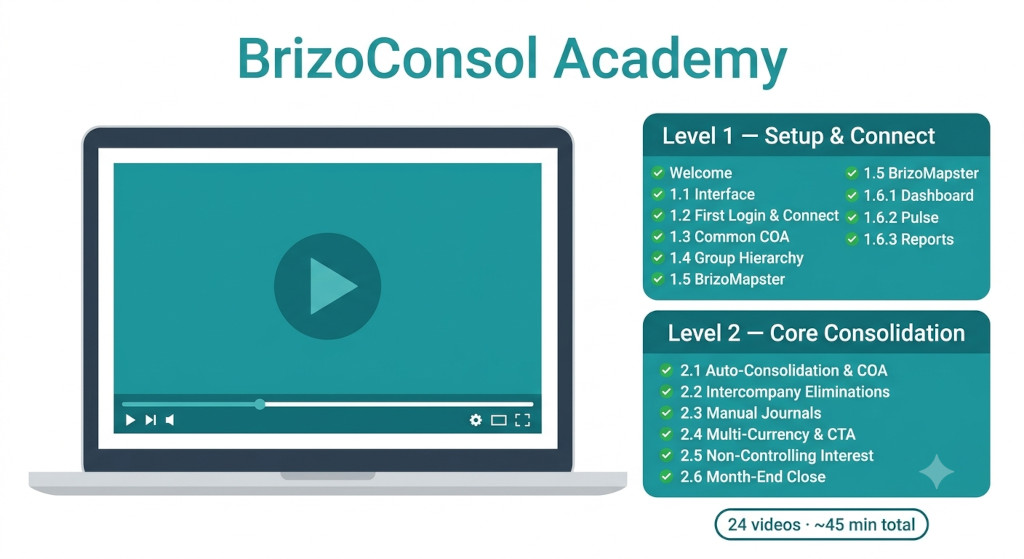
Getting a group consolidation set up — and keeping it running accurately every month — involves a lot of moving parts. Connecting entities, mapping accounts, understanding how eliminations work, handling multi-currency translation, calculating NCI. Each topic is learnable, but it helps to work through them in sequence with clear, focused guidance.
BrizoConsol Academy now has two full levels live — 24 short videos totalling approximately 45 minutes. Level 1 covers setup and connection. Level 2 goes deeper into core consolidation mechanics: automatic consolidation, intercompany eliminations, manual journals, multi-currency and CTA, non-controlling interest, and month-end close. Level 3 — Advanced Topics — is coming soon.
The full library is at brizoconsol.com/tutorials.
Close your books faster every month.
BrizoConsol streamlines your month-end consolidation so your team spends less time on manual work.
What Level 1 Covers
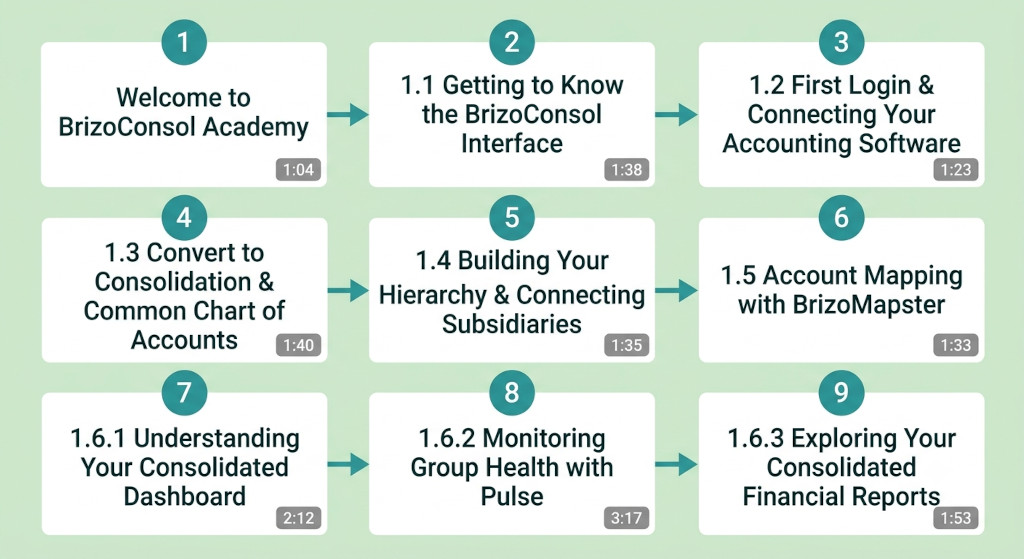
Level 1 — Setup & Connect — consists of nine videos totalling approximately 16 minutes. Each module is short and focused: the longest runs just over three minutes. You can watch the sequence from start to finish in a single sitting, or jump to the specific module you need.
The sequence begins with a brief welcome and course overview, then moves through the steps every new user needs to complete. You start with navigating the interface, then connect your accounting software — Xero, QuickBooks, MYOB, or Zoho Books — via direct API. The next two modules cover setting up your common chart of accounts and building your group entity hierarchy, confirming which entity is the parent and how subsidiaries sit beneath it. From there, Module 1.5 walks through account mapping using BrizoMapster, BrizoConsol’s AI-assisted tool that proposes mappings across entities based on account names and codes.
The level closes with three modules on what your data looks like once setup is done: understanding your consolidated dashboard and its KPI tiles, monitoring group health with the Pulse view — which covers cash flow, AR ageing, and margin scores — and exploring the consolidated financial reports: P&L, balance sheet, and cash flow statement. Most users watch these final three modules after producing their first consolidated report, to understand what they are looking at and where to drill down.
The sequence follows the same path as the guided setup wizard — so if you are working through both at the same time, each video maps directly to a setup step.
Most new users find that watching Level 1 in full before starting setup saves time overall — you arrive at each step knowing what to expect, which reduces back-tracking and configuration errors.
Ten Reference Guides Alongside the Videos
Each tutorial is paired with written reference documentation on the BrizoConsol docs site. The ten guides cover the same ground in more detail, with screenshots, configuration options, and edge case handling that videos don’t have room for. Topics include setting up your first group structure, connecting each accounting system, uploading via Excel or CSV, AI account mapping, intercompany elimination rules, IAS 21 currency translation, NCI setup, manual journal posting, consolidated report generation, and reading Pulse health scores.
The documentation is available at docs.brizoconsol.com and is linked directly from each module on the tutorials page.
What Level 2 Covers
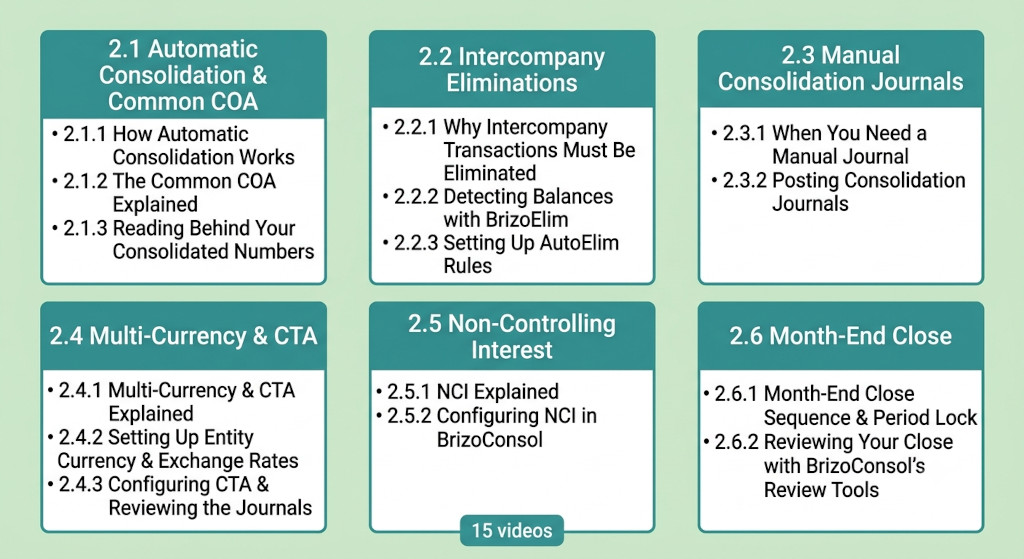
Level 2 — Core Consolidation — consists of 15 videos across six sub-modules. It picks up directly where Level 1 ends: once your entities are connected and accounts are mapped, these modules walk through everything needed to produce accurate consolidated accounts each period.
The level opens with three videos on Automatic Consolidation & the Common COA. These explain what BrizoConsol is actually doing when it consolidates — how trial balances from each connected entity flow through the common chart of accounts structure, and how to drill from a group P&L figure back to the entity-level transactions behind it. A lot of users find this the most clarifying part of Level 2: the numbers stop feeling like a black box.
Intercompany Eliminations is one of the most consequential topics in consolidation — and one of the most commonly mishandled. Three videos cover the accounting principle behind why intercompany transactions must be eliminated, how BrizoElim detects mismatched balances between entities, and how to configure AutoElim rules that handle recurring intercompany revenue, management fees, loans, and dividends automatically each period. For most groups, once AutoElim is configured, eliminations run without manual intervention.
There are scenarios where automation isn’t enough — fair value adjustments, IFRS 16 lease entries, one-off restructuring entries that fall outside AutoElim’s scope. The two Manual Consolidation Journals modules cover when a manual journal is warranted and how to post, review, and audit it in BrizoConsol so it flows correctly into the consolidated output.
For groups with entities reporting in different currencies, Multi-Currency & CTA is the sub-module that matters most. The first video explains the accounting foundation — IAS 21, the three translation rates (closing rate for balance sheet items, average rate for P&L, historical rate for equity), and what the Cumulative Translation Adjustment represents and why it arises. The next two videos cover configuration: setting each entity’s functional currency and exchange rates, then telling BrizoConsol how to calculate the CTA and post it automatically.
Groups with part-owned subsidiaries will work through the two Non-Controlling Interest videos — the conceptual explanation covering what NCI is, why IFRS 10 requires it, and the two measurement methods, followed by the configuration walkthrough for setting ownership percentages and reviewing NCI calculations in BrizoConsol.
Level 2 closes with Month-End Close, which covers the close sequence from start to finish: refreshing entity data, running the close review, applying the period lock, and using BrizoConsol’s review tools to sign off on each period for audit purposes. By the end of these two videos you have a repeatable close process — not a series of manual checks in a spreadsheet, but a structured workflow with a sign-off trail.
Level 3: Advanced Topics — Coming Soon
🔒 Level 3 — Advanced Topics
Coming soon — advanced consolidation scenarios, virtual groups, multi-standard reporting, and more.
Level 3 will cover advanced scenarios for more complex group structures. We will announce it here on the blog and via our newsletter when it launches.
Where to Start
If you are new to BrizoConsol, the recommended path is:
- Watch the Level 1 welcome video to understand the course structure
- Work through Modules 1.1 to 1.5 alongside the guided setup wizard in the app
- Once your entities are connected and accounts are mapped, watch Modules 1.6.1 to 1.6.3 to understand your first consolidated output
- Refer to the written documentation for any configuration detail not covered in the videos
If you are an existing user returning to a specific topic — account mapping, Pulse scores, or understanding your consolidated reports — each module is available individually. You do not need to watch the sequence from the beginning.
The full tutorial library is at brizoconsol.com/tutorials. If you have feedback on a specific module, or a topic you would like covered in Level 2, use the in-app support tool or reach out via the support site.
Ready to Get Started?
Watch Level 1 and set up your group consolidation in your first session — free trial, no credit card required. Watch the Tutorials Start Free Trial