Home
Product
How It Works Security AI in BrizoConsol Built on BRIZO
Features
CTA / FCTR NCI Intercompany Eliminations Step Acquisitions / Partial Disposals Multi-Accounting Standards All Features
Integrations
Xero QuickBooks MYOB Zoho Books Excel Import Other Accounting Software
Solutions
For Accountants CFOs / Finance Leaders Business Owners Multi-Entity Consolidation Group Reporting Multi-Currency Consolidation Board Reporting Management Reporting Pricing See It in Action
Resources
Documentation Tutorials Month-End Guide BRIZO Methodology Webinar Blog
Login Start Free Trial

Your Excel Workbook.
Full Consolidation.

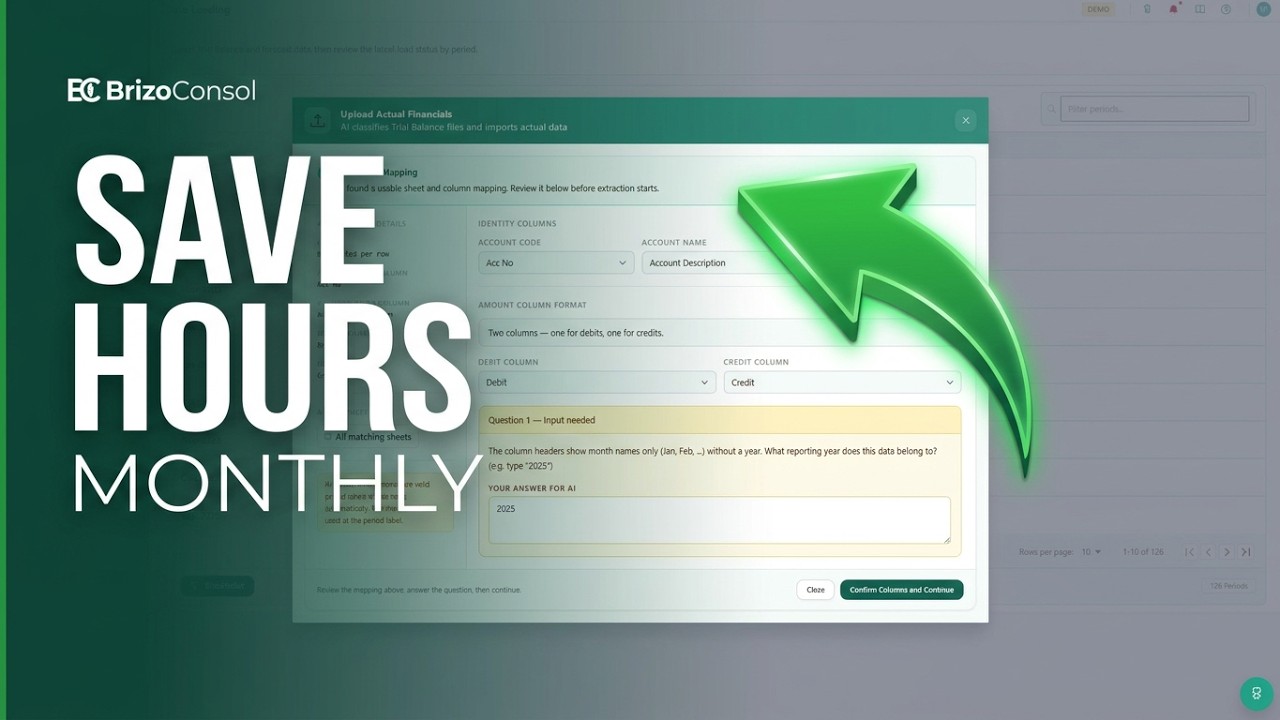
Drag and drop your Excel file. Our AI analyses the format, maps your accounts, and loads your financials — no manual column wrangling required.

No credit card required
Excel Import — SG HoldCoAI Analysed
Format Detected
Workbook FormatMulti-Sheet TB
Sheets Found3 entitiesAuto
AI Account Mapping
RevenueSales Revenue✦ AI
Cost of SalesCost of Goods Sold✦ AI
Admin ExpensesGeneral & Admin✦ AI
312
Rows Loaded
100%
Mapped
0
Errors

BrizoConsol lets finance teams import Excel trial balances, balance sheets, and profit & loss statements directly into a cloud consolidation platform. Whether you're consolidating multiple Excel workbooks or combining Excel entities with Xero, QuickBooks, MYOB, and Zoho Books, BrizoConsol automates account mapping, eliminations, and group reporting.

Drop Your Excel. Get Consolidated Financials in Minutes.

No column templates, no formatting rules to follow. BrizoConsol's AI reads your workbook, detects the format, and guides you through any gaps.

1. Upload File
Drag and drop your .xlsx or .xls workbook.
2. AI Detects Format
Layout, sheet structure, and columns identified automatically.
3. AI Maps Accounts
AI maps to a common COA. Confirm flagged accounts in one click.
4. Consolidate
Entity joins the group — eliminations, FX, and reports applied.
Excel import workflow: Excel workbook uploaded, AI detects format, AI maps accounts, consolidated report produced

Works with the Excel You Already Have

No need to restructure your workbook. BrizoConsol handles the most common Excel financial formats out of the box.

Trial Balance (Standard)

The default and most flexible format. Single or multi-column TB with account code, name, debit, and credit columns — in any order.

P&L + Balance Sheet

If your workbook has P&L and Balance Sheet on separate tabs — or even in the same sheet — the AI reads both and reconstructs the full picture.

Multi-Sheet Workbooks

One workbook, multiple entities. Each sheet can represent a separate entity and is loaded in a single upload — no need to split files.

Single-Column Layout

Accounts listed in a single column with net amounts — common in simpler accounting exports. Recognised and handled automatically.

Multi-Column Layout

Debit and credit in separate columns, or period columns side-by-side. The AI identifies the structure and maps values to the correct fields.

AI Format Detection

Not sure which format your file is? The AI figures it out. It scans headers, column positions, and sheet names to identify the right approach automatically.

Smart Account Mapping, Built In

The AI doesn't just detect your format — it also maps your chart of accounts to a common COA so your consolidated reports are consistent across all entities, regardless of how each one names its accounts.

  • Matches account names to a standard chart of accounts automatically
  • Flags unmapped accounts and prompts you to confirm or adjust
  • Suggests the closest COA match based on account name and type
  • Mappings are saved — re-uploads load instantly without re-mapping
AI Mapping — Review & Confirm
RevenueSales Revenue✦ AI
COGSCost of Goods Sold✦ AI
Admin ExpGeneral & Admin✦ AI
Misc Income?Review neededFlagged
✦ AI mapped 47 of 48 accounts automatically. 1 account flagged for your review.

Excel Entities Get Everything

Excel-imported entities use the same consolidation engine as native connections. No reduced feature set.

Multi-Entity Consolidation

Excel entities consolidate alongside Xero, QuickBooks, MYOB and Zoho connections with identical treatment.

Multi-Currency & CTA

Set functional currency per entity with automatic currency translation adjustments (Pro plan).

Intercompany Eliminations

Automatic intercompany elimination across all entities, including Excel-uploaded ones.

Accounting Standards

Tag entities to IFRS, US GAAP, UK GAAP, SFRS, or Local GAAP for standard-compliant output (Pro plan).

Consolidated Financials

Group-level P&L, Balance Sheet, and Cash Flow with entity drill-down and period comparisons.

Dashboards & Reports

Live dashboards, comparisons, and exportable reports refreshed with each Excel upload.

Recorded

Stop Reformatting Excel Files Before Consolidation

If you're spending hours cleaning and reformatting Excel trial balances before you can consolidate, this session shows you how to eliminate that step entirely.

  • Import Excel files with inconsistent layouts as-is
  • Map non-standard columns and account codes automatically
  • Handle different chart of accounts across entities
  • Consolidate without modifying the source files
Stop Reformatting Excel Files Before Consolidation
5 min
$35 / entity / month

Excel Import is included in every Pro subscription alongside Accounting Standards, Currency Translation, and Non-Controlling Interest. No add-ons, no extra fees.

Start Free Trial View Pricing
✓ No credit card required ✓ Full access for 30 days ✓ Includes all Pro features

Also in Pro: Currency Translation (CTA) →  ·  Non-Controlling Interest (NCI) →

Common Questions

What Excel formats does BrizoConsol support?
BrizoConsol accepts .xlsx and .xls files. The AI supports trial balance (single or multi-column), P&L and Balance Sheet in the same workbook, and multi-sheet workbooks where each sheet represents a different entity.
Do I need to format my Excel file in a specific way?
No. The AI analyses your workbook as-is. It detects column headers, sheet structure, and layout type automatically. You only need to review and confirm any account mappings it flags — everything else is handled for you.
What is account mapping and do I need to do it manually?
Account mapping matches the account names in your Excel file to a common chart of accounts so all entities are comparable. The AI maps most accounts automatically — you only need to confirm or adjust the ones it isn't certain about. Mappings are saved for future uploads.
Can I mix Excel entities with directly connected accounting software?
Yes. A group can include entities from Xero, QuickBooks, MYOB, Zoho Books, and Excel — all consolidated together. BrizoConsol treats them identically in the consolidation engine.
How do I update figures for a new period?
Simply re-upload a new Excel file for the relevant entity and period. Your consolidated reports update automatically. Account mappings from previous uploads are remembered — no need to re-map each time.
What if my workbook has P&L and Balance Sheet on different tabs?
The AI recognises this structure automatically. It reads both sheets, identifies which is the P&L and which is the Balance Sheet, and reconstructs the full financial position for consolidation.
How do I import an Excel trial balance?
In BrizoConsol, add a new entity and select Excel as the source. Upload your .xlsx or .xls trial balance file. The AI analyses the layout, maps your accounts to the common chart of accounts, and loads the data. Your entity then joins the consolidation group automatically.
Can I consolidate multiple Excel workbooks?
Yes. You can add multiple entities from Excel — each as a separate upload — and consolidate them together. You can also include a mix of Excel entities alongside Xero, QuickBooks, MYOB, and Zoho Books organisations in the same group.
Does BrizoConsol support Excel consolidation?
Yes. BrizoConsol accepts Excel trial balances, P&L statements, and balance sheets as entity data sources. Imported Excel entities use the same consolidation engine as directly connected accounting software — including intercompany eliminations, multi-currency translation, and group financial statements.
Can I import historical periods from Excel?
Yes. You can upload Excel files for multiple historical periods. Each upload is assigned to a specific entity and period, allowing you to build a full comparative dataset across periods.
How does AI account mapping work?
When you upload an Excel file, BrizoConsol's AI reads your account names and matches each one to a standard chart of accounts. It suggests the closest match and flags any accounts it isn't confident about for your review. Confirmed mappings are saved so future uploads for the same entity load without re-mapping.

Explore More

Financial Consolidation Software Connect Xero Connect MYOB Connect QuickBooks Connect Zoho Books Pricing Security

Microsoft Excel is a trademark of Microsoft Corporation. BrizoConsol is not affiliated with or endorsed by Microsoft.

Your Excel workbook. Our consolidation engine.

Drag, drop, and consolidate — the AI handles the rest.

Start Free TrialContact Us
No credit card required