New in BrizoConsol Reports: Cleaner Layouts, a Changes in Equity Statement, and the Current & Last Fiscal Year Column Set
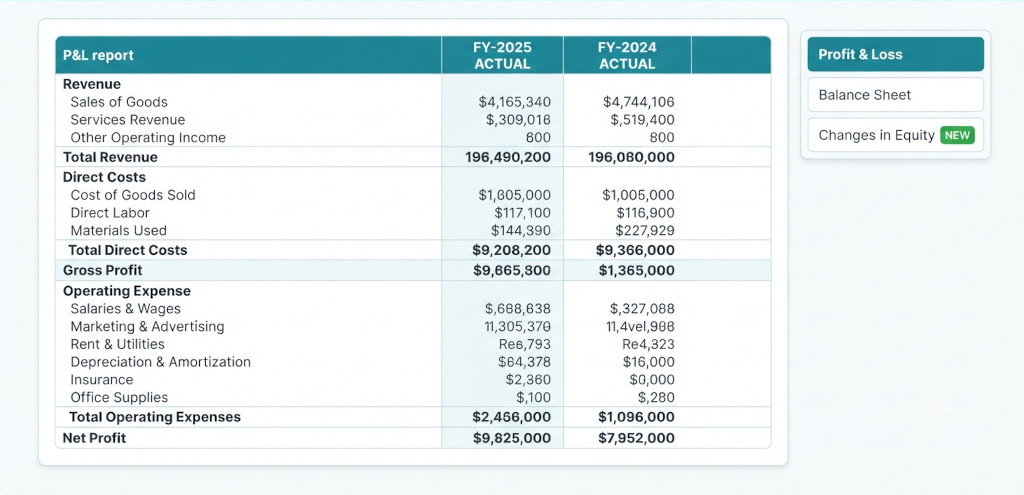
Finance teams spend a lot of time in reports. The quality of the report format — how clearly it communicates, how easy it is to read at a glance, how well it matches what directors and auditors expect to see — matters as much as the numbers themselves. A consolidated P&L that looks like a data dump takes longer to review and creates more questions than it answers.
We have shipped three updates to BrizoConsol’s reporting layer, all aimed at making the output more suitable for the finance professionals who use it: a cleaner, more structured report layout, a new Statement of Changes in Equity, and a pre-built Current and Last Fiscal Year column set that makes year-on-year comparison a one-click operation.
Cleaner Report Format and Layout
The report view has been redesigned with finance audiences in mind. The previous layout worked well enough for getting to the numbers, but it lacked the visual hierarchy that makes a financial statement easy to review quickly — particularly for directors, auditors, and CFOs who are scanning for anomalies rather than reading line by line.
Stop building consolidations in spreadsheets.
BrizoConsol automates multi-entity consolidation — setup in minutes, reports the same day.
The updated layout introduces clearer section groupings — Revenue, Direct Costs, Gross Profit, Operating Expense, Depreciation, Operating Profit, and so on — with bold subtotal rows that visually separate each block. Account codes and names are consistently formatted, zero-value rows can be suppressed with a single toggle, and the entity breakdown view expands or collapses cleanly without disrupting the overall structure.
The period and currency selectors sit prominently above the report so context is always visible — which period, which year, which currency — without needing to scroll. The report also responds correctly to custom column sets, so whatever view you configure is applied consistently across P&L, Balance Sheet, and Cash Flow without needing to reconfigure for each statement.
Reports exported to Excel and PDF carry the same formatting — column structure, groupings, and subtotals — so what you see on screen is what gets sent to the board or the auditor.
Statement of Changes in Equity
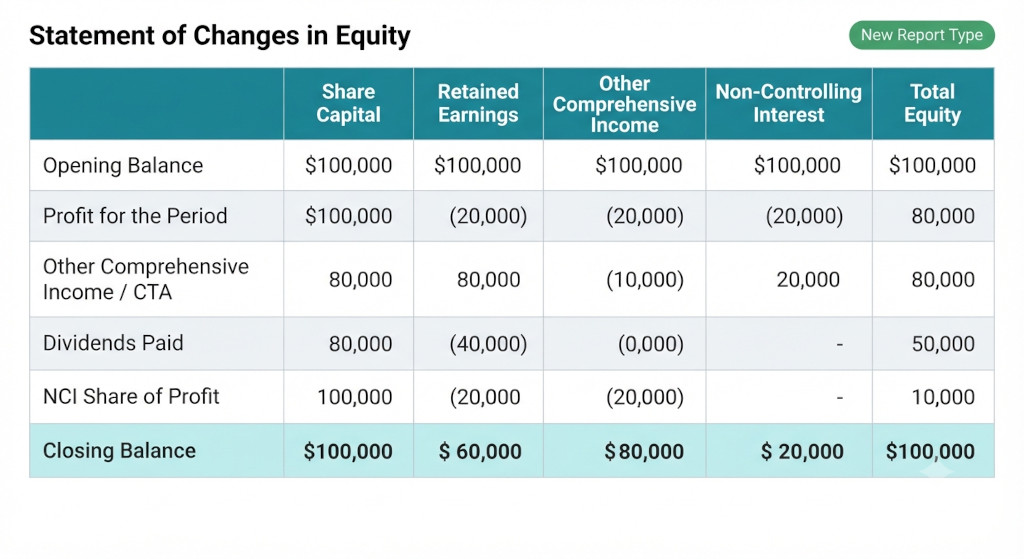
BrizoConsol now produces a Statement of Changes in Equity alongside the P&L, Balance Sheet, and Cash Flow. It is available under All Reports in the Reports section and can be included in any report package alongside the other primary statements.
The statement shows movements in each component of equity across the reporting period: share capital, retained earnings, other comprehensive income (which includes the Cumulative Translation Adjustment for multi-currency groups), non-controlling interest, and total equity. It reconciles the opening and closing equity balance through profit for the period, dividends paid, CTA movements, and any other equity-affecting entries posted in BrizoConsol.
For groups reporting under IFRS or local GAAP equivalents, the Statement of Changes in Equity is a required primary statement — sitting alongside the P&L and balance sheet in any set of statutory accounts. Having it generated automatically from the same consolidation data that drives the other statements means no manual reconciliation, no separate workings, and no risk of the equity roll-forward not agreeing to the balance sheet.
For multi-currency groups, the CTA movement flows directly into the Other Comprehensive Income column, so the statement correctly separates the translation difference from operating profit — which is the treatment required under IAS 21. If you have NCI entities in your structure, the NCI share of profit and equity is already calculated from the ownership percentages you configured in your group hierarchy, and appears in the NCI column automatically.
| Equity Components | Share Capital, Retained Earnings, OCI / CTA, NCI, and Total Equity — all in one statement |
| IAS 21 Compliant | CTA flows directly into OCI — no manual adjustment required for multi-currency groups |
| NCI Included | NCI share of profit and equity calculated automatically from your group hierarchy ownership percentages |
| Ties to Balance Sheet | Closing equity balance reconciles directly to the equity section of the consolidated balance sheet |
Current and Last Fiscal Year Column Set
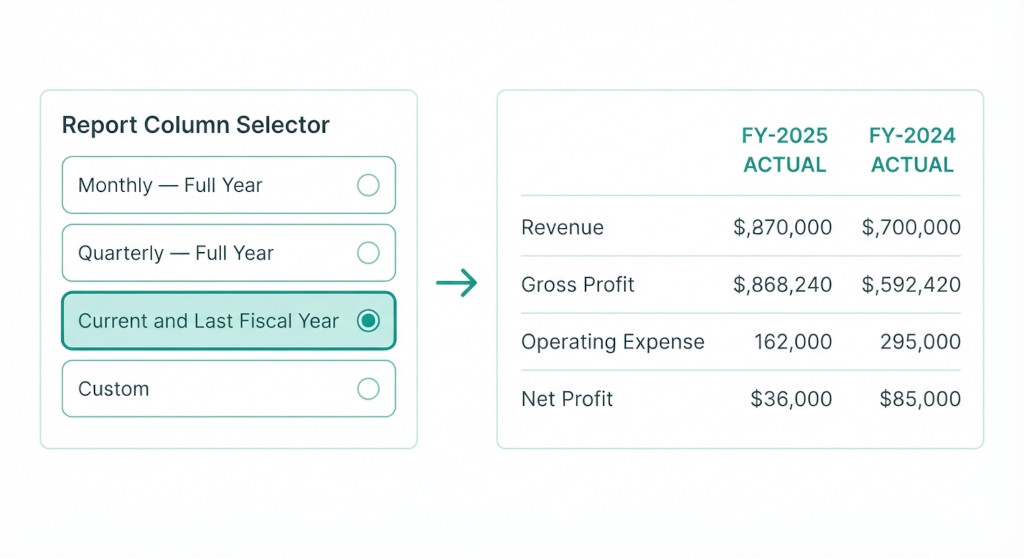
Statutory accounts, audit packs, and year-end board presentations almost always use the same two-column format: current fiscal year actuals on the left, prior fiscal year actuals on the right. No variance column, no percentage movements — just the two years side by side, which is what accountants, auditors, and company directors expect to see in a formal set of financial statements.
BrizoConsol now includes Current and Last Fiscal Year as a pre-built column set under Column Sets in the report view. Selecting it applies a clean two-column layout across whichever report is open — P&L, Balance Sheet, or Changes in Equity — showing current fiscal year actuals alongside prior fiscal year actuals in the format suited to statutory reporting.
The column set is aware of your fiscal year configuration, so if your year runs April to March or July to June, the comparison is still correct — current year to date versus the equivalent prior year period, not just calendar year to date.
For groups with entities in different currencies, the comparison respects the currency setting applied to the report, translating both periods consistently before presenting the side-by-side view.
In addition to Current and Last Fiscal Year, column sets can be fully customised — monthly layouts, quarterly layouts, rolling 12-month views, or any combination of periods and comparisons that your reporting cycle requires. The Current and Last Fiscal Year set is simply the most commonly needed one, now available without any configuration.
Where to Find These Updates
All three updates are live now for all BrizoConsol accounts. The Statement of Changes in Equity appears under Reports → All Reports alongside the existing financial statements. The Current and Last Fiscal Year column set is available under Reports → Column Sets — select it from the column set dropdown in any report view. The updated report layout applies automatically to all reports with no action required.
If you use the scheduled report feature to send monthly report packages, the Changes in Equity statement can be added to any existing schedule from the report settings. The column set applied to each scheduled report is saved with the schedule, so if you switch to the Current and Last Fiscal Year view and save the schedule, that layout will apply to every future delivery.
Documentation for the Statement of Changes in Equity and column set configuration is available at docs.brizoconsol.com. If you have questions about how CTA flows into the equity statement for your specific group structure, or how the prior year comparison handles mid-year entity additions, use the in-app support tool.
See Your Group’s Equity Statement
These updates are live for all BrizoConsol accounts. Start your free trial to see the full report suite including the new Changes in Equity statement. Watch the Tutorials Start Free Trial