The Best Xero Consolidation Software for Multi-Entity Groups
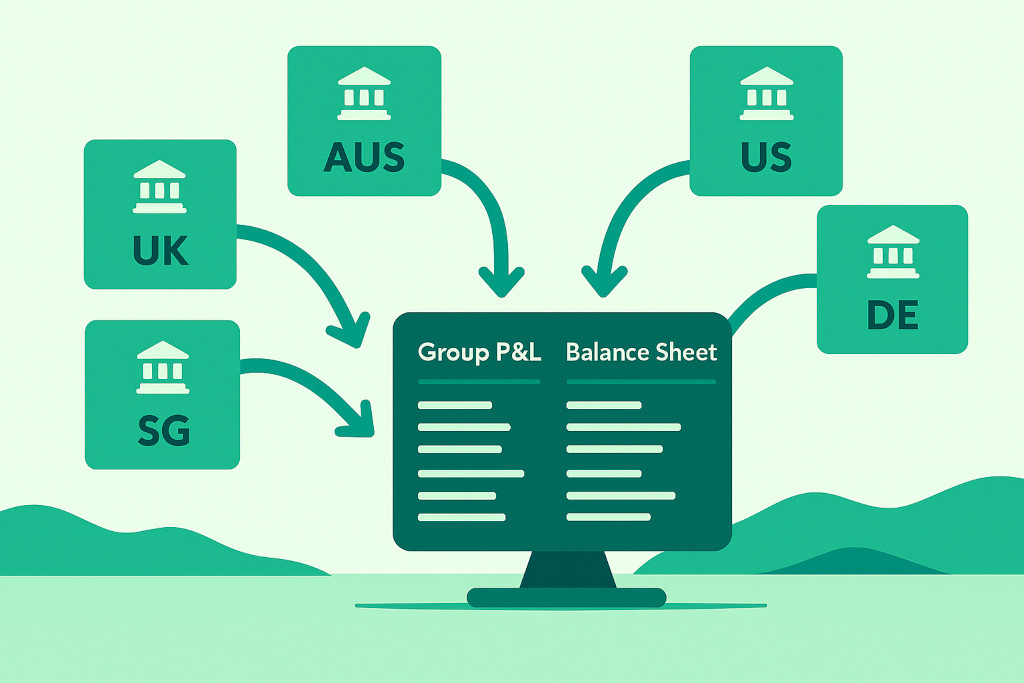
Finance teams running three or more Xero entities will hit the same wall at month-end: Xero has no native mechanism for pulling those books together into a single set of consolidated financial statements. The P&L you need for your board, the Balance Sheet your auditors require, the currency-translated figures your parent company expects — none of it comes out of Xero automatically. Someone on your team is exporting spreadsheets, mapping account codes by hand, and manually eliminating intercompany balances. Every month.
This guide looks at exactly where Xero’s architecture falls short for group accounting, what genuine xero consolidation software must do to fill that gap, and how to evaluate the options available to multi-entity finance teams today.
Why Xero Can’t Consolidate Multiple Entities

Xero is architected around a single legal entity. Each Xero organisation is an isolated ledger with its own chart of accounts, base currency, and reporting period. That design is intentional — and for sole-entity SMEs, it is exactly right. The problem arises the moment a business acquires a second entity, opens a subsidiary in another currency, or takes on investment across multiple holding structures.
Consolidate your Xero entities — automatically.
BrizoConsol pulls from all your Xero organisations and delivers group reports in minutes.
The specific gaps Xero leaves open
- No cross-organisation reporting. Xero has no native “group view” that spans two or more organisations. Reports are always scoped to a single Xero org.
- No intercompany elimination engine. Transactions between related entities — intercompany loans, management fee recharges, intragroup sales — must be eliminated manually in the consolidated statements. Xero has no mechanism to identify or cancel these automatically.
- No currency translation at consolidation. When a UK parent consolidates an Australian subsidiary, balance sheet items must be translated at the closing rate and P&L items at the average rate, with the translation difference posted to equity as a Currency Translation Adjustment (CTA). Xero does not perform this calculation.
- No non-controlling interest (NCI) support. Partially-owned subsidiaries require NCI calculations on both the P&L and equity. Xero has no concept of ownership percentage at consolidation.
- No single chart of accounts across entities. Each Xero org can have a completely different account structure. Mapping these together for group reporting is a manual exercise with significant error risk.
None of this is a criticism of Xero — it is outstanding software for what it is designed to do. But for xero group consolidation, the platform was simply not built for it, and no Xero update since its launch has changed that fundamental architecture.
“The spreadsheet that started as a ‘temporary fix’ for the monthly group pack is now four years old, has 47 tabs, and only two people in the business understand it.” — A sentiment heard in virtually every multi-entity finance team.
What Genuine Xero Consolidation Software Must Do
Not all tools marketed as xero consolidation software provide the same depth. Some are glorified report aggregators that sum two P&Ls together without performing any consolidation accounting. When evaluating options, require evidence of the following capabilities:
1. Direct API connectivity to Xero (no CSV exports)
Any tool that requires you to export data from Xero and import it elsewhere has already introduced a manual step — and a potential error point. Proper consolidation software connects directly to the Xero API, pulls live trial balance data, and refreshes automatically. This is non-negotiable for a scalable process.
2. Automatic intercompany elimination
The software must identify matched intercompany transactions across entities and eliminate them during the consolidation run — not prompt you to do it in a spreadsheet afterwards. Look for the ability to configure elimination rules, see which transactions were matched, and access an audit trail of every elimination posted.
3. Multi-currency consolidation with CTA
If any entity in your group operates in a currency different from the reporting currency, the software must handle functional currency translation automatically: closing rates for balance sheet items, average rates for P&L, and a correctly calculated CTA posted to equity. This is one of the most error-prone areas of group accounting when done manually.
4. Chart of accounts mapping
Because each Xero org likely has a different account structure, the consolidation layer must maintain a mapping between subsidiary accounts and the group chart of accounts. The best tools use intelligent AI-assisted mapping to accelerate the initial setup and flag unmapped accounts on each run.
5. Consolidated financial statements on demand
A consolidated P&L, Balance Sheet, and Cash Flow Statement — compliant with IFRS, US GAAP, or UK GAAP as required — should be available at any point in the month, not just after a laborious manual process. Real-time or near-real-time visibility into group financials is the whole point.
Automating Intercompany Eliminations with BrizoConsol
BrizoConsol connects directly to Xero via its official API — no data exports, no CSV uploads, no manual intervention. Once each Xero organisation is linked, BrizoConsol pulls trial balance data continuously and holds it in a consolidation ledger that sits above your individual entity books.
Intercompany eliminations are configured once. You define which entities transact with each other, which account pairs represent the intercompany relationship (e.g. intercompany receivable in Entity A matched to intercompany payable in Entity B), and BrizoConsol applies those rules automatically on every consolidation run. Where balances don’t match — because one entity has not yet posted a transaction — the platform flags the discrepancy and shows you exactly where the difference sits. Every elimination entry carries a full audit trail: what was eliminated, when, and why.
This is not just a time saving. In groups with more than four entities, manual intercompany reconciliation typically takes two to three days per month. Automating it collapses that to minutes, and removes the category of error that comes from a finance analyst working through a 2,000-row spreadsheet at 11pm on the last day of month-end.
Multi-Currency Groups: Handling CTA the Right Way
Currency translation adjustment is the area where Xero-based group consolidation most often goes wrong. The mechanics are straightforward in principle — closing rate for the balance sheet, average rate for the P&L, difference to equity — but applying them consistently across six or eight entities, with different reporting months and fluctuating rates, is where spreadsheets break down.
BrizoConsol manages the full currency translation workflow within the consolidation layer. The platform maintains a rate table (editable, with a history of rates used), applies the correct methodology to each account class automatically, and calculates the CTA for each subsidiary. The CTA rolls into the consolidated Balance Sheet in equity, and is broken out by entity in the drill-down view so you can explain every line.
For groups reporting under IFRS (IAS 21), UK GAAP (FRS 102 Section 30), or US GAAP (ASC 830), the translation methodology is configured once at setup and applied consistently — giving auditors the documented, traceable process they need.
Virtual Groups and Flexible Reporting Structures
Multi-entity groups rarely have a single reporting structure. A CFO might need consolidated figures for the whole group, but also separate views for the UK entities only, or the Asia-Pacific region, or a particular brand portfolio. Maintaining separate consolidation workbooks for each cut of the business is exactly the kind of overhead that kills finance team productivity.
BrizoConsol’s Virtual Groups feature lets you define any number of reporting groupings across your connected Xero organisations. The Singapore, Hong Kong, and Australian entities become an “APAC” virtual group; the UK and Irish entities form a “UK&I” group. Each virtual group produces its own consolidated financial statements on demand, without any duplication of the underlying setup. Ownership percentages are respected, NCI is calculated correctly, and eliminations apply only to transactions within the selected group.
This is particularly valuable for groups with minority shareholders in individual subsidiaries, or for management reporting by segment that does not align with the legal entity structure.
Evaluating Xero Consolidation Tools: A Practical Checklist
The market for multi-entity accounting software that integrates with Xero has grown substantially. When making a shortlist, use the following criteria:
- Native Xero API integration — live data pull, no manual exports.
- Automatic intercompany eliminations with configurable rules and audit trail.
- Proper currency translation — closing rate / average rate / CTA to equity, not a simple conversion.
- NCI support — partial ownership handled correctly in both P&L and equity.
- Accounting standard tagging — IFRS, US GAAP, UK GAAP, or local GAAP as required.
- Consolidated statements on demand — P&L, Balance Sheet, and Cash Flow, available mid-month.
- Chart of accounts mapping tools — ideally with AI-assisted initial mapping.
- Flexible reporting groups — segment, region, or brand cuts without extra setup.
- Drill-through to source transactions — so any group figure can be traced back to the originating Xero transaction.
- Audit trail on all consolidation adjustments — essential for year-end and external audit.
BrizoConsol meets all ten criteria. It is purpose-built for finance teams who have grown beyond what a single Xero organisation can handle, and who need group consolidation that is genuinely automated — not a spreadsheet with a direct data feed.
For groups also using QuickBooks, MYOB, or Zoho Books alongside Xero (common in acquisitive groups where subsidiaries arrive with their own accounting systems), BrizoConsol connects to all four platforms simultaneously, pulling trial balance data from each and consolidating across a mixed-system group without requiring migration to a single platform.