BrizoElim — Enhanced Intercompany Elimination Detection
Intercompany eliminations fail quietly. The receivable is on Entity A’s books. The payable is on Entity B’s books. Both figures are correctly posted. Neither triggers an error. But if no one configures an elimination rule for that relationship, the consolidation runs with both balances in the consolidated balance sheet — and the error only surfaces when someone looks hard enough at the numbers.
The obvious pairs get handled. The management fee agreement is documented; the intercompany loan has a contract. Those get elimination rules and run every period. The problem is everything else: the subsidiary that started billing a sister entity last quarter under an informal arrangement, the dormant intercompany account that reactivated when someone forgot which entity was paying a shared supplier, the pair of accounts that nearly offset in reporting currency but not quite because of a cross-currency translation gap. These are the eliminations that fall through.
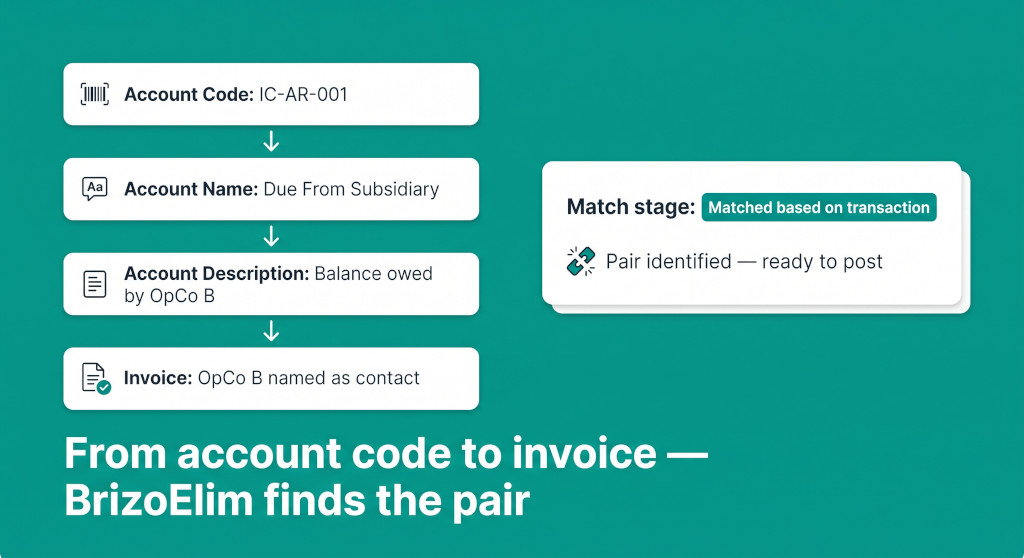
BrizoElim — BrizoConsol’s intercompany elimination detection engine — has been significantly enhanced. The core change is how deeply it looks for evidence that two accounts belong together. Detection now progresses through four match stages: from structural signals in the account code, through the account name and description, and all the way down to invoice and bill transactions in the ledger. The engine also now accepts a list of specific entity pairs to scan, which both focuses the result and enables a smarter way of handling anomaly flags across multiple pair scans.
Intercompany eliminations without the manual work.
BrizoConsol identifies and eliminates intercompany balances automatically at consolidation.
The Four Match Stages
When BrizoElim identifies an intercompany account or forms a pair between two accounts, it records the match stage — the type of evidence that established the identification. Stages progress from structural to transactional: the engine starts with account metadata it can read directly and, when that is not conclusive, goes deeper into the actual transactions. The stage is shown on every suggestion card so the reviewer knows exactly why a pair was flagged.
| Stage | What it means | Example signal |
|---|---|---|
| account_code | The account code itself follows an intercompany naming convention | Code starts or ends with IC-, ICO, INTCO, INTER, GRP, or REL |
| account_name | The account name contains a keyword that signals an intercompany relationship | “Due from subsidiary”, “Intercompany payable”, “Loan to affiliate” |
| account_description | The account description references a counterpart entity or relationship not visible in the name | Description mentions “balance owed by OpCo B” or “counterpart receivable” |
| transaction | An invoice or bill in the ledger names a group entity as the contact — the strongest evidence | A bill posted in Entity A has Entity B as the supplier contact |
Account code matching is deterministic. If the code pattern is there, the account is flagged, no interpretation needed. Name matching widens the search to accounts that are labelled with common intercompany terminology even when the code format is non-standard. Description matching goes one level deeper — accounts where the name alone is generic but the description clarifies the counterpart relationship. Transaction matching is the deepest and most conclusive: it looks at the source documents behind the ledger entries and checks whether any of them name another group entity.
The AI analysis runs over all account metadata — code, name, description, and classification — for every entity in the scan perimeter. When the AI identifies an account or proposes a pair and supplies a match reason, the engine maps that reason back to the appropriate stage. The pattern-based detection runs in parallel across the same metadata, so accounts the AI misses may still be caught by a recognisable code prefix or name keyword.
Scoping Detection to Entity Pairs
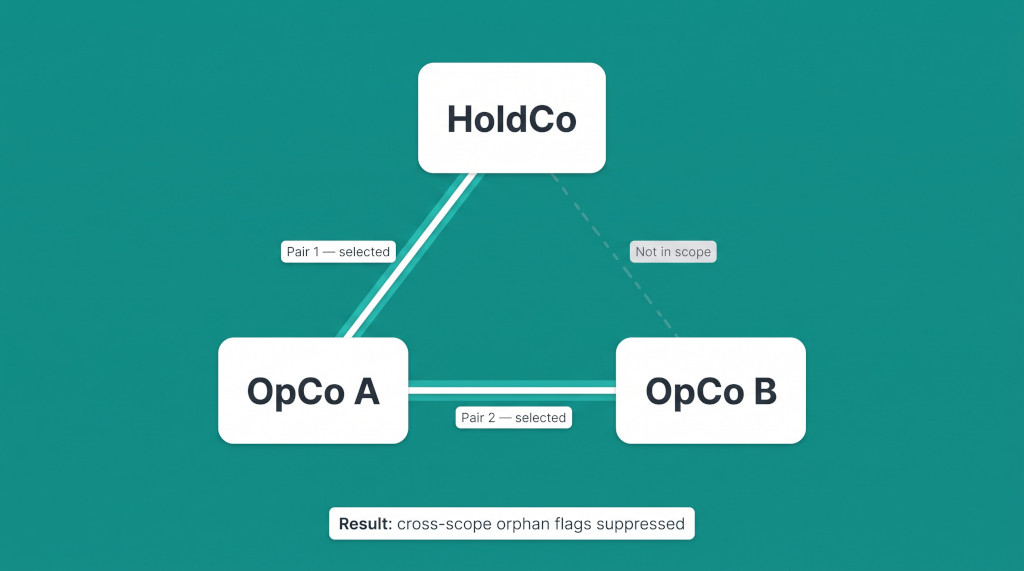
One of the most significant practical improvements is the ability to scope a detection run to specific entity pairs rather than scanning the whole group at once. When you run BrizoElim, you can supply a list of from-entity and to-entity pairs — for example, HoldCo ↔ OpCo A and OpCo A ↔ OpCo B. The engine runs a separate scan for each pair, restricting the perimeter to just those two entities and the accounts within them.
This matters for two reasons. First, it produces more focused suggestions: when the perimeter is limited to two entities, the balance-offset matching and the AI analysis have a smaller, more specific set of accounts to work with. A match that might look ambiguous across a twelve-entity group becomes obvious when you are only comparing two companies at a time. Second, and less obviously, it enables smarter anomaly suppression.
When you scan multiple pairs in a single run, the engine collects all the accounts that were successfully matched across all scopes. Before it finalises the anomaly list, it drops any “orphan” flag — a one-sided posting, dormant reactivation, or balance spike note — for an account that was matched in a different pair scope during the same run. Without this, an account in Entity A that is correctly matched against Entity B in the A↔B scan would still generate a RULE_4 one-sided posting note in the A↔C scan, because from C’s perspective A’s account has no counterpart. That is noise, not a real problem. The engine now removes it.
If you are scanning a group with several entities, scope each run to the pairs with the highest intercompany activity first. You can add more pairs to the same run; the engine de-duplicates them automatically and suppresses cross-scope orphan flags for any account matched in at least one scope.
How Pairs Are Formed
Once accounts are identified, the engine forms candidate pairs. This happens through three mechanisms that run in sequence and combine their results.
AI-proposed pairs
The AI returns candidate pairs alongside the identified accounts. Each pair includes a match confidence level — confirmed, inferred, or possible — and a match reason. The engine validates every AI-proposed pair: both accounts must be in the scan perimeter, they must belong to different entities, and their classifications must form a valid elimination pair — Asset against Liability, or income against expense. Pairs that fail validation are discarded with a diagnostic note. Pairs that pass are added with whatever match stage the AI supplied, normalised against the known stage vocabulary.
Inferred reciprocal pairs
After AI validation, the engine scores every possible combination of identified accounts from different entities. The scoring checks whether the two account names look reciprocal — whether one looks like the asset side and the other like the liability side of the same relationship, or whether both look like income and expense sides of the same transaction. Intercompany keywords in both names score +30; a receivable/due-from name paired against a payable/due-to name scores +70; matching income and expense cues score +70. A total score of 70 or above creates a pair at account_name stage with “possible” confidence. A score of 90 or above is classified as “inferred” — strong enough to generate a suggestion.
Evidence-based pairs
The third mechanism finds pairs that neither the AI nor the name scoring caught, using balance shapes and source documents. For each period in the scan range, the engine compares the reporting-currency balance of every identified account against every other account from a different entity. When two balances are opposite in sign and their residual is small — within 5% of the smaller balance when source-document evidence exists, within 0.1% when it does not — the pair is added. If the source documents (invoices or bills) for either account name a group entity as the contact, the match stage is upgraded to transaction. Without document evidence, the stage is set to account_code if either account has a recognisable IC code prefix, and to account_name otherwise. The tight 0.1% threshold for balance-only matching prevents the engine from creating pairs on coincidental similar balances between unrelated accounts.
See BrizoElim in Action
Watch how BrizoConsol detects, reviews, and posts intercompany eliminations — from first scan to consolidated financials. See It In Action
The Anomaly Rule Set
Detection does not stop at identifying pairs. For every pair and every unmatched intercompany-looking account, the engine runs a set of anomaly rules. Anomalies are separate from suggestions: a suggestion proposes a journal entry; an anomaly says something needs investigation before any entry is created. Each anomaly carries a severity level (error, warning, or info), a plain-language explanation, a risk level, and a suggested action.
| Rule | Severity | Trigger |
|---|---|---|
| RULE_2 — Possible Pair | Info | Evidence suggests a relationship but confidence is below “inferred” — not enough for a journal entry |
| RULE_3 — Balance Reciprocity | Warning | Matched pair does not fully offset in reporting currency |
| RULE_4 — One-Sided Posting | Error | One side of an IC pair has a balance; the other side has no balance in this period |
| RULE_5 — Sign Flip | Error | Both sides of a matched pair carry the same sign — balances should be opposite |
| RULE_6 — Classification Mismatch | Warning | One side is a balance-sheet account; the other is a profit-and-loss account |
| RULE_7 — Dormant Account Reactivated | Warning | An IC-identified account had no prior-period balance but now has activity |
| RULE_8 — Balance Spike | Warning | Period movement exceeds 50% of the prior balance and exceeds the materiality threshold |
| RULE_10 — FX Translation Gap | Warning | Cross-currency pair has a reporting-currency residual above materiality after translation |
RULE_4 is the one to address first: an error means one side of a pair is missing from this period’s ledger, which makes any elimination entry structurally wrong until the underlying balance is found or explained. Warnings are conditions to review and confirm before posting — they do not block entry creation, but they identify where the numbers warrant a closer look.
From Suggestion to Journal Entry
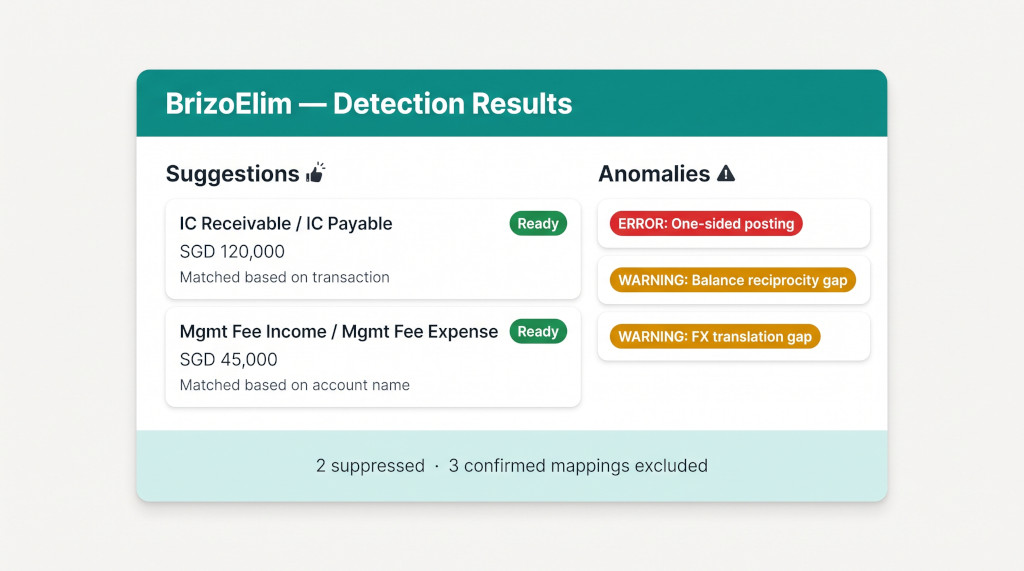
The detection results screen separates output into two panels: Suggestions and Anomalies. A suggestion is generated when a pair has “inferred” or “confirmed” confidence and both sides have a balance above the materiality threshold in that period. The suggestion card shows the debit and credit lines pre-populated with the account, entity, currency, and amount; the net difference between the two sides (if they do not exactly offset); a field for how to treat that difference — by default allocated to the group’s FX difference account — and the match stage that established the pair. The elimination type (trade receivables/payables, intercompany loan, management charge, and so on) is inferred automatically from the account names and codes, and can be changed before posting.
Accounts already covered by a configured auto-elimination rule or with a posted elimination entry for that period are excluded from suggestions and counted in the suppressed total shown at the bottom of the results screen. They do not appear as anomalies either — configured and posted means handled by definition.
Once you review a suggestion, you can accept it (which creates and posts the elimination journal entry) or dismiss it (which records your decision against that suggestion so it does not reappear in the next scan for the same period and scenario). Dismissal decisions are specific to the organisation, scenario, currency flag, and period — dismissing a suggestion for January 2026 does not affect the February 2026 scan.
Worked Example: Cross-Currency Pair
Consider a two-entity scan: OpCo A (USD functional currency) and OpCo B (EUR functional currency), with SGD as the group reporting currency. You run BrizoElim scoped to the OpCo A ↔ OpCo B pair for January 2026.
OpCo A carries “Due From OpCo B” with account code AR-ICO-002 and a balance of USD 85,000. OpCo B carries “Due To OpCo A” with account code AP-ICO-001 and a balance of EUR 78,500. The detection identifies both accounts at account_code stage (the ICO prefix is recognised), then upgrades to transaction stage because an invoice in OpCo B’s ledger names OpCo A as the supplier contact.
| OpCo A — Due From OpCo B (USD 85,000) | SGD 114,070 |
| OpCo B — Due To OpCo A (EUR 78,500) | SGD 114,688 |
| Residual after translation | SGD 618 |
The pair fully offsets at the functional-currency level but not at the reporting-currency level after applying the closing exchange rates for the month. The residual of SGD 618 exceeds the materiality threshold, so RULE_3 fires — a Balance Reciprocity warning noting that the pair does not fully offset in reporting currency. RULE_10 also fires, identifying this as a cross-currency pair with a translation gap above materiality and suggesting the reviewer confirm whether this is expected FX or a posting mismatch. The match stage is “Matched based on transaction” — the strongest possible evidence — so a suggestion is still generated, and the reviewer decides how to treat the residual before posting.
| Account | Dr | Cr |
|---|---|---|
| OpCo B — Due To OpCo A (AP-ICO-001) | 114,688 | |
| OpCo A — Due From OpCo B (AR-ICO-002) | 114,070 | |
| FX Difference Account | 618 |
Match stage: Matched based on transaction · Confidence: inferred · Type: Trade Receivables / Payables
The reviewer confirms the SGD 618 is a translation difference — expected given the two functional currencies — adjusts the difference treatment account to the correct FX reserve account, and posts. The next scan for January 2026 will not show this suggestion: the posted elimination is now counted as coverage and the pair is suppressed.
First-Run Checklist
- Configure Intercompany Rules: Before running detection, navigate to the group organisation’s Settings and open Intercompany Rules. Enable the elimination types that apply to your group — trade receivables/payables, intercompany loans, management charges, dividends, and others — and confirm that BrizoElim (automated entries) is selected as the elimination method. This setting determines which elimination workflow BrizoConsol routes you to and which data types are in scope.
- Set up confirmed rules for known pairs: Any intercompany relationship you already know about should be configured as an auto-elimination rule before you run detection. Known rules are excluded from the detection output by design — configuring them up front keeps the detection results focused on what you do not yet have covered.
- Scope to your highest-risk pairs first: Start with the entity pairs where intercompany activity is most material — the parent-subsidiary loan, the management fee flow between HoldCo and an operating company. Add them as from/to pairs when you run detection. This gives the engine a focused perimeter and enables cross-scope orphan suppression if you include more than one pair.
- Set a realistic materiality threshold: The default threshold controls which balances are large enough to produce a suggestion. Set it in the reporting currency. Balances below the threshold are counted as suppressed, not flagged — they are below the level where misstatement matters.
- Run detection and review the match stage column: Suggestions backed by “Matched based on transaction” are the highest-confidence results and are generally safe to post after a quick check of the invoice reference. Suggestions at “Matched based on account name” or “account description” warrant a closer read of the underlying ledger before posting.
- Clear errors before warnings: RULE_4 errors (one-sided postings) mean one side of a pair is missing. Resolve those first — the counterpart balance may be in a different account or may simply not have been posted yet. RULE_3 warnings (balance reciprocity gaps) and RULE_10 FX gaps can be reviewed alongside the suggestion and handled via the difference treatment field.
- Re-run each period after entity close: Detection reads from the current trial balance. Running it after each entity closes — before the group consolidation is finalised — gives you time to resolve anomalies and post eliminations before the consolidated statements are prepared. Decisions from the prior period do not carry over to the new period, giving you a clean slate each time.
Automate Your Intercompany Eliminations
BrizoConsol handles multi-entity consolidation, intercompany detection, and elimination journal entries — so your team focuses on review rather than discovery. Start Free Trial