QuickBooks Online Plans for Multi-Entity Groups: Which Plan Does Each Company Need?
The controller of a US-based holding group had been running two overseas subsidiaries on QuickBooks Online Simple Start for eighteen months. The subsidiaries operated in Australia and Singapore, invoicing clients in AUD and SGD respectively. The issue surfaced during a year-end audit: because Simple Start does not include multi-currency, the subsidiaries had been recording every foreign currency transaction in USD at a flat assumed rate. The resulting accounts were wrong — and reconciling them required going back through over a thousand transactions to reconstruct the actual exchange rates.
The mistake was a plan-selection error made when the subsidiaries were set up. Multi-currency was available — but not on the plan tier they were on.
For multi-entity groups running QuickBooks Online, plan selection is a company-by-company question. Each legal entity is a separate QuickBooks company file with its own subscription, and the features available to that company depend on the plan tier it is on. This guide covers what each QBO plan includes, when each plan is appropriate for a company within a group, what QuickBooks Online does particularly well for international groups, and what no QBO plan can do — regardless of tier.
Multi-entity QuickBooks consolidation, done for you.
Connect all your QuickBooks companies and get consolidated financials instantly.
QuickBooks Online’s Plan Structure
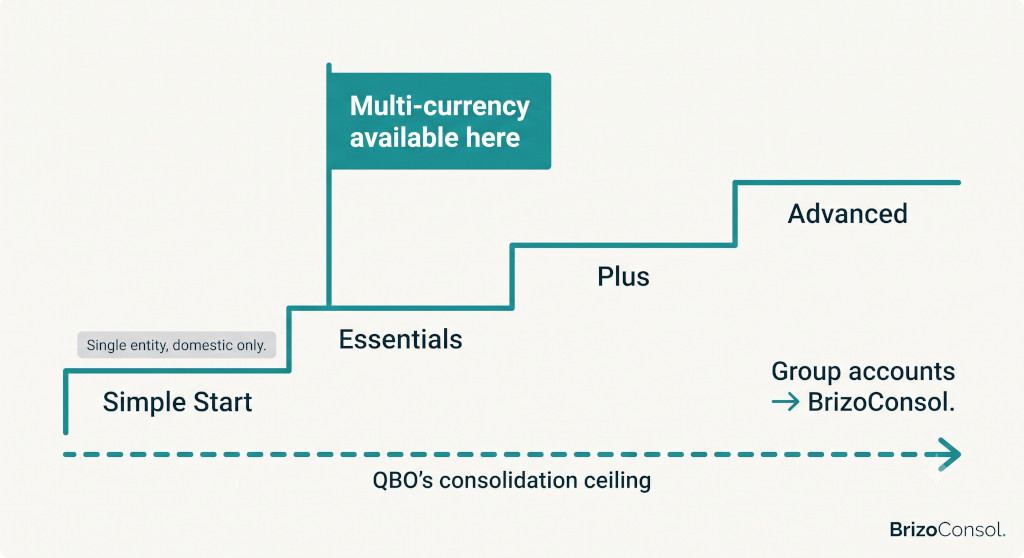
QuickBooks Online operates four main plans: Simple Start, Essentials, Plus, and Advanced. These plans are available globally, though pricing and some features (particularly payroll) vary by region. The plans are designed primarily for the US market but are used widely in Canada, Australia, Singapore, and other markets.
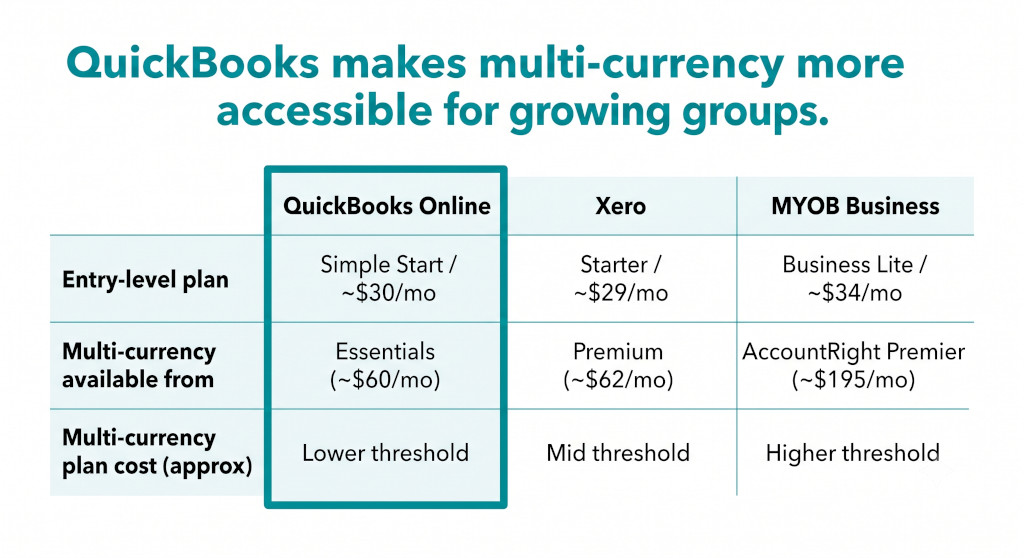
The defining structural difference between QuickBooks Online and comparable platforms is where multi-currency sits in the plan hierarchy. Unlike Xero — where multi-currency requires the Premium plan — and MYOB Business, where it requires AccountRight Premier (the highest tier), QuickBooks Online includes multi-currency from the Essentials plan. For international groups that need multiple entities on multi-currency, this can represent a meaningfully lower subscription cost per entity.
The Four QBO Plans: What Each Includes
QuickBooks Online Simple StartSingle user, domestic operations only
~USD $30/mo per company
InvoicingBank reconciliationIncome / expense tracking1 user onlyNo multi-currencyNo bills / AP
Simple Start is the entry-level plan, restricted to a single user. It does not include accounts payable (you cannot record supplier bills), multi-currency, or time tracking. It is appropriate in a group context only for dormant holding companies or entities with no trading activity that simply need a bank feed reconciliation and basic bookkeeping. Any entity that needs to pay supplier bills, manage accounts payable, or has more than one user should be on Essentials or above. Any entity transacting in foreign currencies must be on Essentials or above — Simple Start will produce materially incorrect accounts for any international activity.
QuickBooks Online EssentialsMulti-currency available from this tier
~USD $60/mo per company
Multi-currency3 usersBills / APTime trackingNo inventoryNo project profitability
Essentials is where multi-currency becomes available in QBO. Once enabled, the company can raise invoices in foreign currencies, pay supplier bills in their local currency, hold foreign currency bank accounts, and record exchange gains and losses automatically. For most international group entities — subsidiaries that transact in one or two foreign currencies but do not carry significant inventory — Essentials is the right plan. The three-user cap covers the typical finance team working on a subsidiary’s accounts. The absence of inventory tracking and project profitability are the main gaps relative to Plus.
QuickBooks Online PlusFor entities with inventory or project billing
~USD $90/mo per company
Multi-currency5 usersInventory trackingProject profitabilityBudgeting
Plus adds inventory tracking and project profitability to everything in Essentials. Multi-currency is included at the same level as Essentials — there is no uplift in multi-currency capability between these two tiers. The decision between Essentials and Plus comes down to whether the entity carries inventory (retail, manufacturing, distribution subsidiaries) or needs to track project-level profitability (professional services subsidiaries that bill by project rather than just by time). Budgeting by class and location is also available in Plus, which can be useful for group entities with multiple departments or operating locations.
QuickBooks Online AdvancedFor high-volume or complex entities
~USD $200/mo per company
Multi-currency25 usersBatch transactionsCustom fieldsAnalytics & insightsPriority support
Advanced is Intuit’s top-tier QBO plan, designed for larger or more complex single entities. It adds batch invoicing and bill entry, custom fields on transactions, enhanced analytics, workflow automation, and dedicated account support. Multi-currency is included but operates identically to Essentials and Plus. For most subsidiaries in a multi-entity group, Advanced provides more functionality than is needed at the entity level — the primary driver for choosing it would be high transaction volumes, a large team needing access, or specific custom field and workflow requirements. The jump from Plus (~$90/mo) to Advanced (~$200/mo) is significant; confirm that the specific features in Advanced are actually needed before upgrading.
For most group entities with international operations, Essentials is the right starting point — not Plus or Advanced. Multi-currency is fully available on Essentials, and the additional features in higher tiers (inventory, projects, batch transactions) should only drive an upgrade if the entity genuinely needs them.
The Multi-Currency Advantage: QBO vs Other Platforms
The position of multi-currency in the plan hierarchy is a meaningful decision point for international groups choosing between platforms — or for groups that already use QBO and are evaluating whether they are on the right plan.
When Multi-Currency Becomes Available
QuickBooks Online: Essentials (~$60/mo) — the second of four tiers. Groups with multiple international entities pay the second tier per entity.
Xero: Premium — the third of four tiers (~$62/mo in AU). Groups needing multi-currency cannot stay on Standard.
MYOB Business: AccountRight Premier (~$195/mo) — the highest of five tiers. The gap between the standard plan and the multi-currency-capable plan is substantial.
For a group with four international subsidiaries, all needing multi-currency, the QBO Essentials plan at approximately $60 per entity would cost around $240 per month across those four entities. The equivalent on Xero Premium would be similar at approximately $248 per month (at AU $62 per entity). On MYOB AccountRight Premier, the same four entities would cost approximately $780 per month. The per-entity cost of multi-currency capability is lowest on QBO among the three main platforms.
This comparison assumes the entities have straightforward accounting needs. If entities require inventory tracking, project profitability, or higher user counts, the cost comparison shifts as different plan tiers come into play. But for a growing international group where the primary requirement is multi-currency entity-level accounting with accounts payable and basic payroll, QBO Essentials is often the most cost-efficient path.
Which Plan Does Each Entity in Your Group Need?
| Entity type | Recommended plan | Key reason |
|---|---|---|
| Dormant holding company (no trading, 1 user) | Simple Start (~$30/mo) | No AP, no multi-currency needed; single-user bookkeeping only |
| Active holding company (management fees, dividends, 2–3 users) | Essentials (~$60/mo) | Needs AP and multiple users; multi-currency if raising IC invoices in foreign currencies |
| Domestic operating entity — USD/CAD/AUD/SGD only | Essentials (~$60/mo) | AP + multi-user covers most domestic subsidiaries; upgrade to Plus if inventory needed |
| Any entity with foreign currency transactions | Essentials (~$60/mo) minimum | Multi-currency is not available on Simple Start; Essentials is the minimum viable plan |
| Entity with inventory (retail, distribution, manufacturing) | Plus (~$90/mo) | Inventory tracking requires Plus or above |
| Professional services entity billing by project | Plus (~$90/mo) | Project profitability tracking is a Plus feature |
| High-volume entity with large team or batch processing needs | Advanced (~$200/mo) | 25 users, batch invoicing, custom fields — confirm these are actually needed before upgrading |
QuickBooks Classes: Segment Reporting Across the Group
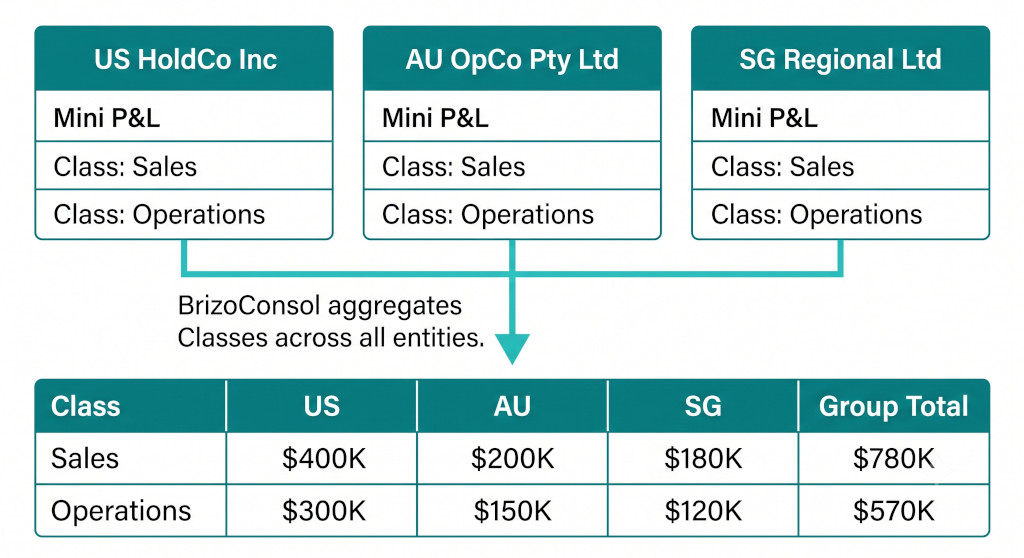
QuickBooks Online allows transactions to be tagged with a Class and, in some plans, a Location. Classes function similarly to Xero’s tracking categories: they allow the entity’s P&L to be segmented by department, product line, region, or any other dimension that matters for management reporting. A consulting firm might use classes of “Advisory”, “Implementation”, and “Support”. A retail entity might use “In-Store”, “Online”, and “Wholesale”.
Classes are available on Essentials, Plus, and Advanced (not Simple Start). For a group that uses consistent class structures across its entities — all entities tag by department, for example — this creates a meaningful reporting opportunity: a consolidated P&L that shows revenue and costs not just by entity but by department across the whole group.
BrizoConsol pulls P&L by Class from every connected QuickBooks company as part of its nightly sync. Alongside the standard consolidated income statement, the consolidated view includes a class-segmented P&L — so the cross-entity department comparison is produced automatically rather than assembled from individual QuickBooks exports. If class naming is consistent across entities, the segment data aggregates directly. If class names differ by entity, BrizoConsol maps them during initial setup.
Groups using QuickBooks that invest in consistent class tagging across entities can extract significantly more value from BrizoConsol’s consolidation than groups that treat classes as an entity-level tool only.
A Practical Cost Example
Example: Four-Entity International Group — Monthly QBO Subscription Cost
US HoldCo Inc — QBO Simple Start (dormant, 1 user)~$30
US OpCo LLC — QBO Essentials (domestic, invoices overseas clients in USD)~$60
AU Pty Ltd — QBO Essentials (invoices in AUD, pays AU suppliers)~$60
SG Pte Ltd — QBO Plus (distributes inventory, invoices in USD and SGD)~$90
Total monthly QBO subscriptions (four entities)~$240
A common mistake in growing groups is placing all entities on QBO Advanced “to have access to everything.” For the four-entity example above, that approach would cost approximately $800 per month — more than three times the cost of a correctly-tiered subscription — for features the holding company and two subsidiary entities will never use. Plan selection by actual requirements, not by the highest available tier, typically saves hundreds of dollars per month across a mid-sized group.
What No QBO Plan Can Do for Your Group
No QuickBooks Online plan — at any tier — produces:
- A consolidated income statement across multiple QBO companies
- A consolidated balance sheet after intercompany eliminations
- Automatic elimination of intercompany sales, costs, loans, and balances
- Currency Translation Adjustment (CTA) for foreign subsidiaries
- Non-controlling interest (NCI / minority interest) in group accounts
- A consolidated cash flow statement across all entities
- Group reporting where some entities use Xero, MYOB, or other systems
These are not features of Advanced that are missing from Essentials. They are absent from every QBO plan. QuickBooks Online is built to manage the accounting of a single legal entity — and it does this well. Group consolidation — combining translated financials from multiple entities, identifying and eliminating intercompany balances, and producing auditable group accounts — is a separate function that QuickBooks does not perform.
QuickBooks Online Advanced does not consolidate multiple companies. Some finance teams assume that the “Advanced” plan includes consolidation reporting because of the plan name and the inclusion of more sophisticated analytics. It does not. Each QBO company file is a standalone set of accounts. Advanced adds batch processing, custom fields, and analytics — all within a single company. Group consolidated accounts require a consolidation tool alongside QBO, regardless of which plan tier each entity is on.
Groups using QuickBooks that need consolidated group accounts typically follow one of two paths: a manual spreadsheet process (exporting from each QBO company, applying exchange rates, eliminating intercompany balances, and combining the results) or a dedicated consolidation tool connected to each QBO company via API.
The manual path degrades rapidly as the group grows. Each additional entity adds another export, another set of intercompany transactions to reconcile, and another currency to translate. A process that takes two days for a three-entity group frequently takes five days for a six-entity group — not because the work doubled, but because the intercompany reconciliation complexity grows non-linearly as the number of entity pairs increases.
BrizoConsol Alongside QuickBooks: The Integration
BrizoConsol connects to QuickBooks Online via Intuit’s OAuth. The connection is read-only — BrizoConsol reads each company’s data and produces consolidated outputs, but never writes back to any QBO company. Accounting staff continue to work in QuickBooks exactly as they always have; BrizoConsol operates in parallel, reading nightly syncs of chart of accounts, general ledger entries, AR and AP transactions, organisation details, and P&L by Class data.
From those inputs, BrizoConsol produces consolidated financial statements for the group: a P&L with intercompany revenues and costs eliminated, a balance sheet with intercompany assets and liabilities netted off, and a cash flow statement. For foreign subsidiary entities, BrizoConsol applies closing rates to balance sheet items and average rates to income statement items, computing the Currency Translation Adjustment automatically and posting it to the foreign currency translation reserve.
For groups with mixed software — a US holding company on QuickBooks and subsidiaries on Xero, MYOB, or Zoho Books — BrizoConsol consolidates across all connected platforms simultaneously. The group accounts draw on every connected entity regardless of which accounting system it uses, and the consolidation treats them uniformly.
QuickBooks Runs Your Entities. BrizoConsol Consolidates Your Group.
Connect your QuickBooks companies via OAuth — any plan, any region. Intercompany eliminations, CTA, and consolidated group accounts produced automatically every period. Start Free Trial
Summary: Plan Decision Framework for QBO Groups
- Does this entity transact in foreign currencies? If yes, Essentials is the minimum. Simple Start will produce incorrect accounts for any FX transactions.
- Does this entity carry inventory or need project-level profitability? If yes, Plus. If no, Essentials covers the standard operating entity requirements.
- Does this entity have a large team, high transaction volumes, or batch-processing needs? If yes, Advanced may be justified. In most cases, Plus is sufficient for group subsidiaries.
- Does the entity tag transactions by department or business line? Classes are available on Essentials and above. If you plan to use BrizoConsol for group segment reporting, standardise class names across entities from the start.
- Does the group need consolidated financial statements? This is not a QBO plan question. No QBO plan consolidates multiple companies. BrizoConsol connects to any QBO plan and handles the consolidation.
Already on QuickBooks? Add Group Consolidation in Minutes.
Connect each QuickBooks company to BrizoConsol via OAuth. Get your first consolidated P&L, balance sheet, and cash flow in one session — with intercompany eliminations and currency translation handled automatically. Start Free Trial — No Credit Card Required