Xero Plans for Multi-Entity Groups: Which Plan Does Each Entity Actually Need?
A finance director at a UK-based group called to explain a problem she had discovered three months into the financial year. Her Australian subsidiary had been raising invoices in AUD to US clients — recording the USD amounts manually as a memo note on each invoice, then converting them at month-end. The reason: the entity was on Xero Standard, which does not include multi-currency. No one had checked whether the plan matched the entity’s actual needs when the subsidiary was set up. It had simply been given the same plan as the parent.
This is a common scenario in growing multi-entity groups: plans are selected once and never revisited, or they are replicated from the parent entity without considering that subsidiaries may have materially different operating requirements. The cost of the wrong plan is not just a subscription fee — it is either missing functionality that the entity genuinely needs, or paying for features it will never use.
This guide walks through Xero’s plan tiers, what each one actually includes, how to match each entity in your group to the right plan, and what happens when Xero reaches a limit that no plan can overcome.
Consolidate your Xero entities — automatically.
BrizoConsol pulls from all your Xero organisations and delivers group reports in minutes.
How Xero’s Plan Tiers Work
Xero operates a single-organisation model: each legal entity is a separate Xero organisation with its own subscription. There is no plan that bundles multiple organisations at a discount or that allows one subscription to cover an entire group. Each entity in your group pays for its own Xero subscription independently, and the features available to that entity are determined by the plan tier it is on.
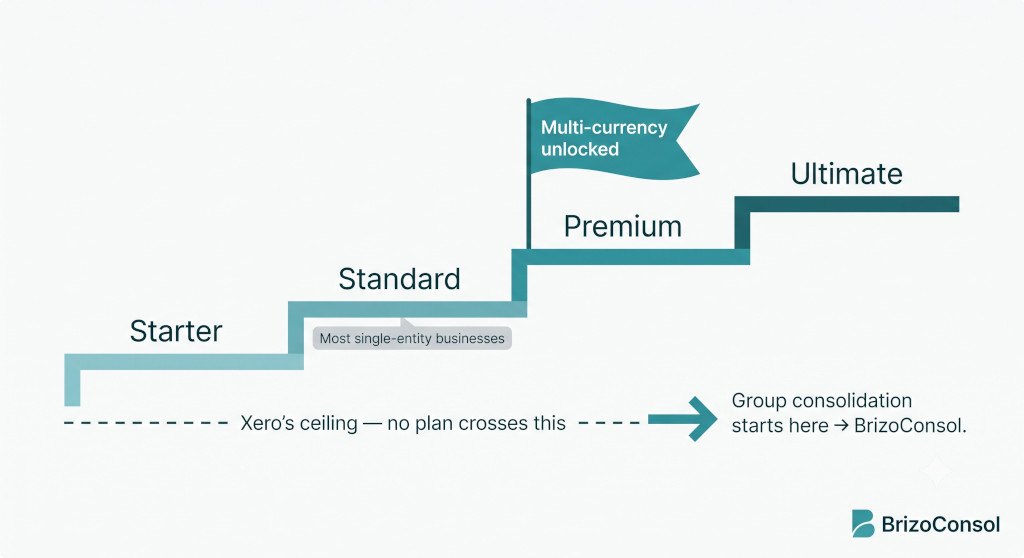
Xero’s plans run from Starter (very limited, designed for sole traders) through Standard (the most common plan for operating entities) to Premium (Standard plus multi-currency) to Ultimate (Premium plus Xero Expenses and Xero Projects). The “10”, “20”, and “100” numbers that appear in some plan names refer to the number of employees that can be managed through Xero Payroll — they do not affect any other features.
Prices vary by region. Xero’s home markets are Australia, New Zealand, and the United Kingdom, and pricing in those markets tends to be most competitive. The structure and feature set, however, is consistent across regions.
The Plans, and What They Actually Include
Xero StarterEntry-level plan for sole traders and very small businesses
Lowest tierper organisation / month
Invoicing (limited)Bank reconciliationNo unlimited invoicesNo multi-currencyNo payroll
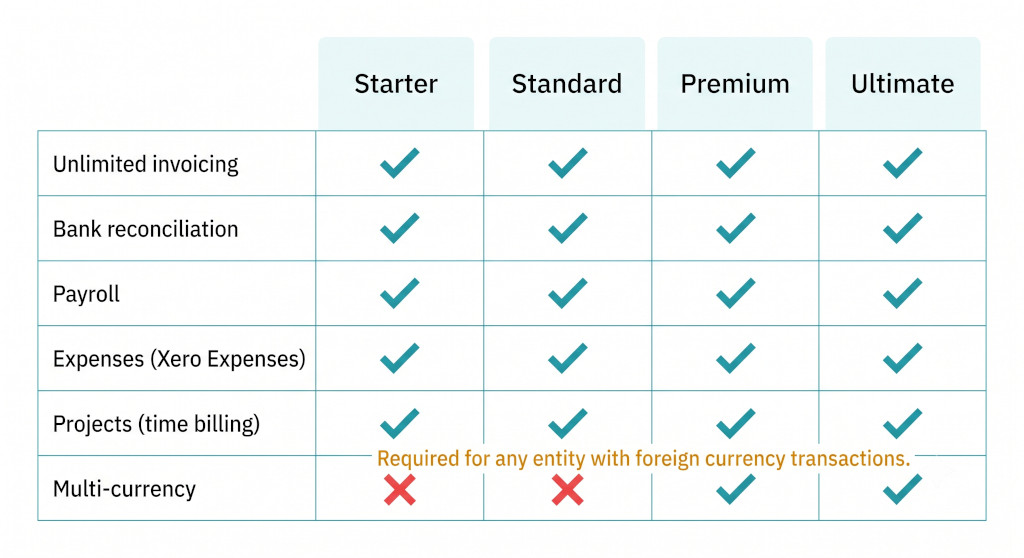
Starter caps the number of invoices, quotes, and bills you can send each month. This alone makes it unsuitable for virtually any trading entity in a group. The one exception is a dormant holding company that issues no invoices and has minimal accounting activity — in that case, Starter’s low cost can be appropriate if the entity simply needs a place to record journal entries and bank transactions.
Xero StandardThe default plan for domestic operating entities
Mid-tierper organisation / month
Unlimited invoicesBank reconciliationPayroll (via Xero Payroll)No multi-currencyNo Xero Expenses
Standard is the right plan for operating entities that transact exclusively in their functional currency — no foreign currency invoices, no overseas supplier payments in local currency, no multi-currency bank accounts. It includes payroll (where Xero Payroll is available for that region), unlimited invoicing, and bank reconciliation. The significant limitation for groups with international operations is the absence of multi-currency: if an entity on Standard raises a USD invoice, Xero cannot record the exchange rate on the invoice itself, and currency revaluation is not available.
Xero Premium (10 / 20 / 100)Required for any entity with foreign currency transactions
Upper-mid tierper organisation / month
Multi-currencyUnlimited invoicesPayrollXero ExpensesNo Xero Projects
Premium is the minimum viable plan for any entity that transacts in foreign currencies. It includes everything in Standard plus multi-currency — which means the entity can raise invoices in foreign currencies, pay suppliers in their local currency, hold foreign currency bank accounts, and have Xero automatically calculate realised and unrealised foreign exchange gains and losses. The “10”, “20”, or “100” designator refers to the number of employees supported by Xero Payroll; all other features are identical across Premium variants. Xero Expenses is also included, allowing staff to submit expenses for approval and reimbursement within Xero.
Xero Ultimate (10 / 20 / 100)Premium plus projects and analytics
Top tierper organisation / month
Multi-currencyXero ProjectsXero ExpensesXero Analytics PlusPayroll
Ultimate includes everything in Premium plus Xero Projects, which allows the entity to track time and costs against specific projects, billable hours, and profitability by project. This is relevant for professional services entities — consultancies, law firms, engineering practices — where project-level profitability is material. The multi-currency capability is identical to Premium; the distinction is the addition of the Projects and Analytics Plus modules. For entities that do not bill by time or project, Premium is almost always sufficient.
The decisive question for plan selection in a multi-entity group is almost always the same: does this entity have any foreign currency transactions? If yes, the minimum plan is Premium. If no, Standard is almost certainly sufficient. The choice between Premium and Ultimate is a secondary question about whether the entity bills by project or time.
Which Xero Plan Does Each Entity Type Need?
| Entity type | Recommended plan | Key reason |
|---|---|---|
| Dormant holding company (no trading, minimal activity) | Starter | No invoices, no payroll, very limited accounting activity |
| Active holding company (management fees, dividends, minimal staff) | Standard | Invoicing, bank reconciliation needed; domestic-currency only is common |
| Domestic operating entity — AUD/GBP/NZD/SGD transactions only | Standard | Unlimited invoices, payroll included; no foreign currency needed |
| Any entity with foreign currency transactions | Premium (10 / 20 / 100) | Multi-currency is Premium-only; cannot raise FX invoices on Standard |
| Professional services entity billing by time/project | Ultimate (10 / 20 / 100) | Xero Projects module for time billing and project profitability |
| Entity with large employee headcount (payroll only driver) | Premium 20 or Premium 100 | Choose the employee-count variant that matches headcount; features otherwise identical |
The Multi-Currency Line: Why It Matters More Than It Looks
The gap between Xero Standard and Xero Premium is often described simply as “multi-currency vs not.” In practice, the impact on a group entity is broader than that phrase suggests.
An entity on Xero Standard that transacts in foreign currencies faces three problems. First, it cannot raise invoices in a foreign currency — every invoice must be denominated in the entity’s functional currency, which means the entity either invoices in its own currency (shifting FX risk to the customer) or records the foreign currency amount as a text note rather than a financial figure. Second, it cannot record overseas supplier payments at the rate on the payment date — the payment is recorded at the invoice amount regardless of what the bank actually settled at. Third, it cannot hold foreign currency bank accounts in Xero in a meaningful way, because there is no mechanism to revalue those balances at period-end.
The result is that an entity on Standard with foreign currency transactions produces accounts that are subtly wrong — not necessarily by large amounts in any single period, but systematically wrong in a way that compounds over time and becomes difficult to unwind when an auditor asks for the exchange rate supporting schedule.
Check every entity’s plan before year-end. The most common error in Xero multi-entity groups is discovering, at year-end or during audit preparation, that one or more subsidiaries have been recording foreign currency transactions on a Standard plan for months. The amounts cannot simply be reposted — the original invoices and payments have the wrong rate (or no rate at all), and the correction requires a detailed reconstruction of each transaction at the correct rate. Upgrading to Premium is simple; cleaning up a year of incorrectly recorded FX transactions is not.
Tracking Categories: A Xero Feature Multi-Entity Groups Underuse
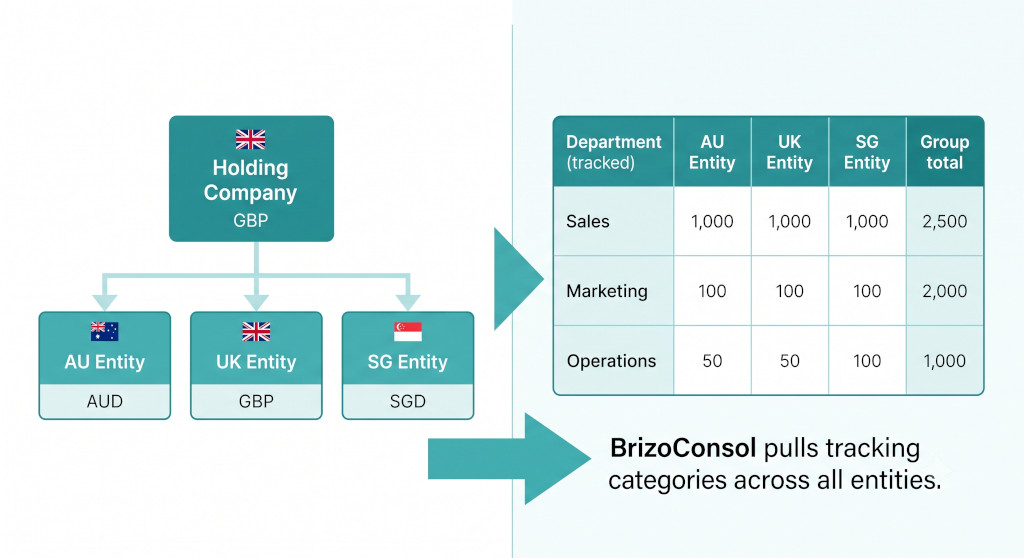
One feature that distinguishes Xero from many other accounting systems — and that is relevant specifically to multi-entity groups — is tracking categories. Every transaction in Xero can be tagged with up to two tracking categories (for example, Department and Region), and Xero can produce profit and loss reports broken down by those tags.
For a group that uses consistent tracking categories across all entities, this creates a meaningful opportunity. If every entity tags transactions by department (Sales, Marketing, Operations, Finance), a consolidated view of the group’s performance by department can be assembled from each entity’s tracking category data. You can see, for example, that your Australian Sales function spent significantly more in Q3 than your UK Sales function — not just that the Australian subsidiary’s total costs were higher.
BrizoConsol pulls tracking category data from every connected Xero organisation as part of its nightly sync. Alongside the standard consolidated P&L and balance sheet, the consolidated view includes a segmented P&L broken down by tracking category — so the cross-entity department comparison is automated rather than assembled manually from individual Xero exports. The tracking structure does not need to be identical across all entities; BrizoConsol maps the categories during setup.
This is a capability that exists entirely within the Xero ecosystem but is very difficult to exploit without a tool that can pull and consolidate the data across organisations. Groups that use tracking categories within individual entities but don’t aggregate them across the group are leaving useful management information on the table.
Xero’s Consolidation Ceiling: What No Plan Provides
No Xero plan — at any tier — produces:
- A consolidated income statement across multiple Xero organisations
- A consolidated balance sheet showing group net assets after intercompany eliminations
- Automatic identification and elimination of intercompany transactions
- Currency Translation Adjustment (CTA / FCTR) for foreign subsidiaries
- Non-controlling interest (NCI / minority interest) calculation and presentation
- A consolidated cash flow statement
- Group reporting across a mixed software environment (Xero + QuickBooks + MYOB etc.)
This is not a gap in the Premium or Ultimate plans — it is a structural boundary of what Xero is designed to do. Xero is an entity-level bookkeeping system, and it does that very well. What it does not do is combine, translate, and adjust data from multiple organisations into a single set of group financial statements.
Groups that try to bridge this gap with manual spreadsheets consistently encounter the same sequence of problems: the initial build takes days, the intercompany reconciliation requires comparing exports from multiple Xero organisations, the exchange rate adjustments are manual and prone to error, and the resulting consolidated accounts have no systematic audit trail. The spreadsheet often becomes a critical, single-person dependency — a document that only one person in the finance team fully understands and that breaks badly if that person is unavailable during a month-end close.
The consolidation itself does not depend on which Xero plan each entity is on. BrizoConsol connects to any Xero organisation via OAuth, regardless of whether it is on Starter, Standard, Premium, or Ultimate. The plan determines what data is in each organisation’s Xero; BrizoConsol reads whatever is there and consolidates across all connected organisations.
Plan selection and consolidation are two separate decisions. The right Xero plan for each entity ensures that entity’s own bookkeeping is complete and accurate. A consolidation tool ensures the group sees those entities together as a single financial picture. Both are required; neither replaces the other.
A Practical Cost Illustration
To make this concrete, consider a four-entity group: a UK holding company, a UK operating subsidiary, an Australian subsidiary that invoices US clients in USD, and a Singapore subsidiary. Here is how a typical plan selection would look, using approximate AUD monthly pricing as a reference:
Example: Four-Entity Group — Monthly Xero Subscription Cost
UK HoldCo Ltd — Xero Starter (dormant, no invoices)~AUD $29
UK Trading Ltd — Xero Standard (domestic GBP only)~AUD $46
AU Pty Ltd — Xero Premium 10 (invoices US clients in USD)~AUD $62
SG Pte Ltd — Xero Premium 10 (invoices in SGD and USD)~AUD $62
Total monthly Xero subscriptions (four entities)~AUD $199
A common error is to put all four entities on Premium on the assumption that it provides the most complete feature set. That approach costs approximately AUD $248 per month for the same four entities — an extra AUD $49 per month for features the holding company and UK trading entity will never use. Over a year, that is AUD $588 of unnecessary subscription spend. Across a ten-entity group with several domestic entities, the unnecessary spend can be substantially higher.
The more significant cost optimisation, however, is usually not plan selection — it is reducing the time spent on manual month-end consolidation. For groups where month-end currently requires two or three days of spreadsheet work across multiple Xero exports, automating that process with a consolidation tool typically delivers far more value than any savings from correct plan selection.
BrizoConsol Alongside Xero: How the Integration Works
BrizoConsol connects to each Xero organisation in your group via Xero’s secure OAuth. The connection is read-only — BrizoConsol never writes to Xero, and nothing in your Xero organisations changes as a result of the integration. Each organisation’s data syncs nightly: chart of accounts, general ledger entries, AR and AP transactions, organisation details, and tracking category data.
From that data, BrizoConsol produces consolidated financial statements for the group: a combined P&L with intercompany sales and costs eliminated, a consolidated balance sheet with intercompany balances netted off, and a cash flow statement. Where subsidiary organisations operate in currencies other than the group’s reporting currency, BrizoConsol applies the correct exchange rates — closing rate for balance sheet items, average rate for income statement items — and computes the Currency Translation Adjustment automatically.
For groups with entities on multiple accounting systems — a holding company on Xero and subsidiaries on MYOB, QuickBooks, or Zoho Books — BrizoConsol consolidates across all connected platforms simultaneously. The group accounts reflect every entity, regardless of which system it runs on.
Connect Your Xero Entities and See Your Whole Group.
BrizoConsol connects to every Xero organisation via OAuth — any plan, any region. Intercompany eliminations, currency translation, and consolidated group accounts produced automatically, every period. Start Free Trial
A Decision Checklist for Each Entity
Before finalising the Xero plan for any entity in your group, work through these questions:
- Does this entity raise invoices or pay bills in foreign currencies? If yes, the minimum plan is Premium. This question alone resolves most plan decisions in international groups.
- Does this entity need to track time against projects and bill clients by time? If yes, consider Ultimate for the Xero Projects module. If time billing is managed outside Xero, Premium is sufficient.
- How many employees need to be on Xero Payroll? Select the “10”, “20”, or “100” variant of Premium or Ultimate accordingly.
- Is this entity essentially dormant — no trading invoices, no payroll? If yes, Starter may be appropriate. If the entity issues any invoices at all, Starter’s invoice caps will create problems quickly.
- Does this entity use tracking categories? All Xero plans support tracking categories. If you are connecting to BrizoConsol, consider standardising category names across entities to enable cross-entity segment reporting.
- Does the group need consolidated financial statements? This is not a Xero plan question — it is a separate tool question. No Xero plan produces consolidated group accounts. BrizoConsol works alongside any Xero plan for this purpose.
Ready to Stop Consolidating in Spreadsheets?
Connect your Xero entities in minutes. BrizoConsol handles the eliminations, the currency translation, and the group reports — so your team can focus on the numbers, not the spreadsheet mechanics. Start Free Trial — No Credit Card Required