How to Record Intercompany Transactions in Xero: The Clearing Account Method and Its Limitations
James is the finance manager of a three-entity construction group — HoldCo, BuildCo (the main trading entity), and EquipCo (which owns and leases equipment to the group). All three organisations run on Xero. The group moves money between entities regularly: HoldCo advances funds to BuildCo when project cashflow tightens, EquipCo charges BuildCo a monthly equipment hire fee, and both trading entities occasionally transfer work-in-progress costs between them when project scopes shift.
Two years ago, James researched how other Xero groups handle this and settled on the intercompany clearing account method. Each entity has a dedicated account in its Xero chart of accounts: “Intercompany – HoldCo”, “Intercompany – BuildCo”, and “Intercompany – EquipCo”. When HoldCo advances $50,000 to BuildCo, HoldCo debits “Intercompany – BuildCo” (a receivable on HoldCo’s books) and credits the bank; BuildCo debits the bank and credits “Intercompany – HoldCo” (a payable on BuildCo’s books). Each transaction is mirrored. It seemed clean and logical.
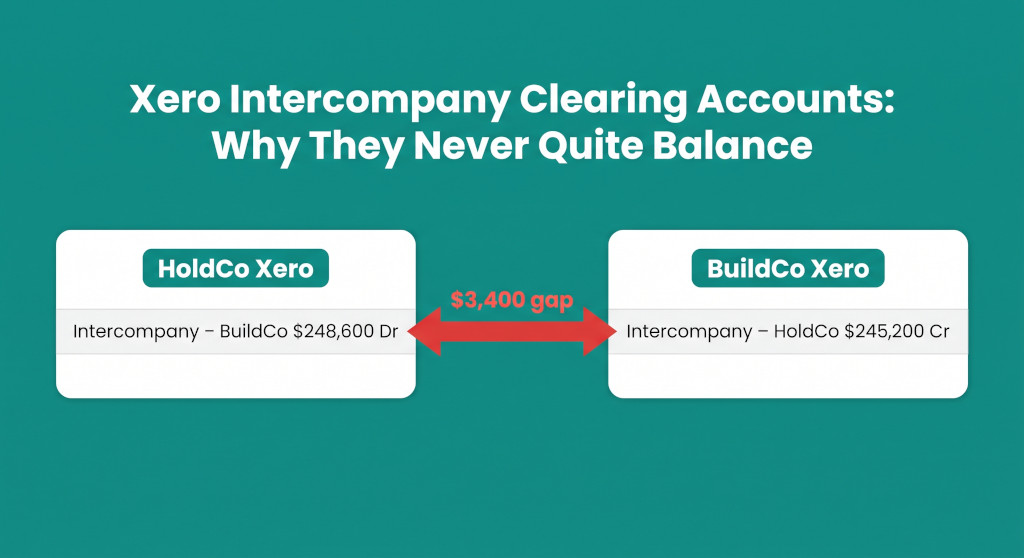
At the end of the first year, James printed both entities’ intercompany accounts to reconcile them before closing. HoldCo’s “Intercompany – BuildCo” showed a net balance of $248,600. BuildCo’s “Intercompany – HoldCo” showed $245,200. A $3,400 gap that he couldn’t immediately explain. Then, when he sent the combined trial balance to the group’s accountant for the consolidated accounts, he got a call: the intercompany balances — even after reconciling — still had to be eliminated. Both sides were showing up in the group’s combined figures.
Consolidate your Xero entities — automatically.
BrizoConsol pulls from all your Xero organisations and delivers group reports in minutes.
James had the right idea. The clearing account method is the correct way to record intercompany transactions within Xero. But two distinct problems complicated what he thought was a solved process: reconciliation gaps that needed to be investigated and corrected, and the fundamental reality that recording in Xero is only the first step — elimination happens outside Xero, at consolidation.
The Clearing Account Method: How It Works
The intercompany clearing account method works by creating a dedicated liability or asset account in each Xero organisation for each intercompany relationship. For a three-entity group — HoldCo, BuildCo, EquipCo — a typical chart of accounts setup looks like this:
| Entity | Account Name | Account Type | Nature at Year-End |
|---|---|---|---|
| HoldCo | Intercompany – BuildCo | Current Asset | Dr (receivable from BuildCo) |
| HoldCo | Intercompany – EquipCo | Current Asset | Dr (receivable from EquipCo) |
| BuildCo | Intercompany – HoldCo | Current Liability | Cr (payable to HoldCo) |
| BuildCo | Intercompany – EquipCo | Current Liability | Cr (payable to EquipCo for hire fees) |
| EquipCo | Intercompany – HoldCo | Current Liability | Cr (payable to HoldCo) |
| EquipCo | Intercompany – BuildCo | Current Asset | Dr (receivable from BuildCo) |
For each intercompany transaction, both entities record their side simultaneously. For a $50,000 advance from HoldCo to BuildCo:
In HoldCo Xero:
| Account | Dr | Cr |
|---|---|---|
| Intercompany – BuildCo | $50,000 | |
| Bank – Operating Account | $50,000 | |
| Advance to BuildCo — 15 June 20XX | ||
In BuildCo Xero:
| Account | Dr | Cr |
|---|---|---|
| Bank – Operating Account | $50,000 | |
| Intercompany – HoldCo | $50,000 | |
| Advance received from HoldCo — 15 June 20XX | ||
Both entries reference the same date, the same amount, and a matching description. In theory, at any point in time, the debit balance in HoldCo’s “Intercompany – BuildCo” should exactly equal the credit balance in BuildCo’s “Intercompany – HoldCo”.
In practice, they rarely do.
Why the Clearing Accounts Don’t Balance
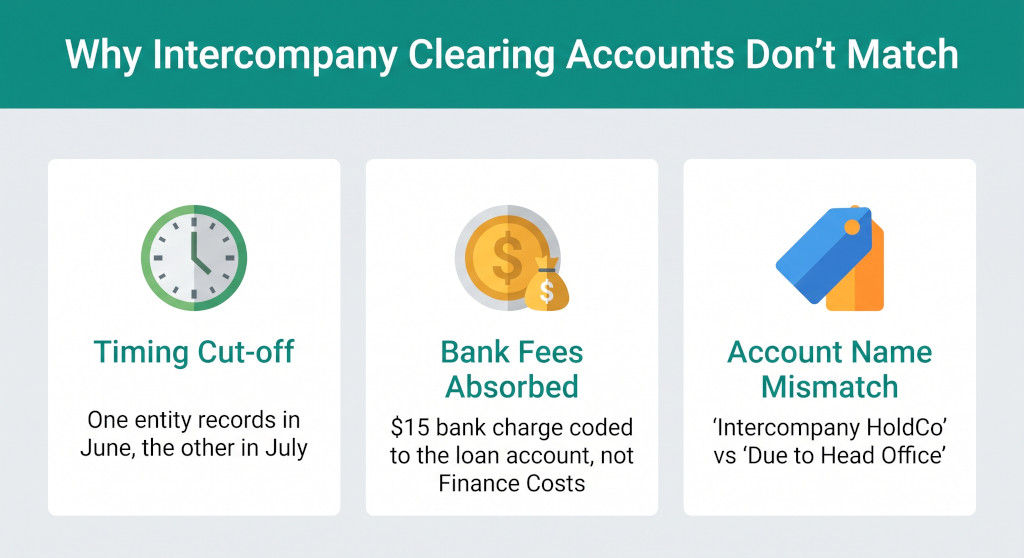
The same three failure modes appear in nearly every Xero multi-entity group running clearing accounts. For a full treatment of these issues in a sister platform, see MYOB Intercompany Loans: Reconciliation and Elimination — the underlying causes are identical regardless of accounting platform.
1. Timing Cut-off
HoldCo transfers $15,000 to BuildCo on 29 June. HoldCo’s bookkeeper records the payment on 29 June — month-end, financial year-end. BuildCo’s bookkeeper is on leave; the transaction gets recorded on 2 July, the new financial year. At 30 June, HoldCo’s intercompany account shows $15,000 more than BuildCo’s. The money left HoldCo’s bank on 29 June, so HoldCo has to record it then. BuildCo’s entry in July is correct for BuildCo’s own books. Both entries are independently accurate. Together, they create a year-end mismatch that can only be resolved by adjusting one side’s cut-off — a decision that requires knowing which entity’s date is commercially correct.
2. Bank Fees Absorbed Into the Transfer
HoldCo instructs its bank to transfer $20,000 to BuildCo’s account. The bank charges a $22 international transfer fee and deducts it from the transfer. BuildCo receives $19,978. HoldCo’s bookkeeper records the intercompany advance at $20,000 (the instructed amount) and codes the $22 fee to Finance Costs — correctly. BuildCo’s bookkeeper codes the receipt of $19,978 to “Intercompany – HoldCo” — also reasonably, because that is what arrived. Result: HoldCo’s account shows $20,000; BuildCo’s shows $19,978. A $22 gap that will persist until someone investigates the bank statement, finds the fee, and either adjusts HoldCo’s intercompany account down by $22 or adjusts BuildCo’s up by $22 with a corresponding charge to Finance Costs.
3. Account Name Inconsistency
James set up “Intercompany – HoldCo” in BuildCo’s Xero. But BuildCo’s original bookkeeper — who pre-dated James — had already created an account called “Due to Head Office” years earlier. Some transactions were coded to “Intercompany – HoldCo”, some to “Due to Head Office”. When James exports the intercompany account to reconcile it, he’s only looking at one of the two accounts on BuildCo’s side. The full payable to HoldCo is split across two accounts with different names, and only one is being compared against HoldCo’s ledger.
Practical fix for account name inconsistency: Run a search in Xero for all account names containing “intercompany”, “head office”, “related party”, “due to”, and “due from”. Merge duplicates using Xero’s chart of accounts management, or recode old transactions. Standardise the naming convention across all entities and document it in the group’s finance procedures.
Building the Intercompany Reconciliation Register
The most reliable way to reconcile clearing accounts across Xero organisations is to build a transaction-level intercompany loan register — a single spreadsheet that lists every intercompany transaction chronologically, with one column for each entity’s recorded amount and a running balance on each side. Any gap between the two running balances identifies precisely which transaction caused the divergence.
| Date | Description | HoldCo Dr (Receivable from BuildCo) | BuildCo Cr (Payable to HoldCo) | Variance |
|---|---|---|---|---|
| 01 Jul | Opening balance | — | — | — |
| 15 Sep | Advance #1 | $50,000 | $50,000 | — |
| 02 Nov | Advance #2 | $80,000 | $80,000 | — |
| 15 Nov | Advance #2 bank fee | — | ($44) | $44 |
| 20 Dec | Repayment #1 | ($30,000) | ($30,000) | $44 |
| 29 Jun | Advance #3 (timing) | $15,000 | — | $15,044 |
| 02 Jul | Advance #3 (BuildCo records) | — | $15,000 | $44 |
| Closing balance (adjusted) | $115,000 | $114,956 | $44 | |
The register immediately identifies the two issues: the advance #3 timing difference (which resolves itself after 2 July once BuildCo records it) and the $44 bank fee that BuildCo absorbed into the loan account rather than coding to Finance Costs. The correction entry in BuildCo Xero:
| Account | Dr | Cr |
|---|---|---|
| Intercompany – HoldCo | $44 | |
| Finance Costs – Bank Charges | $44 | |
| Reclassify bank fee absorbed into advance #2 from HoldCo | ||
After the correction, both sides show $115,000. The intercompany loan is reconciled.
The Elimination Step: Why Reconciled Still Isn’t Enough
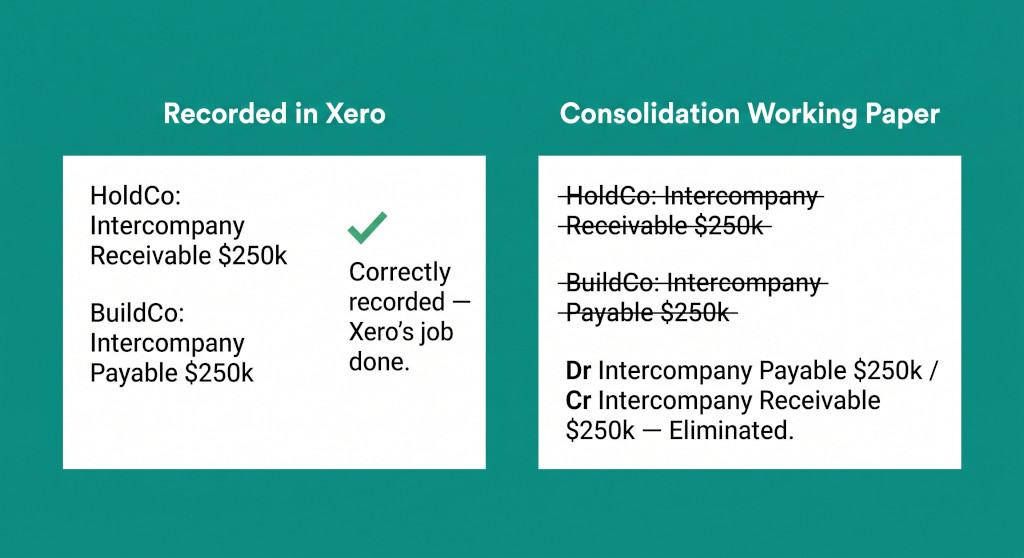
This is where many Xero groups discover that recording and reconciling within Xero is the beginning of the process, not the end of it.
Once both sides of the intercompany loan are reconciled at $115,000, the group’s combined trial balance contains:
- HoldCo: Intercompany Receivable – BuildCo $115,000 Dr
- BuildCo: Intercompany Payable – HoldCo $115,000 Cr
If those figures are simply added together with the rest of the entities’ accounts — which is what any combined export or sum-of-entities exercise does — both appear in the group balance sheet. The group appears to have a $115,000 asset (the receivable) and a $115,000 liability (the payable). But from the group’s perspective, no money has left the group. HoldCo and BuildCo are both inside the group boundary. The loan is an internal transfer. Both sides must be eliminated.
The elimination journal is entered in the consolidation working paper — not in any individual Xero organisation:
| Account | Dr | Cr |
|---|---|---|
| Intercompany Payable – HoldCo (BuildCo) | $115,000 | |
| Intercompany Receivable – BuildCo (HoldCo) | $115,000 | |
| Eliminate intercompany loan — HoldCo / BuildCo at 30 June 20XX | ||
The same elimination logic applies to EquipCo’s monthly hire fee income. EquipCo charges BuildCo $8,000 per month in equipment hire — $96,000 for the year. In EquipCo’s Xero, this is income. In BuildCo’s Xero, it is an expense. Both are correct at the entity level. At the group level, the $96,000 never left the group — EquipCo and BuildCo are both inside the group boundary. The consolidated P&L must eliminate both sides: $96,000 of hire fee income in EquipCo and $96,000 of hire expense in BuildCo. Neither Xero organisation can see the other’s data, so neither can perform this elimination. It must happen in the consolidation working paper:
| Account | Dr | Cr |
|---|---|---|
| Equipment Hire Income (EquipCo) | $96,000 | |
| Equipment Hire Expense (BuildCo) | $96,000 | |
| Eliminate intragroup hire fees — EquipCo to BuildCo FY20XX | ||
What Xero Can and Cannot Do
| Task | Xero Can Do It? | Notes |
|---|---|---|
| Record intercompany loans in each entity | ✓ Yes | Via clearing accounts in each org |
| Reconcile intercompany accounts within an entity | ✓ Yes | Account reconciliation within a single Xero org |
| See another Xero org’s intercompany account | ✗ No | Each org is separate; no cross-org visibility |
| Automatically match intercompany entries across orgs | ✗ No | Must be done manually in a register |
| Eliminate intercompany loans from group accounts | ✗ No | Elimination happens in the consolidation working paper |
| Eliminate intercompany income and expense | ✗ No | Same — no cross-org journal capability |
| Produce a consolidated balance sheet | ✗ No | Xero does not produce consolidated financial statements |
Xero’s job is to record transactions accurately within each legal entity. Consolidation’s job is to combine those records, eliminate intragroup activity, and present the group as a single economic entity. These are sequential steps, not alternatives. A Xero group cannot shortcut the consolidation step by tidying up the clearing accounts.
The Practical Workflow for Xero Multi-Entity Groups
For groups running Xero, the intercompany reconciliation and elimination workflow breaks cleanly into three phases:
Phase 1 — Record (in Xero, monthly): Both sides of every intercompany transaction are entered in the respective Xero organisations on the same date, with matching descriptions and amounts. Any bank fees associated with the transaction are coded to Finance Costs — not to the clearing account. Account names are standardised and documented.
Phase 2 — Reconcile (in a shared register, monthly or quarterly): The transaction-level intercompany register is updated with amounts from both organisations’ clearing accounts. Variances are investigated and corrected before they accumulate. The register shows the agreed intercompany balance for each relationship — the figure that both entities will carry at period-end.
Phase 3 — Eliminate (in the consolidation working paper, at each reporting date): The agreed intercompany balances from the register are eliminated against each other in the consolidation model. Intercompany income and expense items are identified across the entities and eliminated. The result — after eliminations, any NCI adjustments, and foreign currency translation for overseas entities — is the consolidated financial statements.
For Xero groups that need to produce consolidated financial statements without a manual working paper for each of these steps, see How to Consolidate Multiple Xero Organisations Into Group Financial Statements. For a full explanation of what eliminations cover beyond intercompany loans — including unrealised profit in inventory, management fees, and dividends — see Intercompany Eliminations: What They Are and Why They Matter for Group Accounts.
Take the Clearing Account Reconciliation Off Your Plate
BrizoConsol connects to all your Xero organisations, automatically matches intercompany transactions across entities, flags reconciliation gaps before they compound, and eliminates all intragroup activity when producing consolidated financial statements — so Phase 2 and Phase 3 happen in the software, not in a spreadsheet. See It In Action