Xero Multi-Currency Consolidation: How Groups with Foreign Subsidiaries Produce Accurate Group Accounts
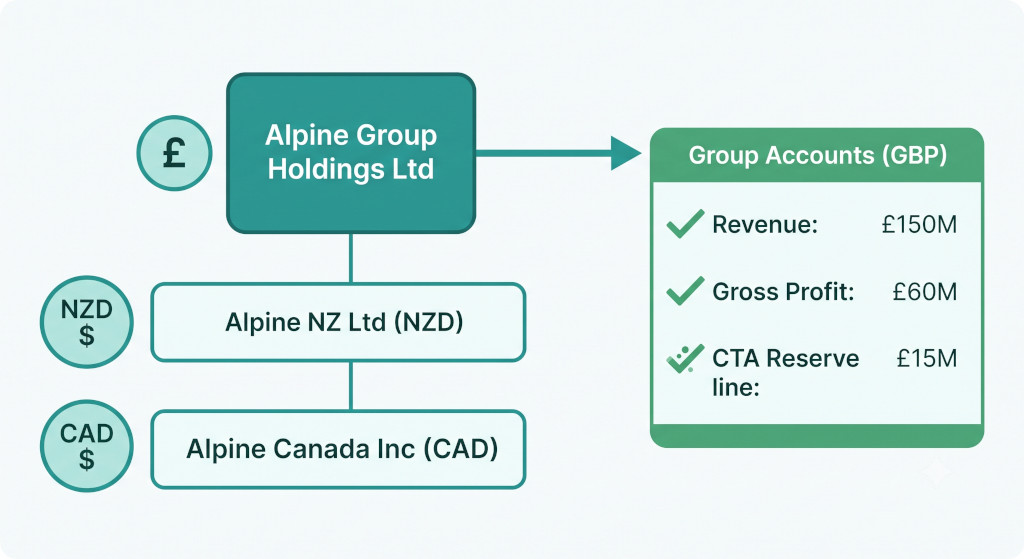
Mark is CFO of a professional services group based in the UK. The parent company runs on Xero. Two years ago the group opened a New Zealand subsidiary, also on Xero. Last year it acquired a small Canadian practice, likewise on Xero. Mark now has three Xero organisations, three currencies, and a month-end process that involves exporting three trial balances, pasting them into a spreadsheet, hunting down the right exchange rates for each account type, and trying to reconcile a balance sheet that stubbornly refuses to balance.
Xero multi-currency consolidation is one of the most commonly searched problems for finance teams running multi-entity Xero groups. Xero handles foreign currencies brilliantly within a single organisation — but the moment you need to combine two or more Xero organisations in different currencies into a single set of group accounts, you have moved beyond what Xero does. The translation of foreign subsidiaries into the group presentation currency, the calculation of the cumulative translation adjustment, and the elimination of intercompany balances all have to happen outside Xero.
This guide explains the translation rules that apply to any Xero group with overseas entities, works through a practical example, and shows how BrizoConsol automates the entire process directly from your Xero data.
Consolidate your Xero entities — automatically.
BrizoConsol pulls from all your Xero organisations and delivers group reports in minutes.
Where Xero’s Multi-Currency Feature Stops
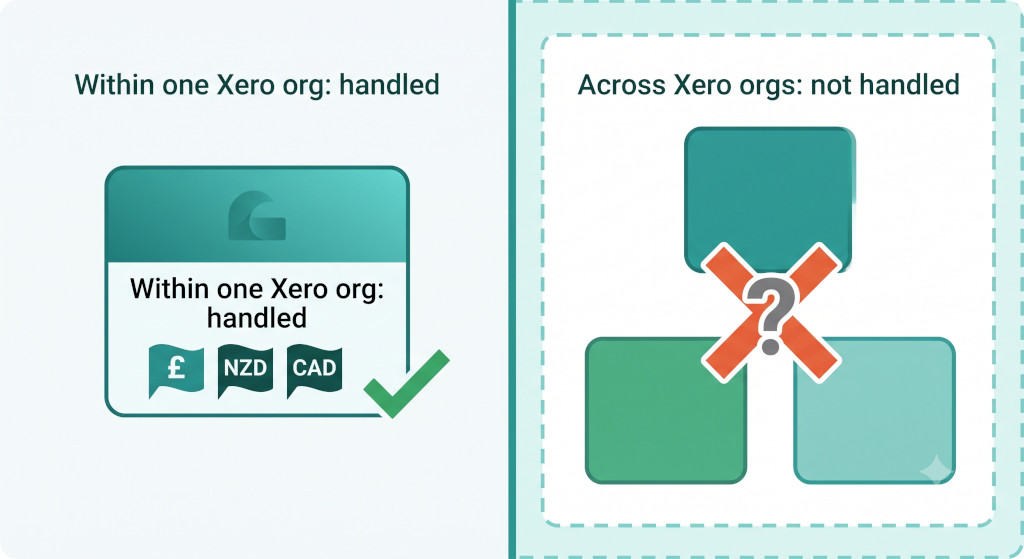
Xero’s multi-currency feature — available on the Business Edition and above — allows a single Xero organisation to record transactions, invoices, and bank accounts in foreign currencies. Xero automatically calculates unrealised and realised foreign exchange gains and losses at the entity level, and it handles currency conversion on individual transactions well.
What Xero does not do is consolidation. Each Xero organisation is a standalone set of books. There is no native mechanism in Xero to pull the trial balances of your UK, New Zealand, and Canadian Xero organisations together, translate the overseas entities into GBP, eliminate intercompany transactions, and produce a single consolidated P&L, balance sheet, and cash flow statement.
This is not a criticism of Xero — it is simply a different product category. Single-entity accounting and multi-entity group consolidation are fundamentally different tasks. Xero excels at the former; a platform like BrizoConsol handles the latter, connecting to your existing Xero organisations and performing the consolidation on top.
Many Xero groups discover the gap at year-end when the auditors request a consolidated set of accounts. If the group has been operating for two or more years without a systematic translation and consolidation process, the cumulative translation adjustment will need to be reconstructed from historical exchange rate data — a significant and avoidable piece of work.
The Three Translation Rates Every Xero Group Must Apply
When a Xero group has overseas subsidiaries, each subsidiary’s accounts must be translated into the group presentation currency before they can be consolidated. Under IAS 21 (The Effects of Changes in Foreign Exchange Rates) and equivalent standards, different types of accounts translate at different rates. Applying the wrong rate to even one category will cause the consolidated balance sheet to be misstated.
Closing rate — balance sheet assets and liabilities
Every asset and liability in the overseas Xero organisation’s balance sheet translates at the closing spot rate on the last day of the reporting period. Cash, trade receivables, inventory, fixed assets, trade payables, loans, and deferred revenue all translate at the same closing rate, regardless of when the underlying transactions occurred during the period.
Average rate — income statement items
Revenue, cost of sales, staff costs, and all other P&L items translate at the average rate for the reporting period — typically the average of the opening and closing spot rate, or a weighted average if rates moved significantly. The average rate approximates the blended rate at which transactions occurred throughout the period.
Historical rate — equity items
Share capital, share premium, and retained earnings brought forward from prior periods translate at historical rates — the rates at which those amounts were originally recognised. Share capital translates at the rate on the date the subsidiary was incorporated or capitalised. Opening retained earnings stay at whatever rate applied when they were first translated; they do not get retranslated each period. Current-year profit translates at the average rate, consistent with the P&L translation.
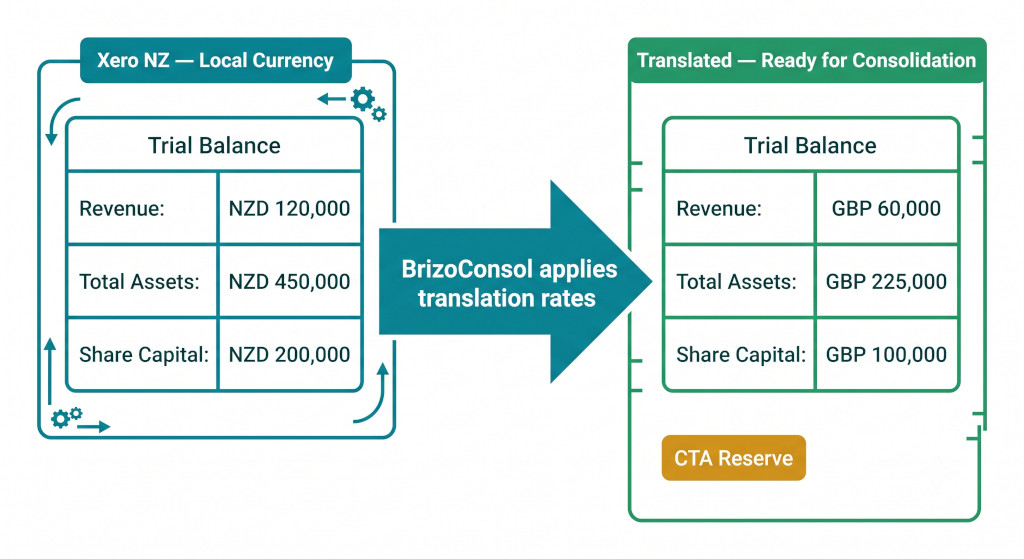
The mathematical consequence of using three different rates is that the balance sheet will not balance unless a residual figure is introduced. That residual is the cumulative translation adjustment (CTA) — it sits in equity as a separate reserve and represents the accumulated effect of exchange rate movements on the translated value of the overseas subsidiary’s net assets.
A Worked Translation Example: Alpine Group
Alpine Group Holdings Ltd (GBP presentation currency) owns Alpine NZ Ltd, which reports in NZD. At the 30 June year-end, the relevant rates are:
| Rate | GBP/NZD | Applied to |
|---|---|---|
| Closing rate (30 June) | 2.08 | All balance sheet assets and liabilities |
| Average rate (full year) | 2.02 | All P&L items |
| Historical rate (at incorporation) | 1.96 | Share capital and opening retained earnings |
Alpine NZ’s Xero trial balance in NZD, and the GBP translated figures, are as follows:
| Account | NZD | Rate used | GBP |
|---|---|---|---|
| INCOME STATEMENT | |||
| Revenue | 1,818,000 | Average (2.02) | 900,000 |
| Cost of Sales | (909,000) | Average (2.02) | (450,000) |
| Operating Expenses | (404,000) | Average (2.02) | (200,000) |
| Net Profit for the Year | 505,000 | 250,000 | |
| BALANCE SHEET | |||
| Total Assets | 2,288,000 | Closing (2.08) | 1,100,000 |
| Total Liabilities | (624,000) | Closing (2.08) | (300,000) |
| Net Assets | 1,664,000 | 800,000 | |
| EQUITY | |||
| Share Capital | 392,000 | Historical (1.96) | 200,000 |
| Opening Retained Earnings | 588,000 | Historical (1.96) | 300,000 |
| Profit for the Year | 505,000 | Average (2.02) | 250,000 |
| CTA Reserve (balancing figure) | — | Derived | 50,000 |
| Total Equity | 1,664,000 | 800,000 | |
The CTA of £50,000 is positive here because the NZD strengthened against GBP over the period — the closing rate of 2.08 means fewer NZD are needed to buy one pound than at the historical rate of 1.96, so the subsidiary’s net assets are worth more in GBP terms when translated at the closing rate than when translated at the historical rate. The CTA captures that gain without routing it through the consolidated P&L.
This £50,000 appears in the consolidated statement of changes in equity as other comprehensive income for the period, and accumulates on the consolidated balance sheet in the foreign currency translation reserve. If Alpine NZ is eventually sold, the CTA balance relating to it is recycled through the P&L as part of the disposal gain or loss — a step that is only possible if the CTA has been tracked accurately from the outset.
The CTA Across Multiple Overseas Xero Organisations
Alpine Group also owns Alpine Canada Inc, reporting in CAD. Each overseas Xero organisation has its own CTA balance, its own historical rate, and its own translation calculation. The consolidated CTA reserve is the sum of all individual entity CTAs — but each must be tracked separately, because they will move differently as exchange rates shift.
In a spreadsheet, this means maintaining a separate CTA roll-forward tab for each overseas entity. Each tab requires the opening CTA carried forward, the current-period CTA movement, a reconciliation to the closing balance, and a check that the translated balance sheet balances. Across two overseas Xero organisations that check must be performed twice, every period, before the consolidation can be finalised.
The most common error is carrying forward the wrong opening CTA balance — either because a prior-period correction was not reflected in the roll-forward, or because someone updated the historical rate mid-year. Either way, the consolidated balance sheet fails to balance, and the search for the discrepancy typically consumes several hours of close time.
A positive CTA means the overseas currency strengthened against your presentation currency since the subsidiary was set up — the subsidiary’s net assets are worth more in group currency terms. A negative CTA means the reverse. Neither is inherently good or bad; what matters is that the CTA is calculated correctly and tracked consistently so the balance sheet always balances.
Intercompany Balances in a Multi-Currency Xero Group
Most Xero groups with overseas subsidiaries have at least one intercompany balance — a loan from the parent to fund the overseas entity’s operations, or a management fee payable. These balances must be eliminated at consolidation, but in a multi-currency context they introduce an additional complication.
If the UK parent has lent £200,000 to Alpine NZ, the parent records a GBP receivable of £200,000. Alpine NZ records a NZD payable — but at the NZD equivalent of £200,000 at the date the loan was advanced, which may differ from the NZD equivalent at the reporting date if the exchange rate has moved. At consolidation, the parent’s GBP receivable and the subsidiary’s translated NZD payable may not match exactly, creating a difference that must be allocated correctly — either to the P&L (for short-term trading balances) or to the CTA reserve (for loans that form part of the net investment in the subsidiary under IAS 21).
Getting this right requires a clear policy on which intercompany loans qualify as net investment loans, applied consistently from the date the loan was made. For groups that have not established this policy from the outset, the retrospective analysis can be time-consuming.
How BrizoConsol Handles Xero Multi-Currency Consolidation
BrizoConsol connects directly to all your Xero organisations via the Xero API. It pulls each entity’s trial balance in its local currency each period — no exports, no reformatting, no copy-paste. The consolidation of multiple Xero companies happens entirely within BrizoConsol, on top of the live Xero data.
Exchange rates are maintained centrally in BrizoConsol. Each period, the finance team records the closing rate and average rate for each currency pair; historical rates are entered once at setup and stored permanently. BrizoConsol then applies the correct rate to each account type automatically — closing rate to balance sheet items, average rate to P&L items, historical rate to equity — without any manual intervention.
The CTA is calculated automatically as the residual balancing figure for each overseas entity and is tracked in a roll-forward that updates each period. There is no separate schedule to maintain. The consolidated statement of changes in equity — with the CTA movement correctly presented as other comprehensive income — is available as a standard report alongside the consolidated P&L and balance sheet.
Intercompany eliminations, including the treatment of net investment loans and their associated exchange differences, are configured once and applied each period. Where a loan qualifies under IAS 21 as part of the net investment, the exchange difference is routed to the CTA reserve rather than the P&L automatically.
For a group like Alpine, running two overseas Xero organisations in NZD and CAD, the translation and consolidation that previously occupied most of a day in a spreadsheet runs in minutes. The multi-entity month-end close compresses from several days to a matter of hours, and the CTA roll-forward is always up to date and audit-ready.
Getting Started: What Xero Multi-Currency Groups Need
To set up multi-currency consolidation in BrizoConsol for a Xero group, you need three things for each overseas Xero organisation: the functional currency, the historical exchange rate at the date the entity was incorporated or capitalised, and the opening CTA balance if the group has already been trading for more than one period.
BrizoConsol connects to each Xero organisation via OAuth — no data export required. Once connected, it pulls the trial balance and begins applying translation rules immediately. For a group starting fresh, the first translated and consolidated output is typically available within a single working session. For groups with prior-period history to incorporate, BrizoConsol’s support team can assist with reconstructing historical CTA balances from exchange rate data.
Consolidate your Xero organisations across currencies — without the spreadsheet.
BrizoConsol connects directly to all your Xero organisations, applies the three translation rates automatically, calculates and tracks the CTA, and produces consolidated accounts in minutes. Start Free Trial