API Access: Connect Your Own Systems Directly to Your Consolidation
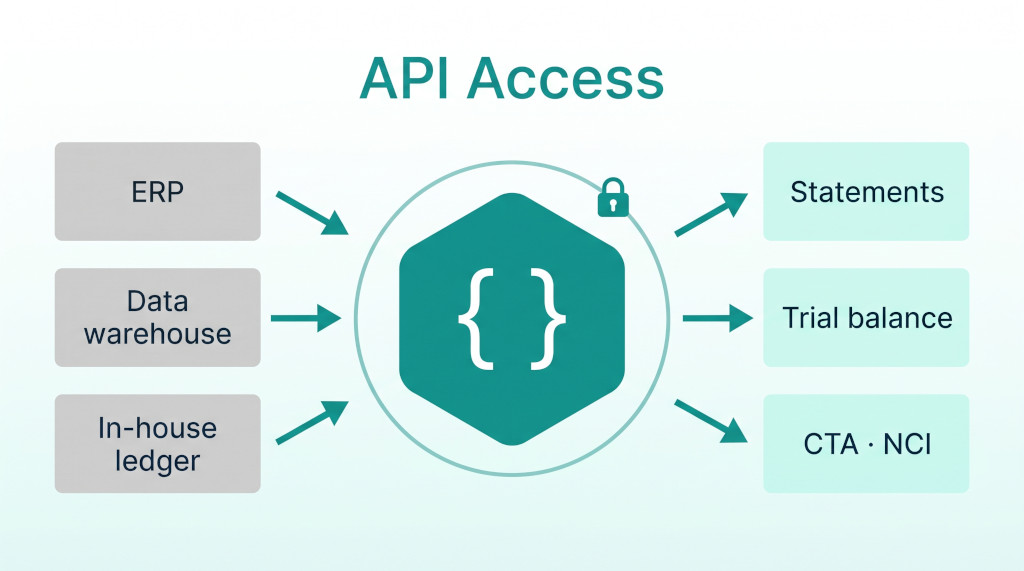
For groups whose subsidiaries run on Xero, QuickBooks, MYOB or Zoho Books, BrizoConsol’s connectors do the loading. But many groups have figures that live elsewhere: a regional ERP, a data warehouse the finance systems team already maintains, or an in-house ledger built years ago. Each month, someone exports from that system, reformats the file, and uploads it. Then, once the consolidation is done, someone else exports the consolidated statements and re-keys them into the group’s BI tool or board pack.
Both ends of that process are manual, and both happen at the moment the close has the least slack. The data is already structured; it simply has no direct route in or out.
BrizoConsol Premium now includes API Access: a REST API that lets your own systems push financial data into BrizoConsol and read consolidated results back out, with consolidation requested programmatically and run overnight. This post covers what the API does, how a credential is set up, and what a monthly integration looks like.
Stop building consolidations in spreadsheets.
BrizoConsol automates multi-entity consolidation — setup in minutes, reports the same day.
What the API covers
Writing data in
The API writes into the same tables the four accounting connectors write into, so data sent through it is read by reports, dashboards and the consolidation exactly as if a connector had loaded it. Six kinds of data can be written:
| Kind | What it carries |
|---|---|
| Accounts | A company’s chart of accounts: code, name, account type, status |
| Trial balance | One company’s month: debit and credit movement per account code |
| Invoices | Sales invoices with party, dates, totals, currency and lines |
| Bills | Supplier bills in the same shape |
| Journal lines | Ledger lines grouped by journal; each journal must balance |
| Operational data | Non-ledger figures with up to three dimensions, for dashboards and reports |
Report figures still come from the trial balance. Invoices, bills and journal lines explain those figures and support drill-down; they never move them. A month’s trial balance is sent in full and replaces that month for your source, and the group’s chart of accounts mapping applies to it exactly as it does to a synced entity.
Reading data out
The read side answers with what BrizoConsol already holds, so a BI tool, data warehouse or script can take consolidated results without an export:
- Reference data — the companies the credential may read, account types, statement sections, currencies, KPIs, and each company’s periods and years.
- Ledger — accounts and trial balances, including movement and closing balance per account.
- Statements — profit and loss, balance sheet and cash flow, with optional detail for the lines behind a section.
- Consolidation — CTA, NCI, journal vouchers, consolidation adjustments and intercompany analysis.
- Supporting data — invoices, bills, transactions, exchange rates, KPI values and operational datasets.
The guiding rule for the read API is that anything a cell-based report in BrizoConsol can show is reachable through it, with the same figure for the same account, month and scenario.
Requesting consolidation
A consolidation request is its own endpoint. Your system posts the request, BrizoConsol records it and answers 202 Accepted, and the group is consolidated in the overnight run. A trial balance written through the API waits for the same run rather than recalculating on its own, so writes for several entities land in one consistent consolidation. Only one request is held per group while it is pending; a retry returns that same request, so a scheduler firing twice does no harm.
Consolidation never runs inside an API call. You write during the day, request once, and read the consolidated statements the next morning.
Setting up a credential
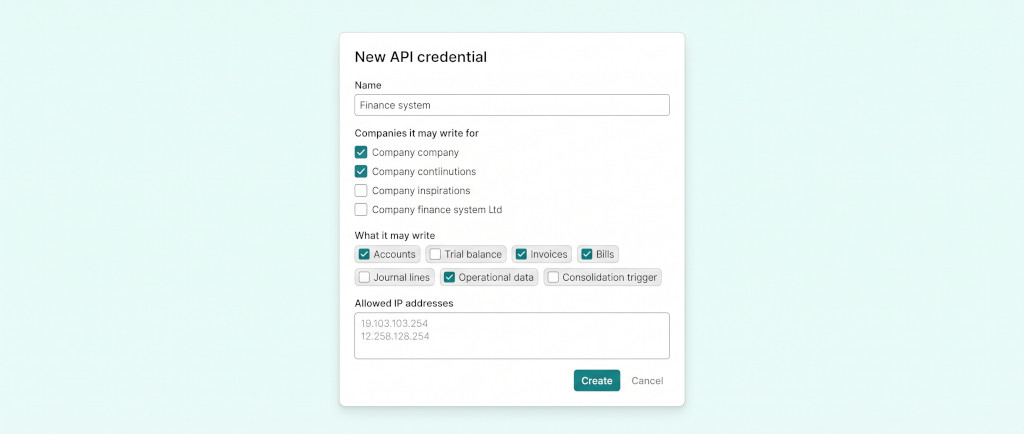
On Premium, API Access appears in the Integrations section of the sidebar. It is available to a data administrator on the group — an Administrator, a Data Loading Admin or the subscription owner — the same people who can already load data through the screens.
Creating a credential takes four inputs:
- Name — what the credential is for, such as “Finance system”.
- Companies it may write for — the entities this credential can reach. Nothing else is writable with it.
- What it may write — the kinds of data it may send, and whether it may request consolidation.
- Allowed IP addresses — optional, one per line. A secret used from any other address is refused.
BrizoConsol then shows the client ID and client secret once. Your system exchanges them for an access token valid for 60 minutes, plus a refresh token to renew it. Revoking a credential is one click, and every token derived from it stops working immediately. Creating and revoking credentials are both recorded in the audit trail.
Connect your systems to your close
Start a free trial and see how data from connectors and your own systems consolidates side by side. Start Free Trial
Built for unattended integrations
An API that runs at night with nobody watching has to be predictable. Several behaviours are designed for that:
- Public field lists. The schema for each kind of data can be read without a credential, so an integration knows exactly what to send — and the limits in force for your organisation — before it holds a token.
- Validate before writing. Each write endpoint has a matching validate endpoint that checks the payload and reports what would be accepted, without storing anything.
- Every write answers. A request reports how many records were created, updated, unchanged or refused, and why each refusal happened. Request history and per-request results can be read back afterwards, and a webhook URL can be supplied to be called once when the request finishes or fails.
- No duplicates. An identical resend is recognised and answered with the request already made.
- One owner per month. If another source already holds a company’s trial balance for a month, the write is refused unless it explicitly states it is switching source; the switch is recorded.
- Text stored as sent. Names, references and descriptions are stored exactly as received, encrypted at rest, and returned unchanged.
- Sensible limits. Requests are rate-limited per group, and only one write runs at a time per company, so two restatements of the same month can never double count.
Worked example: one month, end to end
A group’s parent and two subsidiaries sync from Xero. A third subsidiary, Delta Trading, runs on a regional ERP. The finance systems team connects that ERP to BrizoConsol with a credential limited to Delta Trading, allowed to write trial balances and request consolidation, and restricted to the ERP server’s IP address.
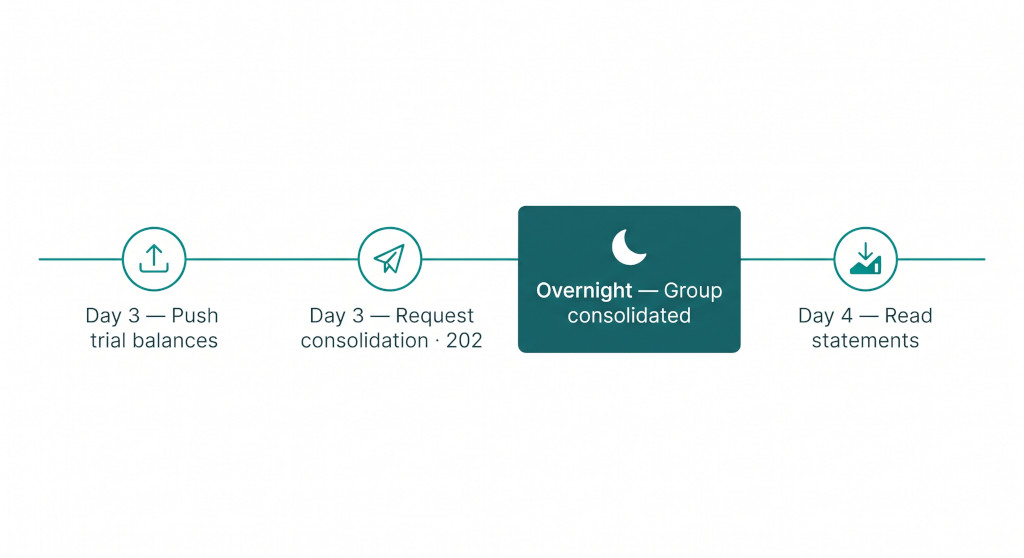
On day 3 of the close, the ERP sends Delta Trading’s October trial balance — the month’s movements by account:
| Account | Dr | Cr |
|---|---|---|
| 1100 Bank | 95,000 | |
| 5000 Cost of sales | 140,000 | |
| 6200 Salaries | 45,000 | |
| 2100 Trade payables | 30,000 | |
| 4000 Sales | 250,000 |
Sent as one request for period 2026-10. Total debits 280,000 = total credits 280,000.
The response reports five records accepted and the month’s recalculation as pending. The ERP then posts a consolidation request for the group and receives 202 Accepted.
| Records sent | 5 |
| Records refused | 0 |
| Records accepted for October 2026 | 5 |
Overnight, BrizoConsol consolidates the group: Delta Trading’s October figures are mapped to the group chart, intercompany eliminations run, and CTA and NCI are calculated as they are for every other entity. On day 4, the group’s data warehouse calls the statements endpoint for the consolidated profit and loss and balance sheet, and the consolidation endpoint for the CTA and NCI detail, and refreshes the board dashboards — with no export and no re-keying at either end.
Availability
API Access is included in the Premium edition at $65 per entity per month, and in Enterprise / Partner. On other editions the API Access screen invites an upgrade and the API refuses requests with a message naming the edition. If a group moves off Premium, its credentials are not deleted: they stop working, stay listed, and work again when Premium is restored.
Developer documentation is published at developer.brizoconsol.com. For no-code imports, Premium also lets Zapier write through the BrizoConsol MCP server, using the same import contract as the API.
Getting started: a checklist
- Confirm the group is on Premium in Subscriptions.
- Open API Access in the Integrations section of the sidebar.
- Create a credential: name it, tick the companies it may write for, tick what it may write, and add your server’s IP addresses.
- Copy the client ID and secret into your system’s secret store — they are shown only once.
- Exchange them for an access token and confirm you can list the companies the credential may read.
- Read the schema for the kind you will send, then load the company’s chart of accounts.
- Send one month’s trial balance to the validate endpoint and check what would be accepted.
- Send it for real, read the request’s results, and post a consolidation request.
- The next morning, read the consolidated statements through the API and agree them to the same figures in BrizoConsol.
See API Access in action
Book a walkthrough and see an external system feed a live BrizoConsol group. See It In Action
Stop building consolidations in spreadsheets.
BrizoConsol automates multi-entity consolidation — setup in minutes, reports the same day.