MYOB Drilldown: Every Report Figure, Down to the Ledger Line
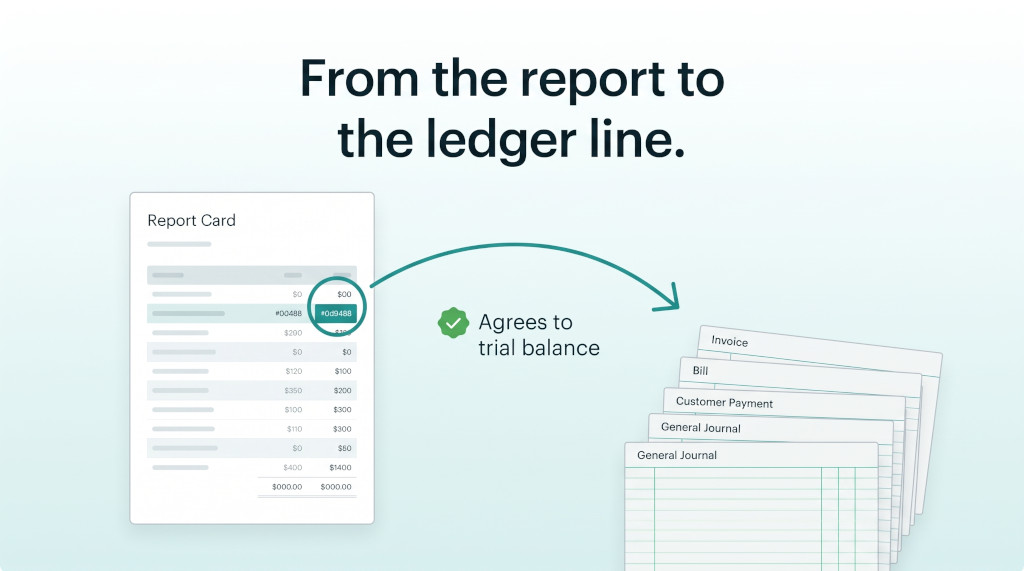
A consolidation built from MYOB trial balances gives the right totals. But when a reviewer asks why a subsidiary’s Trade Debtors rose by 4,150 in October, or what hit an expense account in the last week of the quarter, the total alone does not answer. Until now, the answer meant opening MYOB, finding the company file, and running a ledger report for the same account and month.
BrizoConsol now keeps that answer next to the number. Drill into a figure from a MYOB company file and the trial balance row behind it opens into the ledger lines that moved the account in the period — every invoice, bill, customer payment, supplier payment and general journal, typed as MYOB states it.
The report total still comes from the imported trial balance. The ledger lines explain it; they are never added to it. And BrizoConsol only reads from MYOB — it never writes back.
Consolidate your MYOB entities in minutes.
BrizoConsol connects to MYOB and automates your group financial statements.
One source for the whole movement
MYOB states its whole general ledger, not only the part a document explains. So for MYOB, one source answers the drill: every ledger line names the account it moved, its date, its side and the transaction behind it. A bank fee or a manual journal appears beside an invoice’s posting, not instead of it.
Each line carries the type MYOB gives it — Invoice, Bill, Customer Payment, Supplier Payment or General Journal — rather than being labelled a “journal line” whatever produced it. On a typical company file, almost all ledger lines come from invoices, bills and payments; general journals are a small minority. Seeing the type is what turns a list of amounts into an explanation.
No extra setup
The ledger is loaded with the data BrizoConsol already reads from MYOB. A new MYOB connection reads the ledger on its initial load for the months it publishes documents for; the nightly refresh reads it for the months it updates; and loading a range of months from the Data Loading screen reads it for each month selected. There is no separate permission to approve and no additional option to tick.
Checked before it is stored
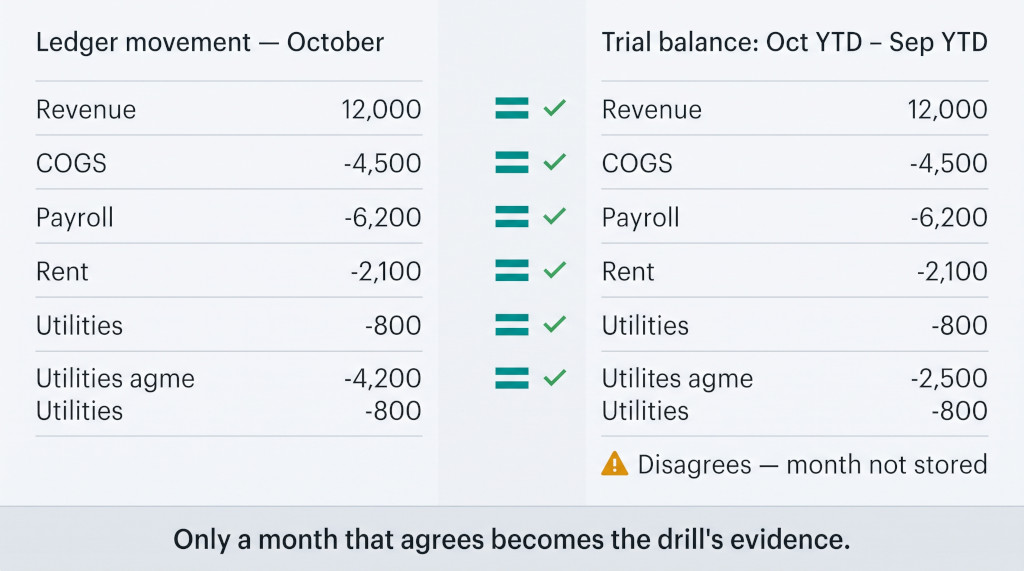
A ledger that disagrees with the report would explain the wrong number. So before a month’s ledger is stored, BrizoConsol checks it against the trial balance imported for that month. MYOB’s trial balance is year to date, so a month’s movement per account is that month’s balance less the month before; the ledger’s movement for each account must agree with it.
- Agrees — the account reconciles, and the month’s ledger is stored.
- Unverified — the account is not in the chart of accounts, so there is no balance to compare it with. It is counted and named in the load rather than treated as agreeing.
- Disagrees — the month’s ledger is not stored at all. The rest of the load still completes: trial balances, invoices and bills are published as normal, and the drill simply falls back to the trial balance for that month.
Two details make the check reliable. A transaction belongs to the month in which it occurred, as MYOB’s own balances do, with the posting date kept alongside it. And the month runs to the end of its last day, so a sale entered at 5pm on the 30th is not lost from the month it belongs to.
Only a ledger month that agrees with the trial balance becomes the evidence behind a report figure.
Trace your MYOB numbers without leaving the report
Start a free trial, connect a MYOB company file, and drill a real month. Start Free Trial
What the drill shows
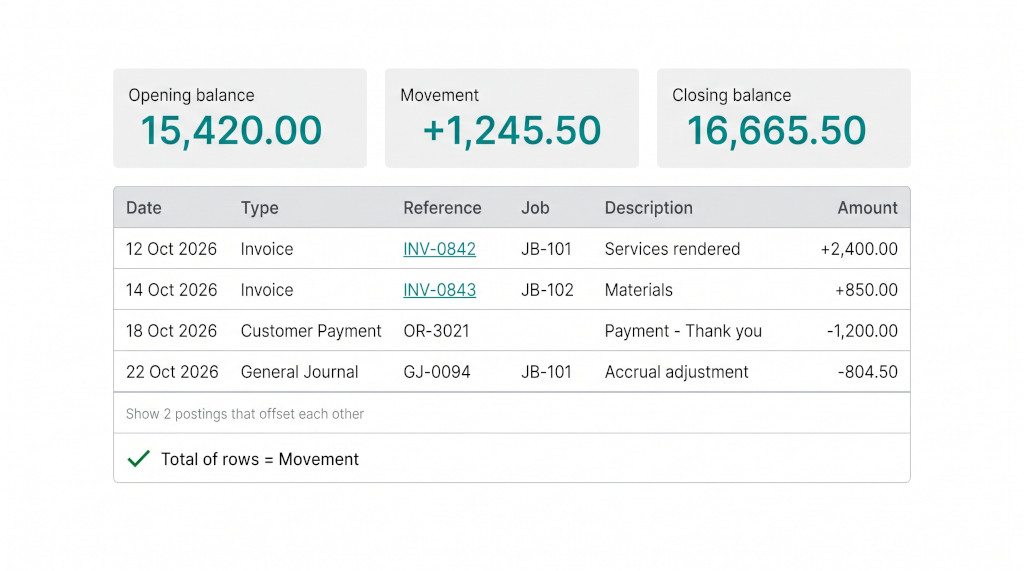
Open a report and click a figure for a MYOB company file. The drill opens with the trial balance rows and their totals as before, and the MYOB row can now be opened. For each ledger line it shows:
| Column | What it holds |
|---|---|
| Date | The date the transaction occurred |
| Type | Invoice, Bill, Customer Payment, Supplier Payment or General Journal |
| Reference | The transaction number; an invoice or bill number opens the document where BrizoConsol holds it |
| Job | The MYOB job on the line, where there is one |
| Description and memo | As MYOB states them |
| Amount | The amount posted to this account, in the company file’s currency |
From any line, the whole transaction can be opened in place, so you can see where the other side of a general journal went.
Balance sheet accounts
For a balance sheet account, the drill also shows the opening balance, the movement and the closing balance. That makes it clear the ledger lines explain the period’s movement, not the whole balance.
Year to date
In a fiscal year-to-date view, the movement runs from the start of the company file’s fiscal year, and the ledger lines cover the same span.
Postings that cancel out
An account’s ledger often holds pairs that net to nothing, such as an entry and its reversal in the same month. The drill hides them and says so — Show postings that offset each other — and one click shows them again.
Nothing absorbed
If the ledger lines do not fully explain the movement, the drill states the difference under the rows. It never adds a balancing line to make the figures meet. The drill also states the span of months the stored ledger covers.
Worked example: Trade Debtors in October
These figures are illustrative. A MYOB subsidiary’s Trade Debtors closes October at 52,350, up from 48,200. Opening the MYOB row shows:
| Date | Type | Reference | Debit | Credit |
|---|---|---|---|---|
| Oct (18 lines) | Invoice | Various | 21,000 | |
| Oct (9 lines) | Customer Payment | Various | 16,500 | |
| 31-Oct-26 | General Journal | GJ000214 | 350 |
| Opening balance, 1 October | 48,200 |
| Invoices raised | 21,000 |
| Customer payments received | (16,500) |
| General journal GJ000214 | (350) |
| Closing balance, 31 October | 52,350 |
The movement of 4,150 is fully explained. The general journal is the line that would previously have sent someone into MYOB. Open it in place and its other side shows the 350 written off to bad debts. Click any invoice number and the invoice opens in the Documents view.
When there’s nothing to expand
The drill says why rather than showing an empty panel:
- The ledger for the month is not loaded. Load the month again to read its ledger; until then the figure is explained by the trial balance only.
- The ledger holds no line for this account in the month. The figure is explained by the trial balance only.
- The month before has no imported trial balance. The movement cannot be stated without it, so load that month first.
- The row is a group of accounts. Ledger lines belong to one account; drill to the individual account.
- A budget, forecast or other accounting standard is selected. MYOB ledger lines explain the local Actual import only.
Availability
MYOB drilldown is part of the accounting detail included in the Pro and Premium editions and in the free trial. Equivalent drilldown is available for Xero, QuickBooks and Zoho Books.
Getting started: a checklist
- Confirm the group is on Pro or Premium (or in its free trial).
- Make sure the MYOB company file has trial balances loaded for the month you want to examine and the month before it.
- If the month predates the initial load, load it from the Data Loading screen so its ledger is read.
- Check the load result for any month whose ledger disagreed with the trial balance, and any unverified accounts.
- Open a report, click a figure for the MYOB company file, and open the MYOB row.
- Confirm the rows total to the movement, and for a balance sheet account that opening plus movement equals closing.
- Open a general journal in place, and click an invoice number to open the document.
See a MYOB month explained line by line
Connect a MYOB company file and we’ll drill a real month with you, from the consolidated report to the ledger. See It In Action
Consolidate your MYOB entities in minutes.
BrizoConsol connects to MYOB and automates your group financial statements.