Xero Drilldown: Every Report Figure, Down to the Posting
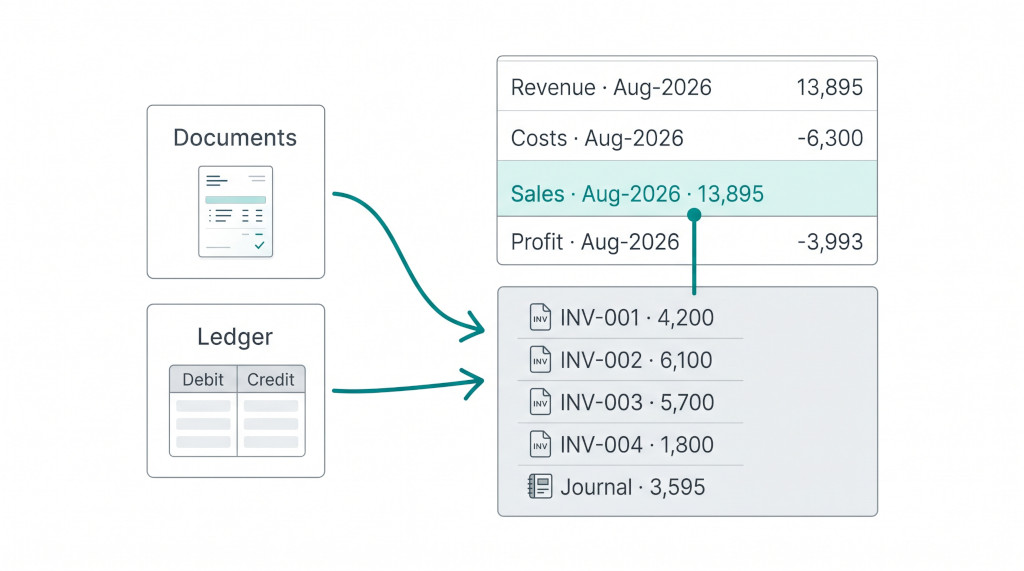
A consolidation report built from Xero trial balances gives the right totals, but a total isn’t an answer. When a reviewer asks why the subsidiary’s Sales moved by 13,895 in August, or what hit the bank account on the last day of the quarter, the answer used to mean logging into Xero, finding the company and running a ledger report for the same account and month.
BrizoConsol now keeps that answer next to the number. Drill into a figure from a Xero company and the trial balance row behind it expands into the source:
- the invoice, bill and credit note lines that posted to the account;
- the ledger journals no document explains, such as a manual journal, a bank charge or a realised currency gain.
The report total still comes from the imported trial balance. The source rows explain it; they are never added to it. The connection only reads Xero and never writes back.
BrizoConsolConsolidate your Xero entities — automatically.
BrizoConsol pulls from all your Xero organisations and delivers group reports in minutes.
Switch it on
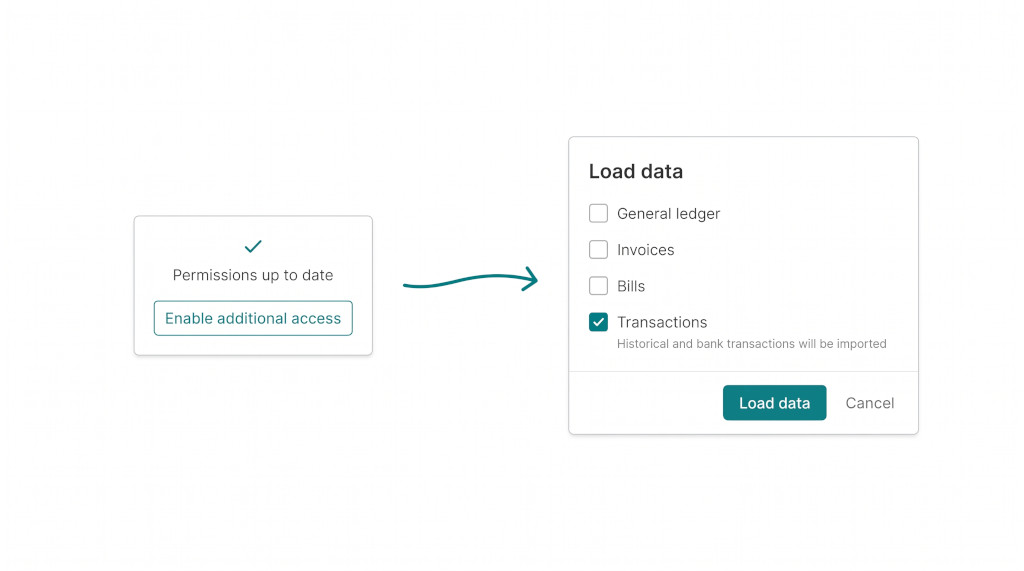
Most Xero connections already have permission to read payments and the ledger. What they haven’t had is a decision to use it. Reading a company’s payments and journals is something you should choose, not something that starts quietly in the background.
- On the Xero company’s Data Loading page, choose Enable additional access on the connection card. This switches on, in one action, everything the connection’s existing Xero grant can already read. If the grant is missing a permission, the card names it and asks you to reconnect Xero to approve it once.
- In the load dialog, a new Transactions option appears beside General ledger, Invoices and Bills: “Load each selected month’s payments, credit notes, prepayments and overpayments against the documents they settle, and the ledger lines behind each account’s movement.”
- Select the months and load. The period table gains a Transactions column showing what’s loaded, what’s running and what failed.
The ledger is read in full and checked before anything is stored:
- every journal must balance between its two sides;
- every line must post to an account the connection has imported;
- any journal numbers Xero didn’t return are reported with the load.
Only postings dated within your permitted history are kept.
What the drill shows
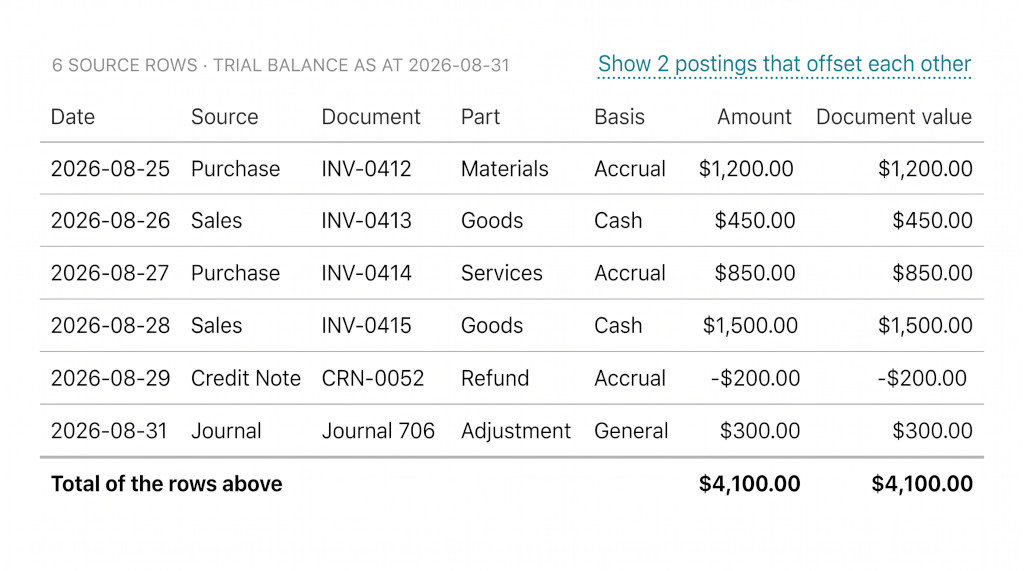
Open a report and click a figure for a Xero company. The drill opens exactly as before, with the trial balance rows and their totals. The Xero row can now be clicked open. The header line states how many source rows there are, the date the trial balance is as at, and when it was imported. The columns are:
| Column | What it holds |
|---|---|
| Date | The posting or document date |
| Source | Invoice, bill, credit note, vendor credit, or a ledger journal |
| Document | The document’s own number, opening it in the Documents view; or Journal and its number, opening the full journal in place |
| Amount | The amount posted to this account, in the company’s base currency |
| Document value | For a foreign-currency document line, its own currency amount where Xero recorded one |
Balance sheet accounts also show the opening balance, the movement and the closing balance. That makes it clear the rows explain the period’s movement, not the whole balance.
Documents first, then the ledger
Xero’s journals record every posting, but a journal line doesn’t say which invoice or payment produced it, and doesn’t carry the currency or rate. So BrizoConsol builds the trail in two layers:
- Document lines. Each invoice, bill, credit note or vendor credit line that posted to the account, with its number, party, date and amount.
- Ledger postings no document explains. A manual journal, a bank charge, a realised currency gain, a payroll posting. These are shown in base currency with the tax type the line states.
A ledger line that a document line already accounts for is matched one for one, on the same account, date and exact amount, and dropped. The same posting is never counted twice.
Draft, submitted, voided and deleted documents never appear in the trail, because they haven’t posted.
Postings that cancel each other
An account’s ledger often holds pairs that net to nothing, such as a receipt and its reversal in the same month. They explain nothing on their own, so the drill hides them and says so: Show 2 postings that offset each other. One click shows them; another hides them again. The pair isn’t claimed to be linked, only that the two amounts cancel.
Worked example
These figures are illustrative. A Xero subsidiary’s Sales for August 2026 reads 13,895.00. Expanding the Xero row shows:
| Invoice lines posted to Sales (31 lines) | 13,745.00 |
| 28-Aug-26 Journal 706 manual journal (credit) | 150.00 |
| Total of the rows above = Sales, Aug-2026 | 13,895.00 |
The manual journal is the row that would have sent you to Xero before. Click Journal 706 and both sides of the journal open in place, showing where the other 150 went.
A foreign-currency bill works the same way. A EUR bill line shows its own EUR value in Document value and the converted amount that actually posted in Amount. The realised gain when it’s paid appears as a ledger posting on the currency gain account.
If part of a movement isn’t matched by any row, the drill says so under the rows instead of inventing a balancing line.
See a Xero month explained line by line
Connect a Xero company and we’ll drill a real month with you, from the consolidated report to the journal. See It In Action
When there’s nothing to expand
The drill tells you why rather than showing an empty panel:
- Transactions not loaded for the month. The figure is explained by the imported trial balance only until that month is loaded.
- The grant doesn’t include journals. Document lines still appear; ledger postings need the connection to be re-approved.
- The row covers several accounts. A group row, such as a section total, can’t be expanded. Drill to the individual account.
- A budget, forecast or other accounting standard. Source postings explain the local Actual import only. Other scenarios and standards, and BrizoConsol’s own journals and eliminations, keep the original drill rows.
Also in this release: settlement detail on documents
The same Transactions load reads each document’s dated payments, credit notes, prepayments, overpayments and refunds. In the Documents view, an invoice or bill now separates cash from credits and states what is still due. A 1,000 invoice settled by 400 in cash and 100 of credit shows 500 due, not 500 cash received.
Older months that still hold an unpaid balance are re-read overnight. An invoice issued months ago and paid today therefore stops showing the balance it had when its month was first loaded.
Checklist
- On the Xero company’s Data Loading page, choose Enable additional access. If the card names a missing permission, reconnect Xero and approve it.
- Load Transactions for the months you report on, and check the Transactions column for each month.
- Open the P&L, drill a Sales figure and expand the Xero row. Confirm the total of the rows above equals the movement.
- Click a journal row to see both sides, and a document number to open the invoice or bill.
- Drill a bank account and use Show postings that offset each other to see any cancelling pairs.
Consolidate Xero with every figure explained
Start a free trial, connect your Xero companies and drill your first month today. Start Free Trial