Custom Intercompany Types: Organise Eliminations Around How Your Group Actually Trades
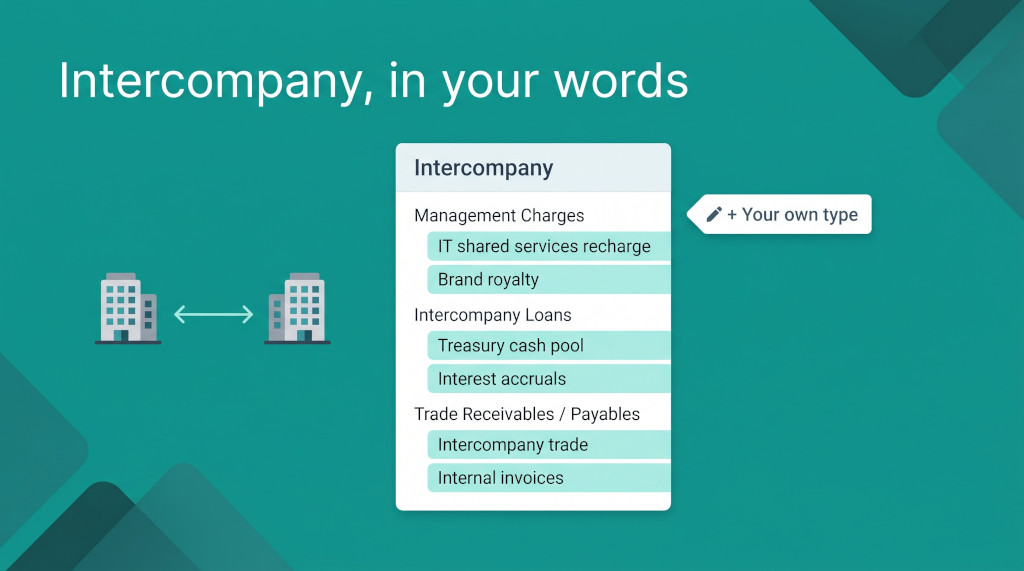
Most groups don’t talk about “management charges”. They talk about the IT recharge from head office, the brand royalty the regional companies pay, and the shared finance-team fee. All three are management charges for elimination purposes, but they come from different agreements, get reviewed by different people and tend to break in different ways. When they all sit in one elimination bucket, a reviewer working through month-end has to open each entry to find out what it is.
The usual workaround is a naming convention in the description field — “IT RECHARGE – Sep” — plus a spreadsheet that maps descriptions back to agreements. It works until someone types the description differently, or a new team member doesn’t know the convention. The elimination is still correct, but the structure that made it reviewable exists only in people’s heads.
BrizoConsol now lets each group create its own intercompany types. A type is a name your group chooses, such as IT shared services recharge, linked to one of BrizoConsol’s elimination treatments. Each type gets its own entry in the Intercompany menu, its own filtered list of entries, and a place in a menu layout you arrange yourself.
Intercompany eliminations without the manual work.
BrizoConsol identifies and eliminates intercompany balances automatically at consolidation.
Types and treatments
BrizoConsol has always grouped eliminations by accounting treatment. The treatment determines what kind of elimination an entry is:
| Treatment | Eliminates |
|---|---|
| Trade Receivables / Payables | Outstanding balances between group entities |
| Sales / Purchases / Services | Internal sales, services and corresponding costs |
| Inventory Transfers | Intercompany inventory sales and purchases |
| Unrealised Profit | Profit in inventory not yet sold outside the group |
| Intercompany Loans | Loans, borrowings, accrued interest and related balances |
| Management Charges | Management fees, service charges and related income and expense |
| Dividends | Intercompany dividend income and distributions |
| Fixed Assets | Gains, losses and value adjustments on intra-group asset transfers |
| Rental / Lease Adjustments | Internal rental and lease effects, from lease schedules |
| Other Income / Expenses | Other intercompany income and expense |
| Other Eliminations | Balances that do not fit the standard categories |
An intercompany type sits one level below a treatment. It doesn’t change the accounting: an entry under IT shared services recharge is still a Management Charges elimination. What the type adds is your group’s own name for the activity, so entries can be found, reviewed and arranged by that name.
Treatments decide how an elimination is accounted for. Types decide how your team finds and reviews it.
What makes a good type
A type is worth creating when a group of entries is reviewed, agreed or reconciled separately from the rest of its treatment. Typical examples:
- Management Charges: IT recharges, brand or trademark royalties, and shared-service fees, each governed by its own agreement.
- Intercompany Loans: a treasury cash pool kept apart from a specific term loan to a new subsidiary.
- Sales / Purchases / Services: product sales between manufacturing and distribution entities, kept apart from internal engineering services.
- Trade Receivables / Payables: balances arising from one particular supply chain, kept apart from general intercompany payables.
If a group of entries never needs to be looked at on its own, it doesn’t need a type. The treatment is enough.
The Intercompany Types screen
Everything is managed on one screen: Intercompany Types, in the sidebar alongside the other group setup screens such as Organisation Hierarchy and Account Mapping. It lists every treatment and every type your group has created, with:
- A kind label — System for BrizoConsol’s treatments, Custom for your own types.
- A switch to enable or disable each row. A switch saves as soon as you click it. Other Eliminations is shown as Always on and cannot be switched off.
- A search box (Search all fields…) and filters for kind (All kinds) and status (All statuses), so a group with many types can find one quickly.
Disabled treatments and types are hidden from the Intercompany menu. Disabling never deletes entries.
Creating a type
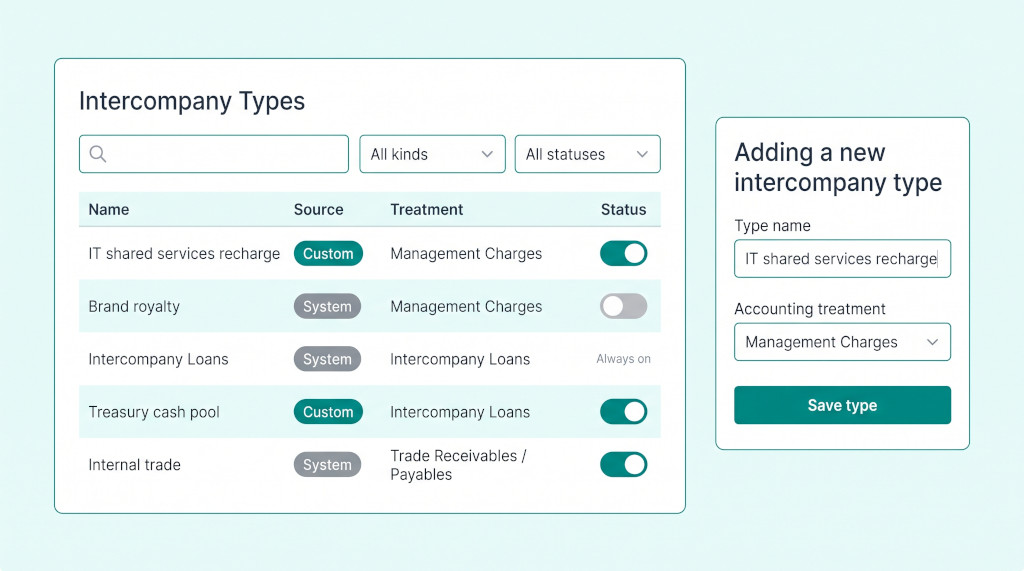
- Open Intercompany Types for the group.
- Click Add an intercompany type. The Adding a new intercompany type dialog opens.
- Enter a Type name — up to 120 characters, and unique within the group.
- Choose the Accounting treatment the type belongs to.
- Click Save type.
The new type appears under its treatment in the Intercompany menu. Opening it shows only the entries that carry that type, and an entry you create from there is saved with it. You don’t pick a type inside the entry dialog: which menu item you open decides it.
Types belong to the group, not to an individual entity, so every company in the group shares the same list. Creating, editing and switching types requires data administration rights on the group.
Editing, deactivating and the rules that protect history
Clicking Edit opens the same dialog as Editing intercompany type, with an extra checkbox: Available for new entries. Three rules keep saved entries consistent:
- Saved entries keep their type. Each entry stores the type’s identity and name as they were when it was saved. Deactivating a type stops it being offered for new entries and hides it from the menu, but existing entries keep it.
- A type in use cannot change treatment. If saved entries already carry a type, BrizoConsol refuses to move it to a different treatment, with the message: “An intercompany type used by saved entries cannot change accounting treatment. Create a separate type.” This keeps the type from relabelling entries that were made under a different treatment.
- Only active types of the matching treatment can be used. A new entry can only carry an active type from the same group and the same treatment.
Choose the treatment carefully when you create a type. Once entries use it, the only way to move that activity to a different treatment is to create a new type.
See intercompany eliminations organised your way
Walk through treatments, types and the Intercompany menu with a live group. See It In Action
Arranging the Intercompany menu
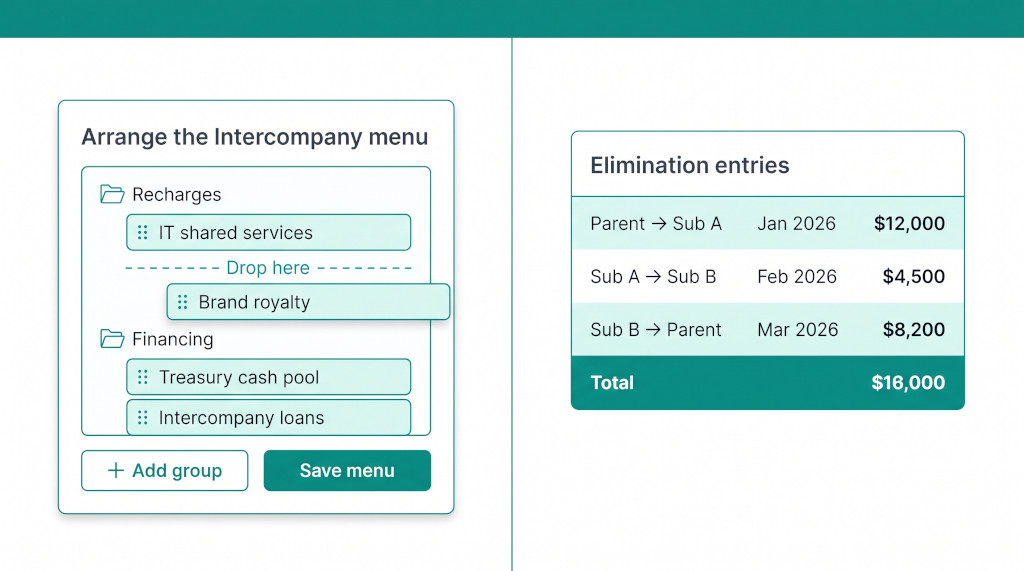
Once a group has several types, the order of the menu matters. From the Intercompany Types screen, click Arrange the Intercompany menu. The dialog shows the menu as a tree:
- Drag to reorder. Drop an entry onto a group to move it in.
- Add group creates a heading — for example Recharges or Financing — and Rename group changes it.
- Save menu stores the layout for the group.
When you switch a type off, BrizoConsol remembers where it was in the layout. Switch it back on and it returns to the same position, so a seasonal or occasional type doesn’t have to be re-placed each time.
Worked example: splitting management charges
Take an illustrative group: a Singapore head office charging three kinds of fee to its two subsidiaries. Before types, all three were Management Charges entries, told apart only by description. The group creates three types, all linked to Management Charges:
| Type name | Accounting treatment | Reviewed by |
|---|---|---|
| IT shared services recharge | Management Charges | IT finance partner |
| Brand royalty | Management Charges | Group tax |
| Finance shared service fee | Management Charges | Group controller |
For Sep-2026, the head office charged:
| IT shared services recharge | 48,000 |
| Brand royalty | 35,000 |
| Finance shared service fee | 22,000 |
| Total Management Charges eliminated | 105,000 |
The IT recharge elimination is entered from the IT shared services recharge menu item, so it is saved with that type:
| Account | Dr | Cr |
|---|---|---|
| Management fee income — IT recharge (Head office) | 48,000 | |
| IT service charges (Subsidiaries) | 48,000 |
Illustrative figures. The accounting is the same Management Charges elimination as before; the entry now also carries the type “IT shared services recharge”.
The consolidated result doesn’t change: 105,000 of intercompany fees is eliminated either way. What changes is the review. The IT finance partner opens IT shared services recharge and sees only the 48,000 entry. Group tax opens Brand royalty and sees only the 35,000. Nobody filters by description or keeps a side spreadsheet. The administrator also arranges the menu so the three types sit together under a group called Recharges.
If the brand royalty agreement ends in December, the administrator switches the type off. September’s entry keeps its Brand royalty label, the type disappears from the menu, and it is not offered for new entries.
Checklist: set up your first intercompany types
- List the recurring intercompany activities your team already talks about by name — recharges, royalties, cash pools, specific loans.
- For each one, decide which accounting treatment it belongs to.
- Open Intercompany Types for the group and review the System treatments. Switch off any your group never uses, so they drop out of the menu.
- Click Add an intercompany type, enter the Type name, choose the Accounting treatment, and click Save type. Repeat for each activity.
- Filter by Custom to check the list of types you created.
- Click Arrange the Intercompany menu, add groups if they help, drag the types into place, and click Save menu.
- In the Intercompany menu, open one new type and create the month’s elimination from there.
- Reopen the type and confirm the entry is listed. Open the parent treatment and confirm the entry also appears there.
- To retire a type, switch it off — or untick Available for new entries in Edit — and confirm earlier entries still show it.
Make month-end eliminations easier to review
Start a free trial of BrizoConsol and set up intercompany types for your own group. Start Free Trial
Intercompany eliminations without the manual work.
BrizoConsol identifies and eliminates intercompany balances automatically at consolidation.