Xero Tracking Categories in Multi-Entity Groups: Why They Can’t Replace Consolidation
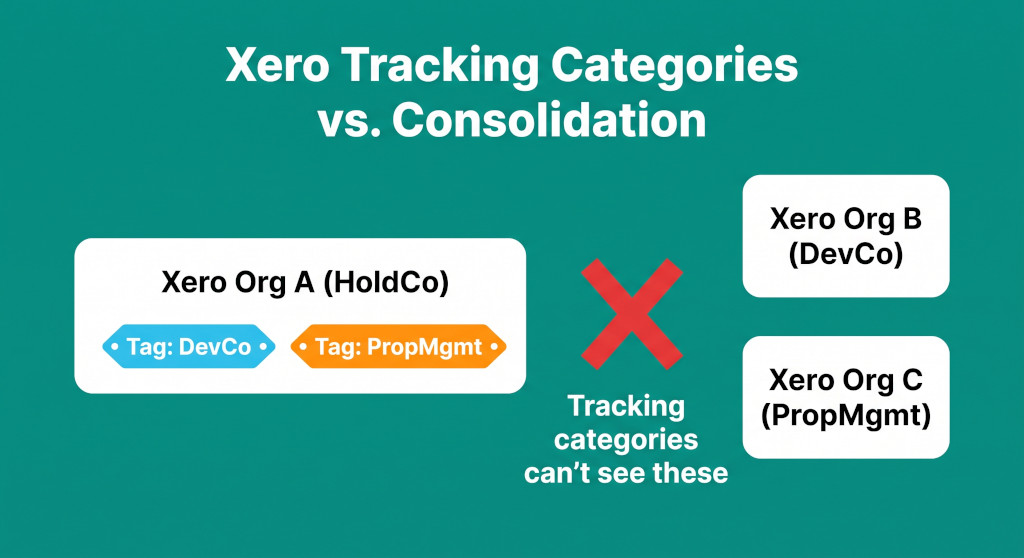
Sophie is the financial controller for a property development group based in Melbourne. The group has three legal entities: a HoldCo that owns 100% of a development company (DevCo) and a property management business (PropMgmt), all operating through separate Xero organisations. Three years ago, Sophie set up two tracking categories in HoldCo’s Xero — one labelled “DevCo” and one labelled “PropMgmt” — so she could see management fees and recharges tagged by entity. She produces a monthly management report filtered by tracking category and sends it to the board under the heading “Group Management Accounts.”
At the end of the financial year, the group’s auditor requests the consolidated financial statements. Sophie sends the tracking category report. The auditor returns it within an hour. It is not a consolidation. It shows only HoldCo’s income and expenses. DevCo’s $2.4 million in development revenue is absent. PropMgmt’s $780,000 in management income is absent. There are no intercompany eliminations. There is no consolidated balance sheet. What Sophie has been producing for three years is a filtered view of one Xero organisation — not a group view of three.
Tracking categories are a genuinely useful feature inside a single Xero entity. But in a multi-entity group context, they are frequently misunderstood as a consolidation tool. They are not, and cannot be — and understanding exactly where the boundary sits is important for any finance team managing a Xero group.
Consolidate your Xero entities — automatically.
BrizoConsol pulls from all your Xero organisations and delivers group reports in minutes.
What Xero Tracking Categories Actually Do
Tracking categories in Xero allow you to tag individual transactions within a single Xero organisation with a label — a department, a project, a cost centre, or in Sophie’s case, an entity name. Once transactions are tagged, you can filter Profit and Loss reports, Budget Manager reports, and some other Xero reports by category to see income and expenses for each tag separately.
Within the boundaries of one Xero organisation, this is powerful. A single entity with multiple divisions — a law firm with litigation and conveyancing departments, for example — can use tracking categories to produce a meaningful split of revenue and costs without maintaining separate accounting files. The categories are a reporting layer on top of the same chart of accounts, within the same organisation, with the same bank accounts and the same balance sheet.
That last point is where the limitation begins. Tracking categories operate within one Xero organisation’s data. They do not reach across to other Xero organisations. They cannot pull balances or transactions from a separate Xero file into the report. They cannot reconcile balances between files. They cannot eliminate anything. They are, in the strictest sense, a tagging and filtering system — not an accounting consolidation.
The Revenue Gap: What Sophie’s Report Was Actually Showing
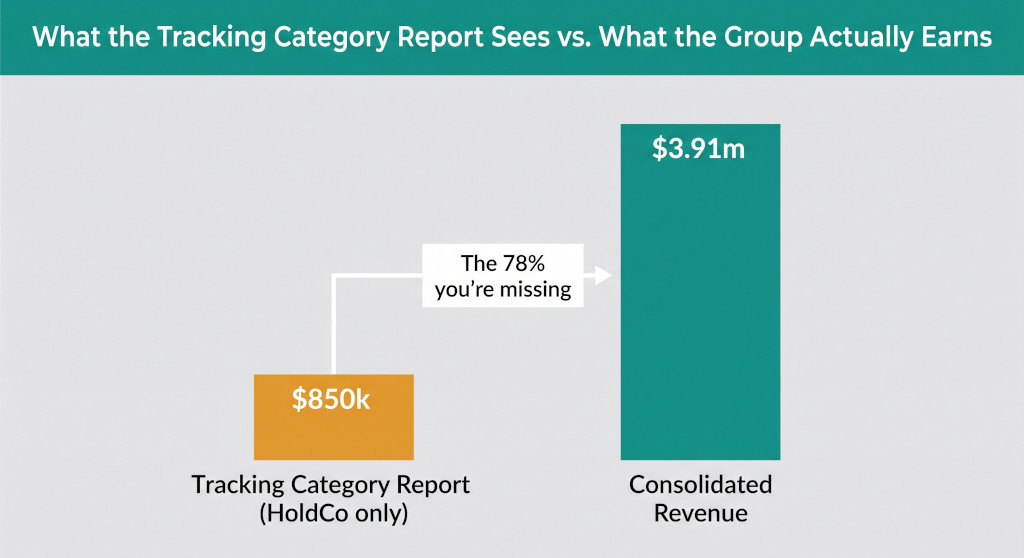
The scale of the gap between Sophie’s tracking category reports and actual consolidated accounts is easier to see with numbers. Here is what the group’s revenue looks like from three different vantage points:
| Entity | Revenue (Entity Accounts) | Visible in Sophie’s Tracking Report? |
|---|---|---|
| HoldCo (Xero Org A) | $850,000 | Yes — this is the entire source of Sophie’s report |
| DevCo (Xero Org B) | $2,400,000 | No — separate Xero organisation |
| PropMgmt (Xero Org C) | $780,000 | No — separate Xero organisation |
| Total before eliminations | $4,030,000 | |
| Less: intercompany management fees eliminated | ($120,000) | No — not performed |
| Consolidated revenue | $3,910,000 | No — not produced |
Sophie’s tracking category report shows $850,000. The group’s consolidated revenue is $3,910,000. The tracking categories captured 22% of the group’s actual turnover. The other 78% belongs to entities whose Xero files Sophie’s report cannot see.
This is not a failure of Sophie’s setup — it is a consequence of what tracking categories are designed to do. The same limitation applies to every Xero group that relies on tracking categories for cross-entity reporting.
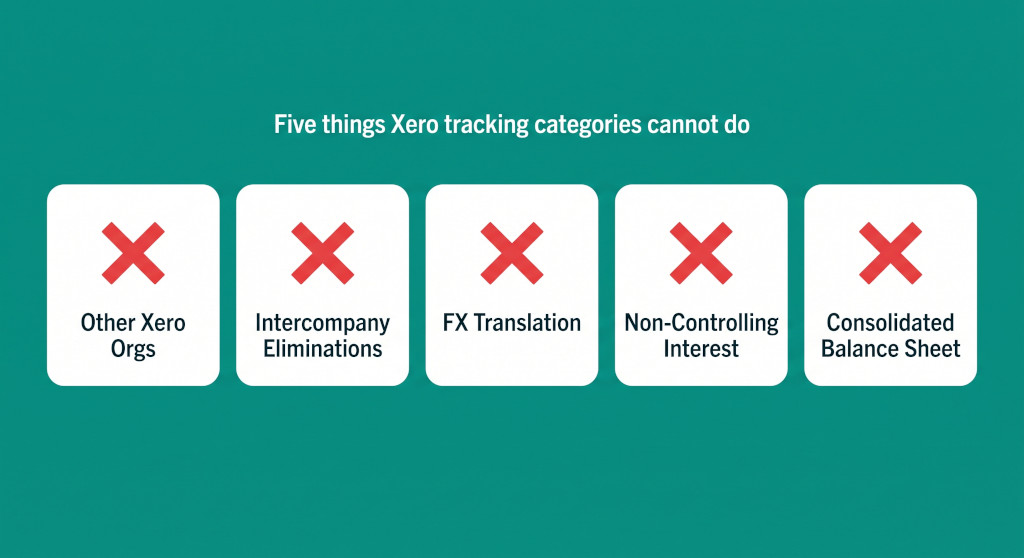
The Five Things Xero Tracking Categories Cannot Do in a Group
1. They Cannot See Other Xero Organisations
This is the fundamental structural limitation. Each Xero organisation is a closed accounting system. Its trial balance, transactions, and reports belong to that organisation alone. A tracking category report in HoldCo’s Xero can only draw on HoldCo’s chart of accounts, HoldCo’s transactions, and HoldCo’s balances. DevCo’s revenue does not flow into HoldCo’s Xero just because HoldCo owns DevCo. The data stays in the file where it was entered.
Consolidation, by definition, requires bringing together the accounts of all entities in the group — which means accessing and combining multiple Xero organisations’ data. Tracking categories cannot do this. They do not know that other Xero organisations exist.
2. They Cannot Eliminate Intercompany Transactions
When HoldCo charges DevCo a management fee, HoldCo records management fee income and DevCo records management fee expense. At a consolidated level, both entries must be eliminated — the income never left the group and the expense was never paid to a third party. The consolidated P&L should show neither. For a broader explanation of how this works across entity types, see Intercompany Management Fee Elimination: What It Is and How to Do It.
Tracking categories have no elimination mechanism. Even if Sophie tags HoldCo’s management fee income as “DevCo” and DevCo records the corresponding expense in its own Xero file, there is no process in either Xero file that cancels these against each other. The income stays on HoldCo’s P&L and the expense stays on DevCo’s P&L. A consolidated view that simply sums the two organisations will double-count the intercompany flow.
3. They Cannot Handle Foreign Currency Translation
Groups with entities in different countries — an Australian HoldCo and a New Zealand or Singapore subsidiary, for example — must translate the foreign entity’s accounts into the group’s presentation currency before consolidating. Balance sheet items translate at the closing rate; income statement items translate at the average rate for the period; the difference goes to other comprehensive income as a cumulative translation adjustment. This is a multi-step mechanical process governed by AASB 121.
Tracking categories apply no translation logic. If a Xero group has a NZD subsidiary and an AUD HoldCo, the NZD balances in the subsidiary’s Xero file cannot be translated into AUD by tagging transactions in the HoldCo file. The translation must happen outside Xero, in a consolidation process that knows the applicable exchange rates for each period. For a full walkthrough of how this works in a Xero context, see Xero Multi-Currency Consolidation: How Groups with Foreign Subsidiaries Produce Accurate Group Accounts.
4. They Cannot Calculate Non-Controlling Interest
When HoldCo owns less than 100% of a subsidiary — say, 75% of DevCo with a 25% external shareholder — the consolidated financial statements must separately present the 25% minority interest. Non-controlling interest appears on the consolidated balance sheet within equity, on the consolidated P&L as a share of profit or loss attributable to NCI, and in the consolidated statement of changes in equity. Calculating NCI requires knowing the subsidiary’s net assets and profit, applying the minority ownership percentage, and carrying the result through multiple statements consistently.
Tracking categories have no concept of ownership percentages. There is no field in a Xero tracking category for “owned by group at 75%.” The NCI calculation must happen in a consolidation workbook or software that holds the group structure and can apply the correct percentages at each reporting date.
5. They Cannot Produce a Consolidated Balance Sheet
Xero tracking categories are primarily a Profit and Loss reporting tool. Even within a single organisation, they do not produce a balance sheet split by category — assets and liabilities are not tracked at the category level in the same way income and expenses are. A consolidated balance sheet requires adding together the assets and liabilities of every entity in the group, eliminating intercompany receivables and payables, removing the parent’s investment in each subsidiary (replaced by the underlying net assets), and presenting the result as a single set of balances.
None of this is possible through tracking categories. The consolidated balance sheet must be built from the trial balances of all entities combined, with elimination adjustments applied. It cannot be derived from a single Xero organisation’s filtered report.
The test for whether you have a consolidation is simple: does your report include the balance sheets and income statements of all group entities, adjusted for intercompany eliminations? If the answer is no — if it only shows one entity’s accounts, or a filtered view of one entity’s accounts — it is not a consolidated financial statement regardless of what it is labelled.
Running a Xero Group and Need Actual Consolidated Accounts?
BrizoConsol connects directly to all your Xero organisations, translates foreign currency subsidiaries, eliminates intercompany transactions, and produces consolidated financial statements — without spreadsheets. See It In Action
Where Tracking Categories Are Genuinely Useful in a Group Context
None of the above means tracking categories have no role in a multi-entity group. Within their design constraints, they do useful work — the limitation is in asking them to do something they were never built for.
Within-entity segmentation. If one of your Xero organisations runs multiple revenue streams or departments — HoldCo that both receives management fees and operates a small advisory practice, for example — tracking categories can split those income streams for internal management reporting within that entity. This is their intended use and they do it well.
Pre-coding for consolidation. Some finance teams use tracking categories to tag intercompany transactions at the point of entry — marking which entity a management fee relates to, for example — so that the intercompany register is easier to maintain. The tag does not perform the elimination, but it creates an audit trail that makes the consolidation workbook cleaner.
Departmental budgeting. Xero’s Budget Manager supports tracking categories, so individual entities in the group can maintain departmental or project budgets without needing separate organisations. This remains a single-entity capability but is practically useful for groups where one entity has significant internal complexity.
The boundary is clear: tracking categories are a tool for reporting within one Xero organisation. As soon as the requirement involves combining accounts from more than one Xero organisation, they reach the edge of what they can do.
The Capability Comparison
| Capability Required for Consolidation | Xero Tracking Categories | Proper Consolidation |
|---|---|---|
| Report across multiple Xero organisations | ✗ | ✓ |
| Eliminate intercompany revenue and expenses | ✗ | ✓ |
| Eliminate intercompany receivables and payables | ✗ | ✓ |
| Translate foreign currency subsidiaries | ✗ | ✓ |
| Calculate non-controlling interest | ✗ | ✓ |
| Produce a consolidated balance sheet | ✗ | ✓ |
| Produce a consolidated cash flow statement | ✗ | ✓ |
| Segment P&L within a single entity | ✓ | ✓ |
| Departmental budgeting within a single entity | ✓ | ✓ |
| Tag intercompany transactions for audit trail | ✓ | ✓ |
What the Group Needs Instead
Producing consolidated financial statements for a Xero multi-entity group requires a process that sits outside Xero and brings together the data from each organisation. The two common approaches are a consolidation spreadsheet and dedicated consolidation software.
A consolidation spreadsheet imports trial balance exports from each Xero organisation, applies exchange rate translations, posts intercompany eliminations as adjustment columns, and produces combined statements in the final output columns. For a small group with two or three same-currency entities and minimal intercompany activity, a well-maintained spreadsheet can work. The failure modes — stale exchange rates, missed eliminations, formula errors, version conflicts — multiply as the group grows. For a practical view of how this is typically structured in a Xero context, see How to Consolidate Multiple Xero Companies Without Excel.
Dedicated consolidation software connects directly to each Xero organisation’s API, pulls the trial balance at each period end, translates currencies at the correct rates, and runs the elimination journals automatically. The consolidated statements are produced from a single source of truth rather than an export-and-paste process. For groups that need to produce consolidated accounts monthly or quarterly — rather than annually for audit — the automation makes the timeline achievable.
Understanding what Xero can and cannot do is the starting point for designing a group reporting process that actually works. Tracking categories are one piece of the picture — useful within the entity, insufficient across entities. The consolidation layer requires something built for the purpose. For a full overview of where Xero’s group capabilities end, see Xero Group Consolidation: What It Can’t Do — and What Finance Teams Use Instead.
If your group’s “consolidated accounts” are produced from one Xero organisation with tracking categories: check whether all entities’ trial balances have been included, whether intercompany eliminations have been performed, and whether any foreign currency translation has been applied. If none of those steps have occurred, what you have is entity-level management accounts — not a consolidated financial statement. The distinction matters for audit, for banking covenants, and for any reporting obligation that requires group-level accounts under AASB 10 or IFRS 10.
Practical Next Steps for Xero Groups Using Tracking Categories for Group Reporting
- Count your entities. If your group has more than one Xero organisation, tracking categories in any one of them cannot produce group accounts. Identify all entities and confirm which have their own Xero files.
- List your intercompany flows. Management fees, loans, recharges, shared costs — any transaction between entities must be eliminated at consolidation. Tracking categories may help identify these flows, but they cannot eliminate them.
- Assess your currency exposure. Any entity with a functional currency different from the group’s presentation currency needs translation at consolidation. Identify which entities this applies to.
- Check your ownership structure. Any subsidiary not 100% owned needs NCI calculated and presented. Confirm which entities have minority shareholders.
- Choose a consolidation method. A consolidation spreadsheet or dedicated consolidation software. The choice depends on the number of entities, frequency of reporting, and complexity of intercompany activity.
- Retain tracking categories for within-entity use. They remain useful for departmental P&L, internal budgeting, and intercompany transaction tagging. They just are not the consolidation layer.
Ready to Produce Real Consolidated Accounts From Your Xero Group?
BrizoConsol connects to all your Xero organisations, handles multi-currency translation, eliminates intercompany transactions, and delivers a consolidated P&L, balance sheet, and cash flow — every period, without the spreadsheet. Start Free Trial