COA Mapping for Group Consolidation: How to Build, Document, and Maintain Your Entity-to-Group Account Map
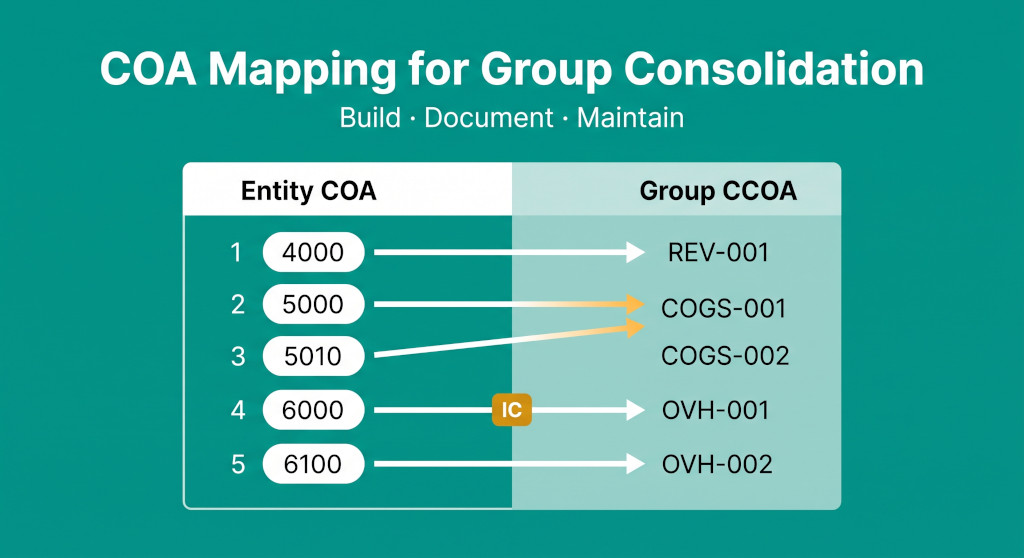
The error had been running for six months before anyone noticed. One of the group’s manufacturing subsidiaries had added a new account code in February — 5095, “Equipment Hire” — to capture the cost of rented plant during a large production run. The account had been mapped to “Direct Materials” in the consolidation because it sat numerically between 5090 and 5100, and whoever had last updated the mapping file had assumed the sequence was complete. In the consolidated P&L, six months of equipment hire costs had been running through direct materials rather than production overhead. The gross margin figure the board had been reviewing every quarter was wrong — not by much, but enough to misstate the manufacturing subsidiary’s true contribution margin by several percentage points.
The fix took two hours. The damage — an audit qualification on comparatives and a board presentation with corrected numbers — took considerably longer to manage.
The entity-to-group account map is the piece of consolidation infrastructure that most finance teams build once, inadequately, and then never systematically review. It is not a glamorous document. It sits between the entity trial balances and the consolidated workbook, doing quiet work every period. But when it is wrong, every line of the consolidated accounts is potentially wrong — and the errors are hard to find because the total always balances. This guide explains how to build the map correctly, how to document the decisions that underpin it, and how to maintain it so it remains accurate as entities and the group’s chart of accounts evolve.
Stop building consolidations in spreadsheets.
BrizoConsol automates multi-entity consolidation — setup in minutes, reports the same day.
What the Map Is (and What It Is Not)
The entity-to-group account map is a lookup table. For each account code in each entity’s chart of accounts, it specifies which account in the group’s common (or consolidated) chart of accounts — referred to here as the CCOA — that entity account rolls up into. When you run the consolidation, the entity trial balances are pulled in and each row’s account code is looked up in the map to determine which CCOA line it contributes to. The consolidated trial balance is the sum of all entity balances after this translation.
The map is not the CCOA design itself — the architecture of what the group’s account structure should look like, what sections it needs, and how granularly it should capture the business. That design question is covered in how to design a common chart of accounts for multi-entity groups. This guide assumes the CCOA exists and addresses the operational question: how do you build and maintain the lookup that connects your entities’ account codes to it?
The map is also not a one-time exercise. It is a living document that must be updated every time an entity adds a new account, every time the group CCOA changes, and every time a new entity joins the group. Most consolidation errors that manifest as misclassified costs or unexplained variances can be traced back to a mapping that was once correct and is no longer so. The governing failure is not building the wrong map; it is failing to maintain a map that started correct.
The Structure of the Mapping Document
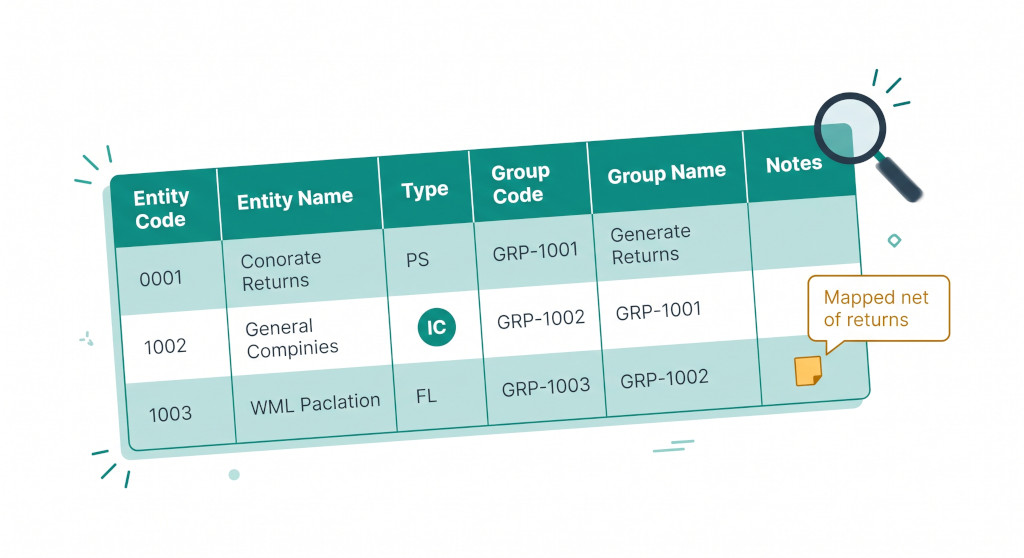
The mapping document needs enough columns to unambiguously specify the relationship between each entity account and the CCOA, and to document why the mapping was made the way it was. A minimum-viable mapping document has six columns for each entity:
| Column | Content | Why it matters |
|---|---|---|
| Entity account code | The code exactly as it appears in the entity’s accounting system | Must match exactly — trailing spaces, leading zeros, and capitalisation differences all break lookups |
| Entity account name | The account name as it appears in the entity’s system | Lets reviewers validate the mapping without opening the entity’s system; essential for audit |
| Account type | P&L / Balance Sheet / Memo (non-financial) | Prevents BS accounts being included in P&L consolidation and vice versa |
| Group CCOA code | The group account code this entity account maps to | The core of the map — must reference a valid, active code in the current CCOA |
| Group CCOA name | The name of the group account | Serves as a readable cross-reference; flags stale mappings when a CCOA account is renamed |
| Mapping notes | Free-text rationale for any non-obvious mapping decision | The most important column — see the documentation section below |
For groups that run multiple entities, the mapping document can be structured as one tab per entity within a shared workbook, or as a single table with an additional “Entity” column that identifies which entity each row belongs to. The single-table format is more useful for auditing and cross-entity comparisons; the per-entity tab format is easier to manage when entities have very different COA structures.
Two additional columns are worth adding if your consolidation software does not handle them automatically: an Intercompany flag (Yes/No) indicating whether a given account contains balances that must be eliminated against a counterparty, and a Status column (Active/Inactive) that allows deprecated accounts to remain in the map without being included in the consolidation run. Keeping inactive accounts in the map — rather than deleting them — preserves the audit trail when questions arise about historical period comparatives.
How to Build the Initial Map
Building the initial map for an entity follows a consistent set of steps. The sequence matters: attempting to map accounts before you have a complete export of the entity’s COA is the most common source of missed accounts.
Step 1: Export the entity’s complete chart of accounts
Pull a full COA export from the entity’s accounting system — not just the accounts with balances, but every active account in the system. Most systems allow a COA export in CSV or Excel. The export should include account code, account name, and account type (P&L / BS). Do not rely on the trial balance as your source of accounts: zero-balance accounts will not appear in the trial balance but may have had activity in prior periods or may receive activity in future periods.
Step 2: Sort by account type, then code
Sort the export first by account type (group all P&L accounts together, then balance sheet), then by account code within each type. This makes the mapping exercise faster and reduces the chance of miscategorising a balance sheet account as P&L.
Step 3: Map in the CCOA code for each account
Working through the sorted list, assign a group CCOA code to each entity account. The mapping decisions fall into a small number of patterns, covered in the section below. Work through all P&L accounts first, then balance sheet, then check for intercompany codes.
Step 4: Identify and flag intercompany accounts
Any account whose balance represents an amount owed to or from, or revenue/cost charged to or received from, another group entity must be identified as an intercompany account and mapped to a group CCOA code designated as an elimination account — not to the same code as external-facing equivalents. An intercompany receivable must map to a group intercompany receivable account, not to “Trade Receivables.” An intercompany revenue account must map to a group intercompany revenue elimination account, not to “Revenue.” Mixing intercompany and external balances in the same CCOA code is one of the primary causes of elimination failures.
Step 5: Document all non-obvious mappings
For any mapping where the rationale is not immediately self-evident from the account names, add a mapping note. See the documentation section below for what to capture.
Step 6: Have a second person review the map before its first use
The person who built the map is the worst person to find its errors — they will read what they intended to write, not what they wrote. A review by a second finance team member, using the entity’s most recent trial balance to validate that no account is missing and no material account is mapped to the wrong section, is essential before the first consolidation run.
The Hard Mapping Cases
Most entity accounts map cleanly to a single group CCOA code. The judgment is required in four recurring cases.
Many-to-one: multiple entity accounts map to one group code
This is the most common case and the safest. Multiple entity accounts — for example, separate entity codes for “Basic Salaries,” “Overtime,” and “Employer National Insurance” — all map to a single group CCOA code “Employment Costs.” The consolidation sums all three into one group line. The mapping note should record why the aggregation is appropriate (for example: “Entity tracks at payroll component level; group requires one employment cost line for the consolidated P&L”).
One-to-many: one entity account must split across group codes
This is harder and should be avoided wherever possible by improving the entity’s COA rather than splitting at consolidation. However, it sometimes cannot be avoided — particularly in newly-acquired entities whose COAs were not designed with group reporting in mind. A single entity account for “Occupancy Costs” might need to be split between “Rent” and “Rates” at the group level. In a static mapping lookup, this cannot be done purely by account code — the split requires either a percentage allocation (documented and updated periodically) or a manual journal at consolidation. The mapping note must record the split basis, who agreed it, and when it was last reviewed.
Netting: an entity account contains both positive and negative balances
A common example is sales returns, which some entities hold in a separate account (say, “4010 Sales Returns”) rather than netting against revenue in the same account. At the group level, revenue is typically presented net. The mapping is: entity account 4010 maps to the same group CCOA code as entity account 4000 (Revenue). The mapped balance will be negative and will net against revenue when summed. The mapping note should confirm this is the intended treatment: “Mapped to REV-001 Revenue for netting; entity presents returns gross in separate account.”
Intercompany accounts: must map to dedicated elimination codes
Any account holding balances with related parties within the group must map to a separate intercompany group account, never to the same CCOA code used for third-party balances. Group CCOA intercompany accounts are the accounts that get zeroed out in the intercompany elimination journals. If intercompany revenue is mapped to the same CCOA code as external revenue, it is impossible to eliminate without also eliminating external revenue. The group’s CCOA must have dedicated intercompany codes — one for each type of intercompany balance (revenue, COGS, receivables, payables, loans, interest income, interest expense). For why intercompany reconciliation must happen before eliminations begin, see why you should never start intercompany eliminations before reconciling balances.
A Worked Example: ManufactureCo’s Account Map
The table below shows a partial COA map for a manufacturing subsidiary (ManufactureCo) mapping into a group CCOA. It illustrates all the mapping patterns described above.
| Entity Code | Entity Account Name | Type | Group Code | Group Name | Pattern | Notes |
|---|---|---|---|---|---|---|
| 4000 | Sales Revenue | P&L | REV-001 | Revenue | 1:1 | |
| 4010 | Sales Returns & Allowances | P&L | REV-001 | Revenue | Note | Netted against REV-001; entity presents gross. Balance will be negative. |
| 4100 | Intercompany Revenue | P&L | IC-REV | Intercompany Revenue (Elimination) | IC | Eliminated against DistributorCo 5100 Intercompany COGS |
| 5000 | Direct Materials | P&L | COGS-001 | Direct Materials | 1:1 | |
| 5010 | Direct Labour | P&L | COGS-002 | Direct Labour | 1:1 | |
| 5020 | Production Overhead — Fixed | P&L | COGS-003 | Production Overhead | Many:1 | Entity splits fixed/variable production overhead; group presents combined |
| 5025 | Production Overhead — Variable | P&L | COGS-003 | Production Overhead | Many:1 | Entity splits fixed/variable production overhead; group presents combined |
| 5095 | Equipment Hire | P&L | COGS-003 | Production Overhead | Note | Added Feb 2026. Rented plant for production — overhead, not direct materials. Confirmed with ManufactureCo FC. |
| 6000 | Repairs & Maintenance | P&L | OVH-001 | Repairs & Maintenance | 1:1 | |
| 6020 | Office Rent | P&L | OVH-003 | Property Costs | Many:1 | Entity splits rent/rates/depreciation; group presents combined property costs line |
| 6030 | Office Rates & Service Charge | P&L | OVH-003 | Property Costs | Many:1 | Entity splits rent/rates/depreciation; group presents combined property costs line |
| 6100 | Directors’ Remuneration | P&L | OVH-004 | Employment Costs | Many:1 | All employment costs (directors + staff) combined at group level |
| 6110 | Salaries — Administrative | P&L | OVH-004 | Employment Costs | Many:1 | All employment costs (directors + staff) combined at group level |
| 6200 | Bank Interest Paid | P&L | FIN-001 | Finance Costs | 1:1 | |
| 6210 | Intercompany Interest Paid | P&L | IC-INT-EXP | Intercompany Interest (Elimination) | IC | Eliminated against HoldCo 7210 Intercompany Interest Received |
| 1100 | Trade Receivables | BS | BS-AR-001 | Trade Receivables | 1:1 | |
| 1110 | Intercompany Receivables | BS | IC-REC | Intercompany Receivables (Elimination) | IC | Eliminated against counterparty IC-PAY; confirm counterparty identity each period |
Notice row 5095 — Equipment Hire — the account that cost ManufactureCo’s group controller six months of miscategorised costs. It is now explicitly documented with the date it was added, the reason for the mapping decision, and confirmation from the entity finance controller. That documentation is what makes the annual map review meaningful: the reviewer can see when the account was added, why it was mapped where it was, and whether the rationale still holds.
Account mapping errors in consolidation are usually invisible until something forces a comparison. The consolidated gross margin looks consistent, the total always agrees, and the variance is absorbed into whichever group line has the most noise. For a full analysis of how mapping errors propagate through the consolidation, see account mapping errors in group consolidation.
Documenting the Map: The Notes Column
The notes column is the most under-used and most valuable part of the mapping document. Finance teams that treat the map as a pure lookup table — account A maps to group code B, full stop — produce maps that are correct when built and increasingly unreliable thereafter, because nobody can reconstruct the reasoning behind non-obvious decisions when they need to review or update them.
A mapping note is required for every account where any of the following are true:
- The entity account name does not obviously suggest the group account it maps to
- The mapping is many-to-one (multiple entity accounts share a group code) and the consolidation logic depends on all those accounts being grouped correctly
- The mapping involves netting — a credit-balance income account mapping to the same group code as a debit-balance revenue account
- The account was added, moved, or re-mapped after the initial build date
- There was any disagreement or discussion about where the account should map
- The mapping depends on a business-level policy decision (for example: “entity records depreciation under property costs; group records it separately under depreciation”)
The note itself should be brief — one or two sentences is sufficient. It should explain the mapping rationale (“Equipment hire maps to production overhead because the plant is used exclusively in the production process”), identify any confirming authority (“Confirmed with ManufactureCo FC on 14 Feb 2026”), and flag any conditions that might change the mapping (“Valid while entity leases rather than owns plant — review if entity acquires fixed plant assets”).
Beyond the row-level notes, maintain a version log for the mapping document itself — a separate tab or a structured comment that records when the document was last updated, who updated it, and what changed. When an auditor or a new team member asks why the map looks the way it does, the version log is the answer.
Maintaining the Map: Governance and Triggers
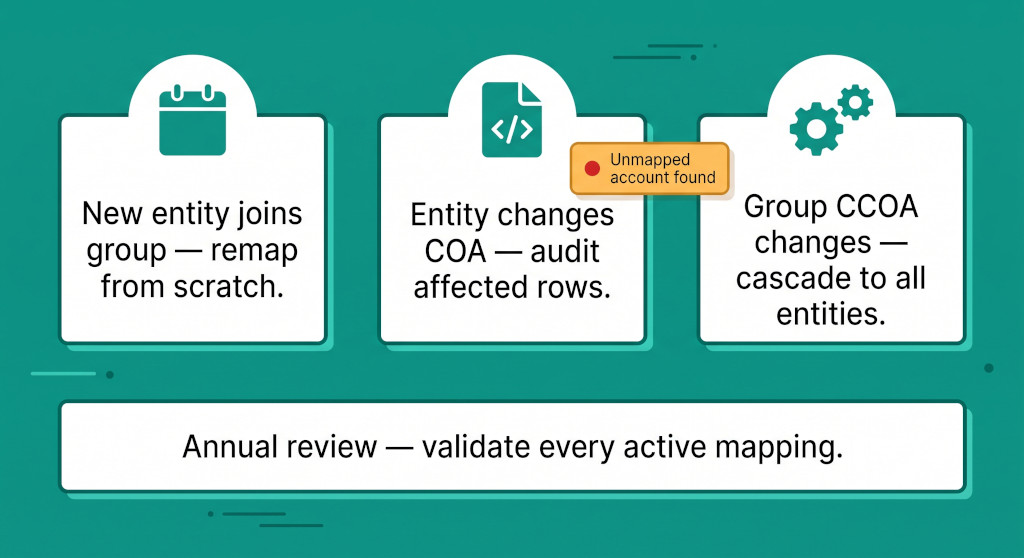
A COA map degrades silently. The entity adds three new account codes in the April payroll run, no one tells the group finance team, and for the rest of the financial year those three accounts appear in the consolidation as unmapped — sitting in an “Other” or “Unclassified” line if the consolidation system has one, or disappearing entirely if the system simply drops unrecognised codes. Neither outcome produces an error message. Both outcomes are wrong.
Governance requires two things: a mechanism to detect changes and a process to respond to them.
Trigger events that require map updates
The following events should each trigger an immediate review and update of the affected entity’s mapping:
- A new entity joins the group. Build the map from scratch using the steps in the previous section. Do not assume the new entity’s COA resembles any existing entity’s — chart of accounts structures are highly idiosyncratic.
- An entity modifies its chart of accounts. New account codes, renamed accounts, merged accounts, or retired accounts all potentially affect the map. An account code that is retired in the entity system but still appears in the mapping document will produce a zero-balance row — harmless, but cluttering. A new account code that does not appear in the map is dangerous.
- The group CCOA changes. If a group CCOA code is added, retired, or renamed, every entity mapping that references it must be reviewed. Retiring a CCOA code without updating all entity maps that point to it creates orphaned mappings.
- A new intercompany relationship is established. When an entity begins trading with another group entity for the first time, the accounts that will carry intercompany balances must be identified and mapped to the group’s intercompany elimination codes — not to the external-facing equivalents.
The annual review
At least once per year — ideally at the start of the financial year before the first consolidation run — run a full validation of every active mapping in every entity. The validation has three checks:
- Coverage check. Export each entity’s current COA and compare it to the mapping document. Every active account in the entity’s current COA must appear in the map. New accounts added during the prior year that were not caught by the trigger process will surface here.
- Reference check. Every group CCOA code referenced in the map must be an active, currently-valid code in the group’s CCOA. Codes that were retired or renamed during the prior year will appear as broken references.
- Reasonableness check. For each entity, run the most recent period’s trial balance through the current map and review the resulting entity-level P&L and balance sheet. Does the categorisation look right? Are any unexpected amounts appearing in unusual lines? This is the check that catches logical errors that survive the coverage and reference checks.
The annual review is most effective when it is conducted by someone who understands both the entity’s business and the group’s reporting requirements — not just by the person who built the map. The reviewer needs to be able to read “Equipment Hire — Production Overhead” and ask: “Is this still production overhead? Or has the business changed so that some of this hire is now being used for distribution?”
Common Failure Modes
Beyond the account-level mapping errors covered in account mapping errors in group consolidation, the following systemic failures account for most COA mapping problems in practice.
Building once, updating never. The most common failure. The initial map is built with care; subsequent updates are not applied consistently. The result is a map that was accurate for year one and increasingly unreliable thereafter. The fix is a documented governance process with named responsibility for each entity’s map maintenance.
Mapping at too high a level. All entity revenue codes mapped to a single group “Revenue” line. All overhead codes mapped to a single group “Overhead” line. This produces a consolidated P&L that balances but obscures every meaningful management insight: gross margin by product type, overhead category analysis, direct versus indirect cost splits. The group CCOA design should reflect the level of analysis the business needs; the entity-to-group map should preserve that granularity where the entity data supports it. See when entities code the same cost differently for the downstream impact on group management reporting.
Intercompany accounts mapped to external codes. This produces elimination failures that only appear when you run the intercompany reconciliation and find that the intercompany balances cannot be matched to any elimination account. The fix at consolidation is manual — identifying the misclassified balances and posting correcting journals. The proper fix is correcting the map. For the full elimination workflow, see the complete guide to intercompany eliminations.
No ownership, no accountability. The map exists in a shared drive and nobody is explicitly responsible for maintaining it. When a new account appears in an entity, the entity’s finance team does not think to notify the group; the group team does not have a process to detect it. Assign a named owner to each entity’s map and make map maintenance a standing item in the month-end and year-end close process. For a close-process framework that includes map validation, see how to build a consolidation review checklist.
Treating the map as sensitive or proprietary. Finance teams sometimes restrict access to the mapping document. This creates a single-person dependency: if the one person who understands the map is unavailable when a question arises, no one can investigate. The map should be accessible to everyone involved in the consolidation process, including auditors. Its value lies in accuracy and completeness, not confidentiality.
Automate your COA mapping
BrizoConsol’s AI Auto-Map builds an initial entity-to-group account map in minutes, flags unmapped accounts at every consolidation run, and alerts you when entity COAs change. Finance teams typically cut mapping maintenance time by more than 80%. See It in Action
Practical Checklist: Building, Documenting, and Maintaining Your COA Map
- Export the complete COA from the entity system — all active accounts, not just those with balances. Include account code, name, and type.
- Sort by account type then code before beginning the mapping exercise.
- Map all accounts to a valid, active group CCOA code. If no appropriate CCOA code exists, escalate to the group finance team to assess whether the CCOA needs updating — not the entity’s COA.
- Identify and separately map every intercompany account to a dedicated group intercompany elimination code. Never map intercompany accounts to the same CCOA codes used for external balances.
- Document all non-obvious mappings with a brief rationale note, the confirming authority, and any conditions that might change the mapping in future.
- Have a second reviewer validate the map using the most recent trial balance before the first live consolidation run.
- Set up trigger-based update protocols for new accounts, retired accounts, entity COA changes, and CCOA changes.
- Assign a named map owner for each entity. Map maintenance must be a specific person’s responsibility, not a shared assumption.
- Run an annual coverage check — compare each entity’s current COA export against the mapping document to surface accounts added during the year that were not caught by the trigger process.
- Run an annual reference check — confirm every group CCOA code referenced in the map is still active and correctly named.
- Include map validation in your consolidation review process. For the full review framework, see how to review a consolidation before final sign-off.
Group consolidation that stays accurate as your entities evolve
BrizoConsol connects directly to your entities’ accounting systems, detects new and unmapped accounts automatically, and keeps your consolidation clean even as entities add accounts, change COAs, or join the group. Start with a free trial. Start Free Trial