How to Consolidate Entities With Different Charts of Accounts
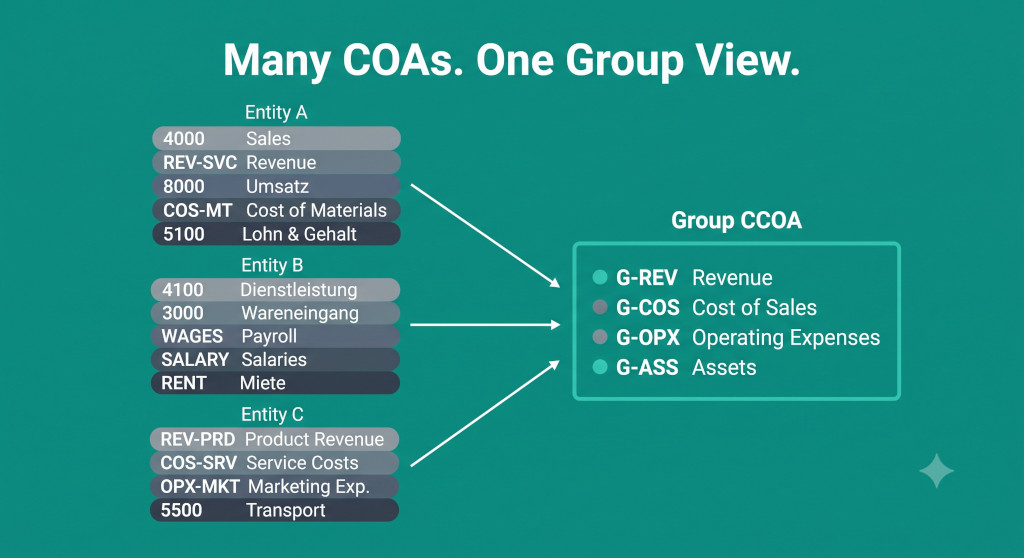
The three entities in Sofia’s group each had their own accounting history. Entity A was the original business, built on Xero with a clean chart of accounts that matched the group’s reporting structure almost perfectly. Entity B was acquired four years ago — a professional services firm whose QuickBooks setup had evolved organically since 2009, with 340 account codes that bore no resemblance to anything in Entity A’s structure. Entity C was the German subsidiary, added eighteen months ago, running on a local accounting package with codes that followed the German standard chart of accounts (SKR04) and had never been mapped to anything in the group.
Every month, when Sofia ran the consolidation, Entity A’s figures came through cleanly. Entity B’s figures came through mostly correctly, except for the seventeen account codes that a previous finance manager had added and never added to the mapping table — those balances were silently excluded each time, and nobody had noticed because the consolidation still balanced (zero maps to zero). Entity C’s figures were a manual job every close: someone opened the German trial balance, manually matched each code to a group account, and hoped the translation was consistent with last month’s.
The chart of accounts mapping problem is not a design problem — it is an operational problem that affects every consolidation close, silently and persistently, until someone builds a structure to manage it properly. This post covers that structure: how to build and maintain a mapping table that handles different entity COAs reliably, how to catch unmapped accounts before they exclude balances from the consolidation, and how to handle the specific mapping patterns — many-to-one, one-to-many — that don’t fit neatly into a simple lookup.
Stop building consolidations in spreadsheets.
BrizoConsol automates multi-entity consolidation — setup in minutes, reports the same day.
Why Different COAs Break the Consolidation — Not Just Make It Harder
The intuitive assumption is that different charts of accounts just mean more manual work. The reality is more serious: incompatible COA structures create a category of error that is structurally invisible — the consolidation appears to balance, the numbers look plausible, and the error is only discovered when someone traces a specific balance back to the source and finds that it never arrived.
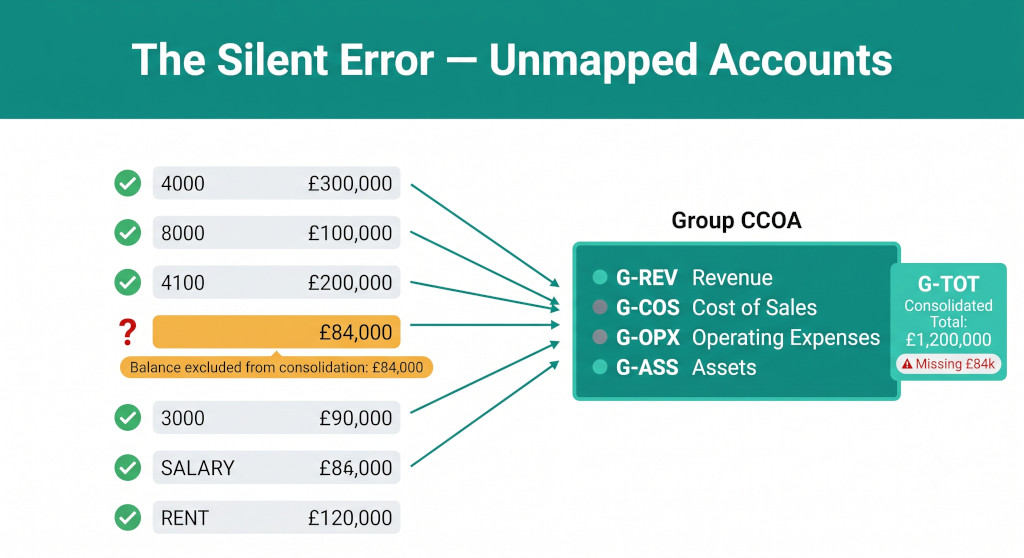
The mechanism is straightforward. In a mapping-based consolidation, each entity account code is looked up in a mapping table and its balance is routed to the corresponding group account. If the lookup finds a match, the balance is included. If it finds no match — because the account code doesn’t exist in the mapping table — the lookup returns zero. Zero is a valid result. The consolidation total changes by nothing, the balance sheet still balances (because the error affects the same amount on both sides of the double entry), and the missing balance disappears without triggering any visible error.
For Sofia’s seventeen unmapped accounts in Entity B, the balances excluded varied by period. In some months the unmapped codes held trivial amounts; in one month, a £84,000 accrual posted to an unmapped expense code was excluded from the consolidated P&L entirely. The group’s operating costs were understated by £84,000. The auditors found it during their year-end procedures, nine months after the error began.
The unmapped account is the most dangerous error in a manual COA mapping process precisely because it is self-concealing. The only reliable defence is a reconciliation check built into the import step that compares the sum of all mapped balances to the entity’s total trial balance. If those two figures differ, there is an unmapped account. If they agree, the mapping is complete for this period.
The Three Types of COA Mapping Challenge
COA mapping problems fall into three categories, each of which requires a different fix in the mapping table.
Structural differences: the same information in a different shape
The entity uses account codes in a completely different numbering range or format from the group. Entity A uses four-digit codes starting with 4 for revenue (4000, 4010, 4020). Entity C uses SKR04 codes starting with 8 for revenue (8000, 8010, 8019). The same economic content — service revenue from external customers — sits in accounts with entirely different names and numbers. The mapping is conceptually simple once you understand both charts, but it must be documented explicitly. There is no algorithmic shortcut for this: someone who understands both COAs must sit down and work through the correspondence account by account.
Semantic differences: the same code means different things
Account code 6000 means “salaries and wages” in Entity A and “other operating expenses” in Entity B. Account code 1200 means “trade receivables” in one system and “prepayments” in another. These differences require careful review because a lookup that routes Entity B’s code 6000 to the group’s salaries line will produce a number in the right format but in the wrong group account. The consolidation will balance, but the group’s analysis of payroll costs versus other operating costs will be wrong.
Semantic differences are particularly common in groups that grew through acquisition, where each acquired entity used a different accountant to set up their chart of accounts. The codes were chosen locally for local convenience and were never designed to be comparable across entities. Identifying semantic differences requires someone to review not just the account codes but the transaction detail behind each code to confirm what it actually contains.
Granularity differences: one entity is more detailed than the group needs
Entity B tracks twenty-three separate cost categories for its professional services delivery — each service line, each region, each client type has its own account. The group consolidation needs only three cost lines: cost of sales, staff costs, and other operating costs. The mapping is many-to-one: twenty-three entity accounts need to collapse into three group accounts. This is structurally straightforward but requires a judgement about which entity account belongs in which group bucket — and that judgement must be documented and applied consistently each period.
The reverse granularity difference — where the group needs more detail than the entity provides — is harder. If the entity posts all overhead costs to a single “overheads” code and the group needs to split overheads between premises costs and administrative costs, the one-to-many mapping requires either a fixed split rule (e.g., 60% premises, 40% admin, based on a cost study) or a reclassification at the entity level before submission. A fixed split rule is the practical solution in most cases, but it must be reviewed annually as the entity’s cost profile changes.
Building the Master Mapping Table
The mapping table is the single document that makes the consolidation work. Every entity account code used in every consolidation period must have a row in this table. The table should be maintained centrally by the group finance team, not by individual entities — the group controls the group COA, and the mapping is a group function.
A complete mapping table has these columns as a minimum:
| Column | Description | Why It Matters |
|---|---|---|
| Entity ID | Short code identifying which entity this row applies to | Allows the table to be filtered per entity at import time |
| Entity Account Code | The code exactly as it appears in the trial balance export | Must match character-for-character, including leading zeros and case |
| Entity Account Name | The account name from the entity’s chart of accounts | Human-readable confirmation the code has been correctly identified |
| Group CCOA Code | The group common chart of accounts code this maps to | The lookup target for all consolidation formulas |
| Group CCOA Name | The group account name | Confirms the mapping is semantically correct, not just structurally matched |
| Statement | P&L or Balance Sheet | Routes the balance to the correct financial statement |
| Sign Convention | Normal or Reversed | Handles cases where the entity uses a different debit/credit convention (e.g., revenue as positive vs. negative) |
| Split Rule | Percentage or formula for one-to-many mappings | Required where a single entity code maps to multiple group lines |
| Last Verified | Date this mapping was last confirmed as correct | Any row not verified in the last twelve months should be reviewed |
| Verified By | Name of the person who confirmed the mapping | Audit trail for the mapping decision |
The Sign Convention column deserves particular attention. Some accounting software exports revenue as a positive number; others export it as a negative number (because revenue is a credit balance and the software is showing the “natural” sign). If the entity exports revenue as negative and the group consolidation expects positive revenue, the consolidation formula will subtract revenue instead of adding it — producing a consolidated revenue figure that is wrong by twice the amount of that entity’s revenue. This error is obvious when it occurs in a large entity (the consolidated revenue figure will be dramatically wrong), but easy to miss in a small entity where the impact is within the range of normal period-to-period fluctuation.
The Unmapped Account Problem: Making It Structurally Impossible to Miss
The reconciliation check described earlier — comparing the sum of mapped balances to the entity’s trial balance total — is the essential safeguard. But it needs to be built into the consolidation process as an enforced step, not an optional one. The way to enforce it is to make the consolidation workbook or system refuse to accept the entity’s data until the reconciliation passes.
In a spreadsheet-based consolidation, this means adding a validation cell to each entity’s import tab that calculates the difference between the trial balance total and the sum of all mapped balances, and formats that cell in red if the difference is non-zero. The cell should be visible to whoever is running the consolidation and should be on the checklist of things to verify before the import is approved. A difference of exactly zero means the mapping is complete. Any non-zero difference must be investigated and resolved before the data is used — not rounded, not noted for follow-up, but resolved.
Common mistake: Building the reconciliation check but not enforcing it — leaving it as a reference cell that the consolidation preparer glances at rather than a hard stop. The check only has value if a non-zero result prevents the data from being included in the consolidation. An unenforced reconciliation is decorative.
When a non-zero difference appears, the diagnostic process is straightforward. Export the entity’s trial balance, sort by account code, and run a lookup against the mapping table for every code. Any code that returns an error or blank in the lookup column is an unmapped account. Review the account’s transaction detail, determine the correct group CCOA mapping, add the row to the mapping table, and rerun the reconciliation. This process typically takes fifteen to thirty minutes per unmapped account. The temptation to defer it — to proceed with the consolidation and “fix it next month” — should be firmly resisted: a balance excluded this month is a balance that will be wrong in cumulative YTD figures and in comparative numbers next year.
For groups using a purpose-built consolidation tool, the mapping process can be substantially automated. BrizoConsol’s AI auto-mapping, for instance, proposes mappings for new or unrecognised account codes based on the account name and the existing mapping pattern — reducing the manual matching work to a review-and-confirm step rather than a build-from-scratch one. See AI Auto-Map Explained for how this works in practice.
Worked Example: Mapping Three COAs to One Group CCOA
The following shows a partial mapping for Sofia’s three entities, all mapping to the group’s service revenue line (G-REV-001).
| Entity | Entity Code | Entity Account Name | Balance £ | → Group Code | Notes |
|---|---|---|---|---|---|
| Entity A (Xero) | 4000 | Sales — Consulting | 284,000 | G-REV-001 | Direct 1:1 mapping |
| Entity A (Xero) | 4010 | Sales — Software | 96,000 | G-REV-001 | Different product line, same group code |
| Entity A (Xero) | 4020 | Sales Returns | (11,000) | G-REV-001 | Contra revenue — nets into the same line |
| Entity B (QuickBooks) | REV-CON | Consulting Revenue | 512,000 | G-REV-001 | Alpha code, not numeric — must match exactly |
| Entity B (QuickBooks) | REV-ADV | Advisory Fees | 138,000 | G-REV-001 | Separate QB code, same group line |
| Entity B (QuickBooks) | REV-RET | Retainer Income | 74,000 | G-REV-001 | |
| Entity B (QuickBooks) | MISC-INC | Miscellaneous Income | 84,000 | UNMAPPED | ⚠ Added Jan — not in mapping table |
| Entity C (SKR04) | 8000 | Umsatzerlöse | 620,000 | G-REV-001 | German revenue — EUR translated at avg rate |
| Entity C (SKR04) | 8010 | Erlösschmälerungen | (9,500) | G-REV-001 | Revenue contra — sign reversed in mapping |
| Mapped total for G-REV-001 | 1,703,500 | Missing: £84,000 from MISC-INC | |||
The amber row — Entity B’s MISC-INC code — is the unmapped account. Its £84,000 balance is excluded from the group revenue line. The reconciliation check at the Entity B import step would show a £84,000 difference between the trial balance total and the sum of mapped balances, flagging the problem before the data enters the consolidation. The mapping table needs a new row: Entity B / MISC-INC / Miscellaneous Income / G-REV-001 (or, depending on the nature of the income, a different group code — which is exactly why the account detail needs to be reviewed before the mapping is assigned, not assumed).
For a structured approach to the group common chart of accounts that this mapping table feeds into, see How to Design a Common Chart of Accounts for Multi-Entity Groups.
Handling One-to-Many and Many-to-One Mappings
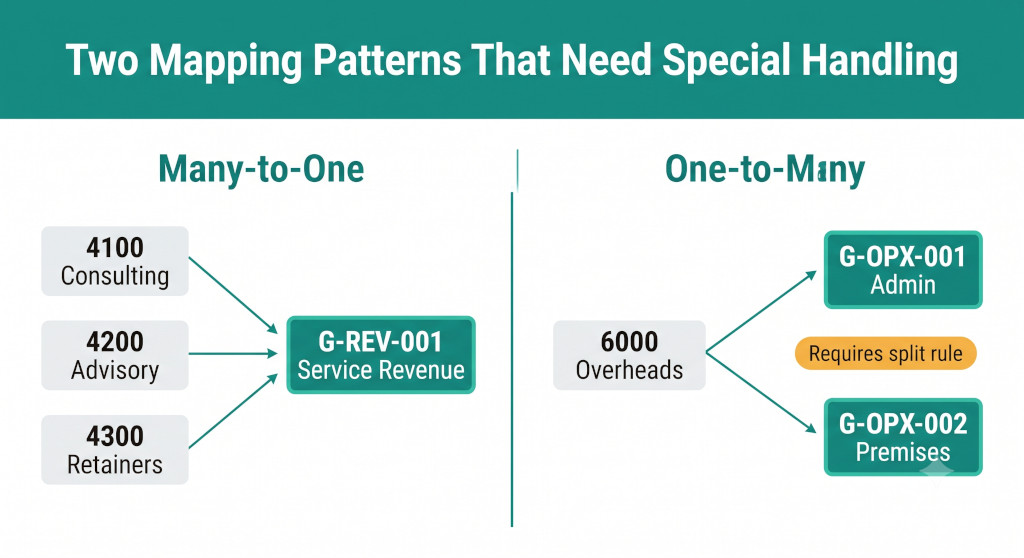
Many-to-one (multiple entity codes → one group line)
This is the most common pattern and the easiest to handle. Multiple rows in the mapping table all point to the same group CCOA code. At consolidation, all matching balances are summed into the single group line. Entity B’s three revenue codes (REV-CON, REV-ADV, REV-RET) all mapping to G-REV-001 is a many-to-one pattern — it works correctly as long as every entity code that should map to G-REV-001 has a row in the mapping table pointing there.
The risk in many-to-one mappings is not the mapping itself but the completeness check: every entity code that represents revenue must be mapped. If one revenue code is missed, the many-to-one sum will be understated. This is why the reconciliation check at entity level — mapped total versus trial balance total — is the essential safeguard. Without it, a missing revenue code in a many-to-one mapping is invisible.
One-to-many (one entity code → multiple group lines)
This is the harder pattern. An entity uses a single “Overheads” code to capture costs that the group needs to split between premises and administrative expenses. The mapping table cannot contain a single row pointing to two group codes simultaneously; the split must be encoded as a rule.
The practical approaches are: a fixed percentage split (60% to G-OPX-001 Premises, 40% to G-OPX-002 Admin), based on a cost analysis done at the start of the year and reviewed annually; a transaction-level reclassification at the entity, where the subsidiary finance team posts individual costs to separate codes before closing; or a consolidation adjustment journal that reclassifies a portion of the overhead balance at group level. Each approach has trade-offs — the fixed split is simplest but least accurate; the transaction-level reclassification is most accurate but requires the subsidiary to manage two codes where previously they used one; the consolidation adjustment journal is flexible but adds a manual step each period.
For most groups with a small number of one-to-many mappings, a fixed split reviewed annually is the practical choice. The split percentage should be documented in the mapping table’s Split Rule column and should be supported by a calculation that shows how it was derived. See How to Use Journal Entries in Group Consolidation for how to structure the reclassification journals where the adjustment-based approach is preferred.
Keeping the Mapping Current: COA Evolution
A mapping table that is correct today will contain errors within six months if it is not actively maintained. Entities add new account codes, rename existing ones, deactivate old ones, and split categories as their operations evolve. Every one of these changes is a potential mapping break.
The most effective maintenance discipline is a quarterly mapping review, timed before each quarter’s consolidation close:
- Request each entity to export their current chart of accounts — all active codes.
- Run a lookup of every active entity code against the mapping table. Any code not found is a new or renamed account that needs to be mapped before the next close.
- Check the “Last Verified” column in the mapping table. Any row not verified in the previous twelve months should be re-confirmed with the entity’s finance team — the account may have changed its economic content even if the code hasn’t changed.
- Review deactivated codes. If an entity has deactivated a code that was previously mapped, confirm there are no residual balances in that code before removing it from the mapping table.
This quarterly process typically takes two to three hours for a group of five to eight entities. It is far less costly than the alternative: discovering a mapping gap during the annual audit and having to restate several periods of management accounts. For a practical month-end close framework that integrates the mapping review into the close timetable, see Month-End Group Consolidation in Under 30 Minutes.
Account mapping without the maintenance headache
BrizoConsol’s AI auto-mapping proposes mappings for new and changed account codes automatically — so your mapping table stays current without a quarterly manual review. Connect your accounting software and start mapping today.See It In Action
The Intercompany Dimension of COA Mapping
One mapping challenge that deserves specific attention is the intercompany account structure. For the consolidation to eliminate intercompany balances correctly, every entity must have identifiable intercompany codes — accounts that flag receivables, payables, revenue, and costs as intercompany rather than third-party. If an entity posts intercompany management charges to the same cost code as external supplier invoices, the consolidation cannot distinguish between internal and external costs, and the intercompany elimination will either miss the internal cost or eliminate part of a genuine external cost.
The mapping table should include a column that flags each group CCOA code as “intercompany” or “external.” Any entity account that maps to an intercompany group code must be populated only with intercompany transactions. If entity accounts are used for both intercompany and external items — common in entities that set up their chart of accounts before joining a group — this is a classification problem that needs to be fixed at the entity level before the consolidation mapping can work correctly. For more on why intercompany balances fail to reconcile and how to resolve it, see Why Your Intercompany Balances Never Match Even When Both Companies Agree.
Practical Checklist: Consolidating Entities With Different Charts of Accounts
- Build a complete mapping table before the first consolidation close. Every entity account code that carries a balance needs a row. Do not proceed with the first consolidation until the table is complete and the reconciliation check passes for every entity.
- Classify every mapping as one-to-one, many-to-one, or one-to-many. One-to-many mappings need a documented split rule. Embed the split rule in the mapping table, not in the consolidation formula — so it can be reviewed and updated independently of the mechanics.
- Add a sign convention column. Confirm for each entity whether revenue is exported as positive or negative, and whether liabilities are exported as positive or negative. Apply the correction in the mapping table so the consolidation formula is consistent across all entities.
- Build the reconciliation check into every entity import tab. The check must compare the sum of all mapped balances to the entity’s trial balance total. Make it visually prominent — a red cell is better than a footnote — and treat a non-zero result as a hard stop, not a flag for later.
- Investigate every non-zero reconciliation before the close. Find the unmapped code, review its transaction detail, determine the correct group mapping, add it to the mapping table, and rerun the reconciliation. Never proceed with an unexplained difference.
- Flag intercompany accounts explicitly in the mapping table. Confirm that entity accounts mapped to intercompany group codes contain only intercompany transactions. Mixed accounts need to be resolved at entity level.
- Run a quarterly COA refresh. Before each quarter-end close, export each entity’s active account list and check it against the mapping table. Any new code not in the table is a mapping gap that must be closed before the next consolidation.
- Set a re-verification schedule for existing mappings. Any mapping row not confirmed in the previous twelve months should be re-checked with the entity’s finance team. Account names stay the same; account content changes.
- Document the basis for one-to-many split rules. The split percentage should be supported by a calculation, reviewed annually, and recorded in the mapping table’s Split Rule column with the date it was last set.
- Audit the mapping table annually alongside the group accounts preparation. The mapping table is a financial control document. It should be reviewed by someone independent of the person who maintains it — typically the group financial controller or the external auditors — at least once a year. For how to prepare the mapping documentation for audit, see How to Prepare for Audit with Consolidated Financials.
The chart of accounts mapping problem is not solved once and left alone — it is a living process that requires active maintenance at every close and a systematic review at least quarterly. The investment in building the table correctly, with reconciliation checks enforced and split rules documented, pays back within the first two or three closes: the time spent on the initial build is recovered many times over in the minutes-not-hours each entity’s import takes when the mapping is complete and the checks pass cleanly. The alternative — the ad-hoc reformat-and-paste approach that most groups start with — is not just slower. It is structurally unreliable, as Sofia’s nine months of understated operating costs demonstrated.
Map once. Consolidate every month in minutes.
BrizoConsol builds and maintains your account mappings automatically as your entities evolve — with AI-assisted proposals for new codes and a full audit trail of every mapping decision. Start free today. Start Free Trial