QuickBooks Intercompany Loans: Recording, Reconciling, and Eliminating at Consolidation
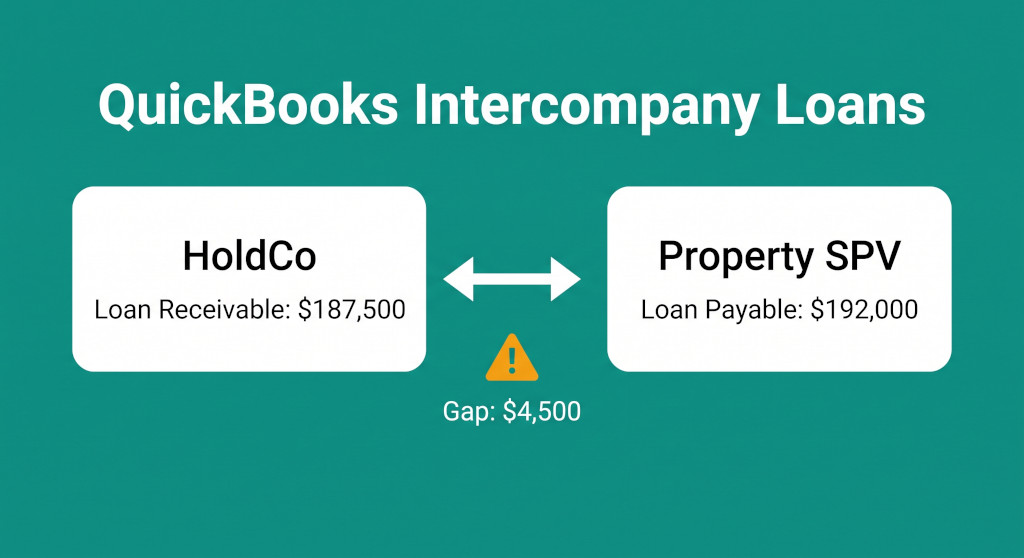
Marcus is the financial controller for a property group running three QuickBooks Online companies: a holding company, an operating entity, and a property SPV. Eighteen months ago, HoldCo advanced $250,000 to the SPV to fund a fit-out. Both entities have been recording repayments — or so Marcus thought. When he sits down to prepare the June year-end consolidated balance sheet, he pulls the intercompany loan account from both QuickBooks files. HoldCo shows a loan receivable of $187,500. The SPV shows a loan payable of $192,000. The numbers do not match, and Marcus cannot work out which one is correct.
This is the single most common consolidation problem for QuickBooks groups. QuickBooks records transactions in individual company files — there is no automatic sync, no shared ledger, and no built-in mechanism to keep intercompany balances aligned across entities. A repayment processed two days apart in two separate companies, a bank import that posted with the wrong date, or a rounding difference on an interest calculation can cause the balances to drift without anyone noticing until month-end close.
The problem is not trivial. If you attempt to post the elimination before the balances reconcile, you will introduce a difference into your consolidated balance sheet that has no clear source — and that difference will compound as you add more eliminations. You should never start intercompany eliminations before reconciling balances. This guide explains how to fix Marcus’s situation step by step: reconcile the two QuickBooks loan accounts, identify and correct the difference, post the elimination entries (including interest), and build a process that prevents the problem from recurring.
Multi-entity QuickBooks consolidation, done for you.
Connect all your QuickBooks companies and get consolidated financials instantly.
Why QuickBooks Intercompany Loan Balances Drift Apart
In a single-entity accounting system, a loan lives in one ledger. In a multi-entity QuickBooks group, the same loan appears in two separate places — as a receivable in the lender and as a payable in the borrower — and nothing connects them. Each entity records its own transactions independently. Any of the following will cause the balances to diverge:
- Timing differences. The lender processes a repayment on 28 June; the borrower processes the same payment on 2 July. At 30 June, the receivable is already reduced; the payable is not.
- Missing entries. One entity records a loan advance; the other forgets or records it in a different account.
- Interest calculations in two places. The lender calculates interest on the outstanding balance and books it. The borrower uses a slightly different balance or a different day-count convention and arrives at a different number.
- Bank import errors. A repayment is imported from a bank feed and auto-coded to the wrong account in one entity, leaving the intercompany loan balance untouched.
- Currency rounding. Where the loan is denominated in a foreign currency and both entities are translating at different rates, small rounding differences accumulate over time.
Marcus’s $4,500 difference turns out to be the simplest type: a timing cut-off difference. HoldCo processed the June repayment on 28 June, reducing its receivable to $187,500. The SPV’s bookkeeper recorded the same payment on 2 July — after the period end — leaving the payable at $192,000. Once identified, the fix is straightforward.
Step 1: Build the Reconciliation Schedule Before Touching the Elimination
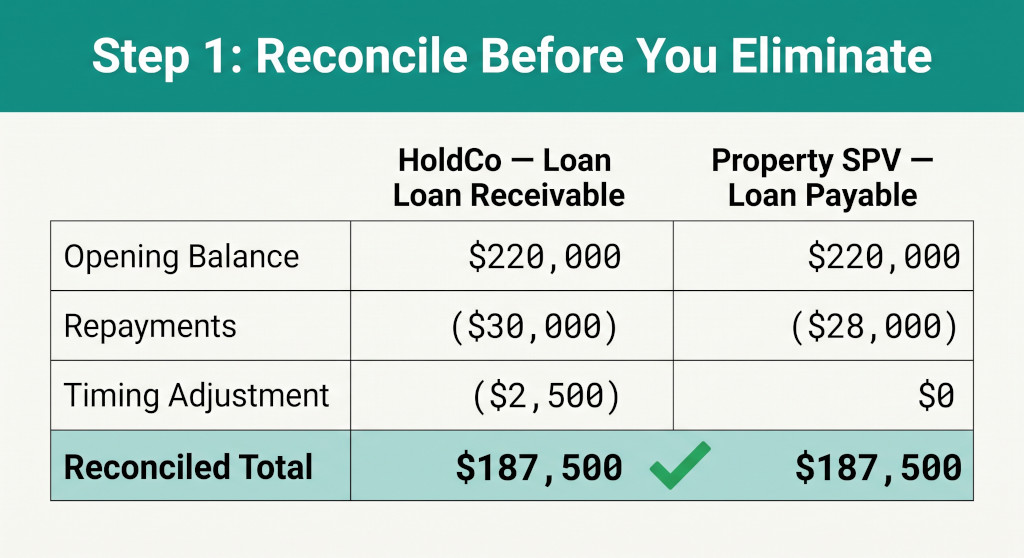
The reconciliation schedule is the control document that proves both entities agree on the loan balance before any elimination is posted. It should be built for every intercompany loan, every period. Here is the format Marcus uses:
| Movement | HoldCo — Loan Receivable | Property SPV — Loan Payable |
|---|---|---|
| Opening balance (1 July) | $225,000 | $225,000 |
| Repayments received / paid (Jul–May) | ($37,500) | ($37,500) |
| June repayment — HoldCo (28 June) | ($4,500) | — |
| June repayment — SPV (2 July, posted after period end) | — | ($4,500)* |
| Closing balance per QuickBooks (30 June) | $187,500 | $192,000 |
| Timing difference identified | — | ($4,500) |
| Agreed closing balance after correction | $187,500 | $187,500 |
* The SPV’s $4,500 repayment was recorded on 2 July but relates to June. It needs to be re-dated to 28 June — the economic settlement date — to reflect the correct balance at 30 June.
Once this schedule is complete and both sides agree at $187,500, you can proceed to the correction and then the elimination.
Step 2: Fix the Difference in QuickBooks
For a timing difference, the fix involves editing the transaction date in the relevant entity’s QuickBooks file. In Marcus’s case, the SPV’s bookkeeper must locate the July repayment entry and change the date to 28 June. If the period has been locked for VAT or payroll purposes, a journal entry dated 28 June is the alternative.
Watch out: Before re-dating any entry in QuickBooks, check whether the period is locked or whether a BAS/GST return has already been lodged for June. If the period is locked, post a manual journal entry rather than editing the original transaction. Document the correction in your reconciliation schedule so the auditor can follow the logic.
For a genuine error rather than a timing difference — for example, one entity recorded a loan advance that the other entity never posted at all — the correction is more involved. You need to determine which entity’s records are correct (usually the one with bank transaction evidence) and post the missing entry in the other entity. The principle is the same: both entities must show the same balance before the elimination is posted. Why Your Intercompany Balances Never Match explores the full taxonomy of causes and how to trace each one.
Step 3: Post the Loan Principal Elimination
With both QuickBooks files now showing a loan receivable and loan payable of $187,500, the elimination entry can be posted in your consolidation workbook or consolidation software. This entry removes both sides of the loan from the consolidated balance sheet — they exist only as a group-internal financing arrangement and have no existence from the perspective of the group as a whole.
| Account | Dr | Cr |
|---|---|---|
| Intercompany Loan Payable — HoldCo (SPV balance sheet) | $187,500 | |
| Intercompany Loan Receivable — SPV (HoldCo balance sheet) | $187,500 |
This entry is posted in the consolidation working paper, not in either entity’s QuickBooks file. It eliminates both the asset and the liability from the group’s consolidated balance sheet.
This elimination only works cleanly if the accounts in each QuickBooks company are named and coded to make the intercompany nature clear. If HoldCo has coded the loan receivable as “Other Debtors” and the SPV has coded the payable as “Bank Loan”, you will need to identify and reclassify before you can match them. Setting up dedicated intercompany account codes in both QuickBooks files is worth the 20 minutes it takes.
The Complication Everyone Forgets: Intercompany Interest
Most intercompany loans in property groups are not interest-free — and even if there is no written agreement, HMRC, the ATO, and most other tax authorities expect arm’s-length interest to be charged between group entities. That means HoldCo is recognising interest income on the loan, and the SPV is recognising interest expense. Both of those amounts must be eliminated from the consolidated income statement, just as the principal balances are eliminated from the balance sheet.
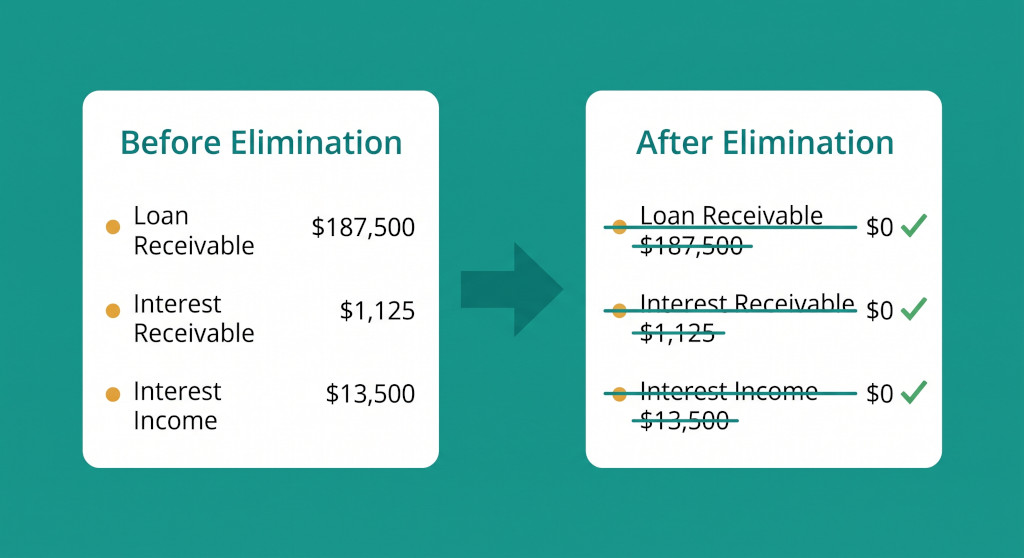
For Marcus’s loan, the agreed rate is 6% per annum. With an average outstanding balance of $225,000 over the year, total interest for the period is $13,500. Of that, $12,375 was paid quarterly and $1,125 remains accrued and unpaid at 30 June. Both entities have been recording this consistently, so there is no reconciliation difference to resolve.
Three elimination entries are required — one for the P&L amounts and two for the accrued balance sheet positions:
Elimination 1: Interest income and expense (P&L)
| Account | Dr | Cr |
|---|---|---|
| Interest income — intercompany (HoldCo P&L) | $13,500 | |
| Interest expense — intercompany (SPV P&L) | $13,500 |
Removes the gross interest from both sides of the consolidated income statement. From the group’s perspective, no interest has been paid to or received from an external party.
Elimination 2: Accrued interest balances (balance sheet)
| Account | Dr | Cr |
|---|---|---|
| Intercompany Interest Payable (SPV balance sheet) | $1,125 | |
| Intercompany Interest Receivable (HoldCo balance sheet) | $1,125 |
Removes the accrued but unpaid interest from both balance sheets. If this entry is missed, the consolidated balance sheet will be inflated by $1,125 on both sides — a small amount here, but it compounds across multiple loans over multiple periods.
After all three entries, the group’s consolidated financial statements show no trace of this loan — no asset, no liability, no income, no expense. The financing arrangement between HoldCo and the SPV is exactly what it is from an external perspective: internal capital movement that does not add economic value at the group level.
The full mechanics of intercompany loan eliminations — including complications such as impairment, currency mismatches, and partially forgiven loans — are explored in Intercompany Loan Eliminations: A Practical Guide to the Complications That Matter.
Still Eliminating QuickBooks Intercompany Loans Manually?
BrizoConsol connects directly to your QuickBooks companies, reconciles intercompany balances automatically, and posts the elimination entries without a spreadsheet in sight. See it live in a 20-minute demo. See It In Action
Building the Intercompany Loan Register: What to Track Every Period
Groups with more than two entities and more than one intercompany loan quickly find that ad-hoc reconciliation at year-end is not sustainable. The reconciliation schedule Marcus built for one loan needs to exist for every active loan — and it needs to be completed before the month-end close, not on the day you’re trying to finalise the consolidated accounts.
The intercompany loan register should capture the following for every loan, every period:
| Field | Why It Matters |
|---|---|
| Loan reference / description | Uniquely identifies the loan across both entity files |
| Lender entity and QuickBooks account code | Pinpoints where to find the receivable |
| Borrower entity and QuickBooks account code | Pinpoints where to find the payable |
| Opening balance (agreed) | Confirmed starting point — must match prior period closing |
| Movements in period (advances, repayments) | Itemised from each entity’s QB file |
| Interest rate and basis | Required to calculate and agree interest entries |
| Agreed closing balance | The figure both entities confirm before elimination is posted |
| Difference (if any) and resolution | Documents any timing or error adjustments made |
| Elimination journal reference | Cross-reference to the consolidation working paper entry |
A register with these fields gives the auditor everything they need to trace the loan from the QuickBooks source through to the consolidated accounts — and it gives the finance team a clear owner for each reconciliation task at close. The principles of building and maintaining this kind of register are covered in The Intercompany Elimination Schedule.
How Often Should You Reconcile Intercompany Loans?
The answer depends on transaction frequency, but the rule of thumb is: reconcile as often as repayments or advances occur. For a loan with monthly repayments, reconcile monthly. For a static loan with no movements in a period, a quarterly check may be sufficient — but you still need to reconcile accrued interest if the rate is running.
| Loan activity level | Recommended reconciliation frequency | Risk of skipping |
|---|---|---|
| Regular repayments (monthly or more frequent) | Monthly — before period close | High: timing differences accumulate and are hard to untangle later |
| Quarterly repayments, active interest accrual | Quarterly — on repayment dates | Medium: interest differences can distort quarterly consolidated P&L |
| Static principal, annual interest settlement | At minimum annually, ideally quarterly | Low-medium: balance difference unlikely, but interest accrual must agree |
| Multi-currency intercompany loan | Monthly regardless of repayment schedule | High: exchange rate movements create translation differences that must be tracked |
The discipline to reconcile on schedule — rather than at year-end when the pressure is on — is what separates groups that close in three days from those that spend a week chasing intercompany differences. Intercompany Reconciliation for Multi-Entity Groups sets out the full close-faster methodology.
When Manual QuickBooks Reconciliation Stops Being Practical
For a group with two entities and one intercompany loan, the process described above is manageable in a spreadsheet. For a group with five entities and eight active intercompany loans — some in foreign currencies, some with variable rates, some with mixed repayment schedules — the manual effort becomes a meaningful risk in itself. Reconciliation errors, missed entries, and version-control problems with the consolidation spreadsheet start causing the same kind of month-end pain that the process was designed to prevent.
The signals that manual QuickBooks consolidation has run its limits tend to appear in the intercompany accounts first: balances that no one can reconcile quickly, a growing stack of open differences carried forward from prior periods, and consolidation journals that get posted without full supporting documentation because there is not enough time to prepare it properly.
At that point, the question is not whether to change the process but when. QuickBooks Multi-Entity Consolidation: What It Can’t Do details the structural limitations of the QuickBooks approach, and How to Consolidate Multiple QuickBooks Companies shows the full workflow for groups that are still using QuickBooks as their source and managing the consolidation externally.
Practical Checklist: Intercompany Loans at Consolidation Close
- Open the intercompany loan register and confirm every active loan is listed with the current lender and borrower entity, account codes in each QuickBooks file, and the agreed opening balance from last period.
- Extract closing balances from each QuickBooks file. Run a balance sheet report in each entity as at the period-end date and pull the intercompany loan balances.
- Build the reconciliation schedule for each loan. List opening balance, movements, and closing balance for both the receivable and payable sides. Calculate the difference.
- Classify and resolve every difference. Timing differences: re-date in the correct entity. Missing entries: post in the entity that is wrong. Genuine errors: investigate and correct with documentary support.
- Agree the closing balance. Confirm that both entity files now show the same amount before proceeding.
- Calculate accrued interest at period end. Agree the interest for the period and the accrued but unpaid balance between both entities.
- Post the elimination entries in the consolidation workbook. Three entries per loan: (a) principal — Dr Loan Payable, Cr Loan Receivable; (b) interest P&L — Dr Interest Income, Cr Interest Expense; (c) accrued interest balance sheet — Dr Interest Payable, Cr Interest Receivable.
- Confirm the consolidated balance sheet shows nil for each intercompany loan account. Any residual balance indicates a reconciliation step has been missed.
- File the reconciliation schedule in the consolidation pack for the period as audit evidence.
Take QuickBooks Intercompany Loans Off Your Month-End List
BrizoConsol pulls data directly from your QuickBooks companies, flags intercompany balance mismatches before you start the close, and automates the elimination entries. Start a free trial and see how fast your group close can be. Start Free Trial