The Intercompany Elimination Schedule: How to Build the Register That Runs Your Group Close
Three weeks after the year-end close, the external auditors asked a straightforward question: could the group controller produce a complete list of every intercompany elimination that had been posted during the consolidation? It took two days to compile one. The eliminations were in the working papers — somewhere — spread across four separate worksheets, two email threads, and a set of adjustment journals that had been posted directly into the consolidation model without any accompanying register. During that two-day reconstruction, the controller discovered that one elimination had been posted twice (the revenue side from one worksheet, the COGS side from another, with no matching cross-reference) and two had been missed entirely — both small, but both sufficient to produce a qualified auditor comment on the process.
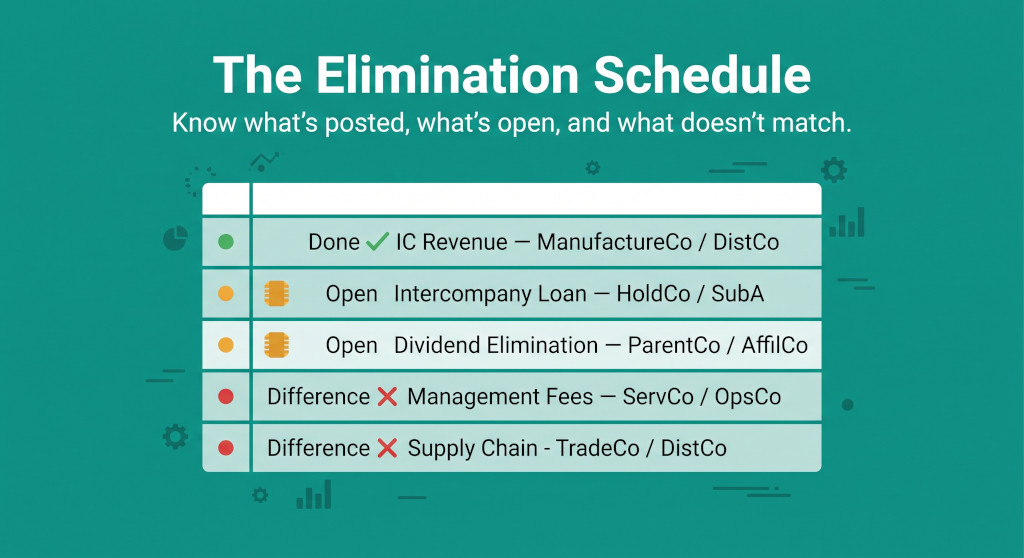
The mechanics of intercompany eliminations are well-understood: eliminate intercompany revenue against the corresponding cost, eliminate intercompany loan balances against the matching payable, eliminate unrealised profit still sitting in closing inventory. What is less commonly addressed is the organisational question: how do you track all the eliminations a multi-entity group needs to run at each close, ensure none are missed, spot differences before they become audit findings, and close the period with a complete, reviewable record? The answer is an elimination schedule — a register that runs the entire elimination process from opening to sign-off.
This guide explains how to build that register, how to populate it at each close, in what order to post the eliminations, and how to use it to catch problems before they compound.
Intercompany eliminations without the manual work.
BrizoConsol identifies and eliminates intercompany balances automatically at consolidation.
What the Elimination Schedule Is
The elimination schedule is a structured log of every intercompany elimination the group is required to post in a given reporting period. It is not a trial balance, not a set of journals, and not a reconciliation. It sits between those three things: it sources its expected amounts from the reconciliation (which confirms what balances exist between entities), it generates the journals that are then posted into the consolidation model, and it feeds the trial balance review by providing evidence that all required eliminations have been posted and agreed.
The schedule has three jobs. First, it ensures completeness — every required elimination is listed before the posting process starts, so nothing is discovered missing at the review stage. Second, it tracks status — each elimination can be marked pending, posted, or differing, which gives the controller a real-time view of where the close stands. Third, it provides an audit trail — when the auditors ask what was eliminated and why, the schedule is the answer, ideally with a reference to the supporting source document for each entry.
Without a schedule, the elimination process is sequential and invisible: you post what you remember, in the order you think of it, and hope nothing was missed. With a schedule, it is systematic and reviewable: you work through a pre-populated list in a defined order, and the close is not complete until every row has a status and every difference is resolved.
The Taxonomy of Eliminations: How to Categorise What You Need to Post
Before building the register, you need a consistent way to categorise the eliminations your group runs. A clear taxonomy serves two purposes: it determines the order in which eliminations should be posted (which matters, as covered below), and it makes the register easy to navigate when you are working through it under time pressure.
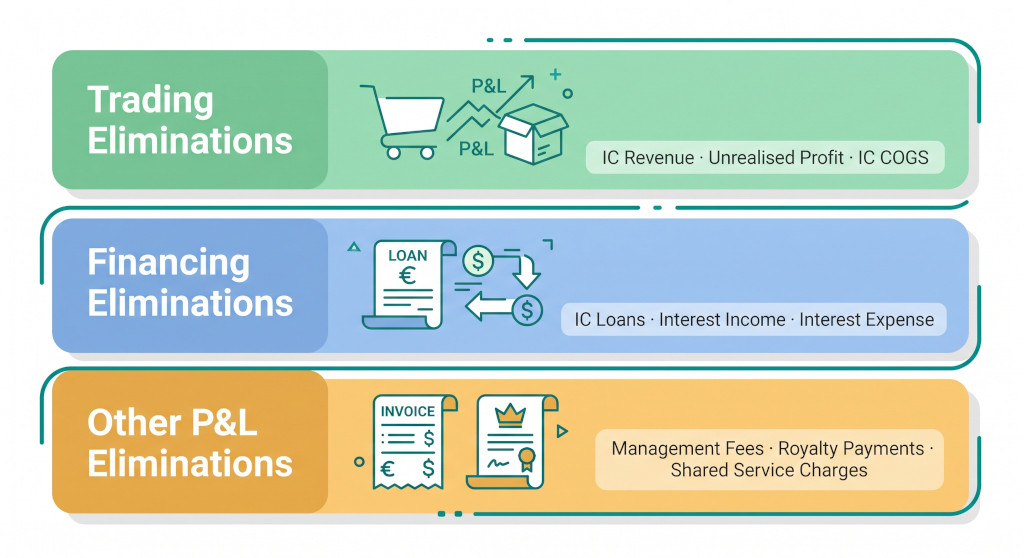
Most group consolidations use three categories:
Category 1: Trading eliminations
Trading eliminations arise from goods or services sold between group entities. They have two components: the revenue/cost elimination (which removes the intercompany transaction from the group’s P&L by cancelling the seller’s revenue against the buyer’s cost) and the unrealised profit elimination (which removes any margin embedded in stock the buyer still holds at the period end). Both components must be posted; the revenue/cost entry alone leaves inflated inventory on the balance sheet.
Examples: elimination of intercompany product sales; elimination of intercompany service charges where the service has been capitalised by the recipient; elimination of unrealised profit in closing inventory.
Category 2: Financing eliminations
Financing eliminations arise from loans, advances, and dividend flows between group entities. They are typically simpler to calculate than trading eliminations but can become complicated by impairments, foreign-currency differences, and accrued interest. The balance sheet elimination cancels the loan receivable against the loan payable; the P&L elimination cancels interest income against interest expense.
Examples: elimination of intercompany loan balance; elimination of intercompany interest income and expense; elimination of intercompany dividend received against dividend paid (and the corresponding equity movement). For complications specific to intercompany loans, see intercompany loan eliminations: a practical guide to the complications that matter. For dividends, see intercompany dividends in consolidation.
Category 3: Other P&L eliminations
Other P&L eliminations cover intercompany charges that are neither trading (goods/services that generate inventory) nor financing (loans/returns on capital). Management fees, royalties, IT service charges, and shared service centre recharges fall here. The elimination is usually a straightforward P&L-only entry: cancel the income in the charging entity against the expense in the recipient — but the appropriate group account each side maps to requires thought about where the cost truly sits in the group P&L.
The distinction between trading eliminations (which require an unrealised profit calculation) and other P&L eliminations (which do not) is the most practically important categorisation in the taxonomy. A management fee that is expensed immediately by the recipient does not create unrealised profit. A service charged to a subsidiary that capitalises it as part of a fixed asset does. If in doubt: ask whether any value from the intercompany charge is still sitting on the group balance sheet in a form that includes the intercompany margin. If yes, unrealised profit must be calculated and eliminated.
Building the Elimination Register
The register is a table — one row per elimination. For each elimination you need to capture enough information to post it, verify it, and explain it to a reviewer. The minimum set of columns is:
| Column | Content | Notes |
|---|---|---|
| Ref | Unique identifier for the elimination (e.g. IC-01, IC-02) | Used as the journal reference when posting into the consolidation model |
| Category | Trading / Financing / Other P&L | Determines posting order and review sequence |
| Description | Brief plain-English description of what is being eliminated | e.g. “ManufactureCo → DistributorCo product sales”; “HoldCo → SubA intercompany loan” |
| Dr Entity | The entity whose account is debited | |
| Dr Account | The group CCOA account being debited | Must be an intercompany elimination account in the group COA, not an external-facing account |
| Cr Entity | The entity whose account is credited | |
| Cr Account | The group CCOA account being credited | |
| Expected amount | The amount sourced from the reconciliation or schedule | This is what the elimination should be, before any differences are investigated |
| Posted amount | The amount actually posted in the consolidation model | Filled in after posting |
| Difference | Expected minus Posted | Zero = clean; non-zero = requires investigation or a note |
| Status | Pending / Posted / Difference — Investigating / Difference — Accepted | The real-time view of where the close stands |
| Source | Reference to the supporting document | e.g. “IC reconciliation tab B3”; “Loan schedule row 12”; “Management accounts — Nov” |
| Notes | Any explanation for differences, timing decisions, or non-standard treatments | This column is the audit trail — populate it whenever anything is not straightforward |
A worked example: five-entity group, one month’s elimination register
The table below shows a partial elimination register for a manufacturing group with five entities. The trading elimination has two rows (one for the revenue/COGS entry, one for the unrealised profit in closing stock) because they are conceptually separate — they have different source documents and different investigation paths if a difference arises.
| Ref | Cat | Description | Dr Entity → Account | Cr Entity → Account | Expected | Posted | Diff | Status |
|---|---|---|---|---|---|---|---|---|
| IC-01 | Fin | HoldCo loan to ManufactureCo — BS elimination | HoldCo → IC Loan Payable | ManufactureCo → IC Loan Receivable | 500,000 | 500,000 | — | Posted ✓ |
| IC-02 | Fin | HoldCo loan to ManufactureCo — interest P&L | HoldCo → IC Interest Income | ManufactureCo → IC Interest Expense | 12,500 | 12,500 | — | Posted ✓ |
| IC-03 | Trade | ManufactureCo → DistributorCo product sales — revenue/COGS | ManufactureCo → IC Revenue | DistributorCo → IC COGS | 600,000 | 600,000 | — | Posted ✓ |
| IC-04 | Trade | ManufactureCo → DistributorCo — unrealised profit in closing stock | Group → COGS (unrealised profit) | Group → Inventory | 27,692 | 27,692 | — | Posted ✓ |
| IC-05 | Other | HoldCo management fee to DistributorCo | HoldCo → IC Management Fee Income | DistributorCo → IC Management Fee Expense | 36,000 | 36,000 | — | Posted ✓ |
| IC-06 | Fin | HoldCo → RetailCo intercompany loan — BS elimination | HoldCo → IC Loan Payable | RetailCo → IC Loan Receivable | 200,000 | 198,500 | 1,500 | Difference |
| IC-07 | Other | HoldCo IT service charge to ServiceCo | HoldCo → IC Service Income | ServiceCo → IC Service Expense | 15,000 | — | — | Pending |
At a glance: five eliminations posted clean, one difference to investigate (IC-06, a £1,500 loan balance discrepancy), one still pending (IC-07). The controller knows exactly where the close stands without opening the consolidation model. IC-06 needs a conversation between HoldCo and RetailCo before it is resolved. IC-07 is waiting for the ServiceCo management accounts.
How to Populate the Register Before Each Close
The expected amounts column must be populated from source documents before posting starts. Posting first and documenting second is the pattern that produces missed items and unexplained differences. The sources for each category are:
Trading eliminations — revenue/COGS: The intercompany reconciliation, which confirms what sales each entity has recorded with each other entity and what the counterparty has recorded as purchases. If the two figures do not agree before you post, you have a reconciliation difference, not an elimination — and reconciliation differences must be resolved before eliminations begin. For why this order matters, see why you should never start intercompany eliminations before reconciling balances.
Trading eliminations — unrealised profit: The closing inventory figure from the buying entity, the intercompany selling margin, and the proportion of closing stock that was sourced from the intercompany supplier. These three inputs produce the unrealised profit calculation. The source document is the buying entity’s inventory breakdown — specifically, the portion of closing stock that contains intercompany-sourced goods.
Financing eliminations: The intercompany loan schedule, maintained by HoldCo (or the treasury function), showing the opening balance, movements during the period, and closing balance of each loan. The interest figure should be derived from the same schedule. Any difference between HoldCo’s loan receivable and the subsidiary’s loan payable is a reconciliation difference, not an elimination difference — it must be traced and resolved before posting.
Other P&L eliminations: The billing schedule or management accounts of the charging entity. Management fees are typically on fixed schedules and easy to confirm. Royalties and service charges may require a calculation based on usage or revenue.
Populate the Expected Amount column at the start of the close, before any posting. Then post. Then fill in the Posted Amount and calculate the Difference. This sequence means that if your expected and posted amounts differ, you know the difference arose in the posting — not in the source calculation — which dramatically narrows the investigation.
The Posting Order
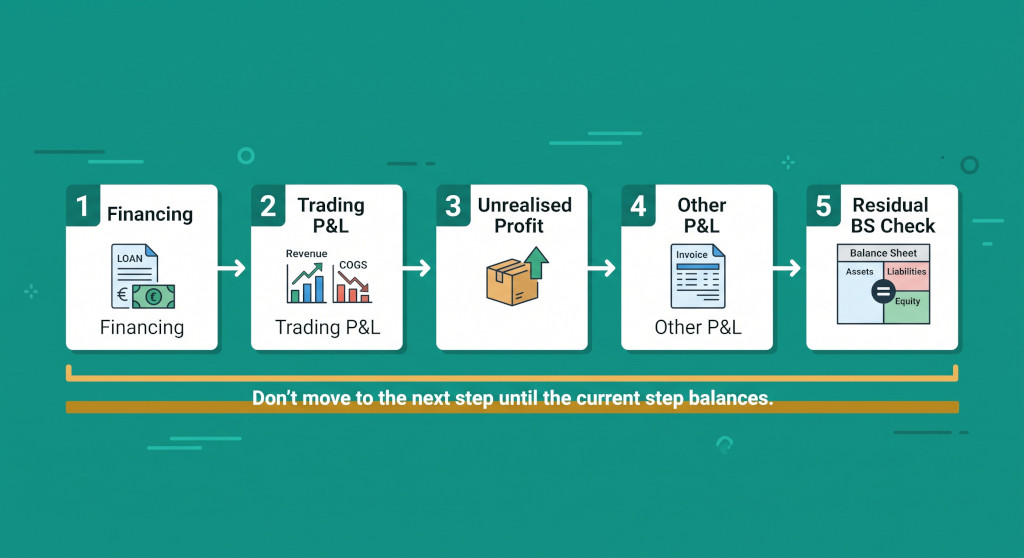
Intercompany eliminations should be posted in a specific order, not in whatever sequence they happen to appear in the register. The ordering principle is: resolve balance sheet positions before touching the P&L, and clear the simplest eliminations before attempting the ones that depend on figures generated by earlier steps.
Financing eliminations (loans & interest)
Trading P&L (revenue & COGS)
Unrealised profit in inventory
Other P&L (fees, royalties)
Residual BS check
Step 1 — Financing eliminations first. Intercompany loan balances are balance-sheet-only (or matched P&L on interest). They are the most straightforward to verify against the loan schedule, and clearing them first means you can identify any residual intercompany balance sheet positions at step 5 with confidence that all financing flows have already been dealt with.
Step 2 — Trading P&L (revenue/COGS) second. Eliminate the intercompany sales revenue against the corresponding cost of goods purchased. This is the entry that zeros out the intercompany revenue and cost flows in the consolidated P&L. It must come before the unrealised profit step because step 3 depends on confirming how much of the goods sold intercompany are still in closing stock.
Step 3 — Unrealised profit third. Once the revenue/cost flow is eliminated, assess what proportion of the intercompany goods are still in the buyer’s closing inventory and calculate the unrealised profit to be eliminated from that stock. This entry reduces both the cost of sales (reversing the over-stated cost in closing inventory) and the inventory balance sheet figure. It cannot be calculated reliably until step 2 is posted because you need to know the total goods sold intercompany to determine the correct margin rate.
Step 4 — Other P&L eliminations (management fees, royalties, service charges) fourth. These eliminations are P&L only and do not affect the balance sheet intercompany positions. They are posted last among the substantive eliminations because they are typically the most straightforward — fixed amounts on known schedules — and any disputes in steps 1–3 should be resolved before adding further complexity.
Step 5 — Residual balance sheet check. After all eliminations are posted, every intercompany account on the consolidated balance sheet should show a zero balance. Run a filtered view of the consolidated trial balance showing only accounts designated as intercompany in the group COA. Any non-zero balance is either a missed elimination or a difference from a reconciliation that was not fully resolved. This is the completeness check — the register tells you what was intended; the residual balance sheet check tells you whether anything was missed.
The residual balance sheet check is not optional. The most common source of missed eliminations is eliminations that were identified in the register but not posted — either because the period was closed before the entry was made, or because a difference was noted but the entry was posted at the expected amount rather than the reconciled amount. A non-zero intercompany balance after all entries are posted is always a problem to resolve, not a rounding item to ignore.
Managing Differences
A difference in the elimination register means the expected amount (from the source document) and the posted amount (in the consolidation model) do not agree. Differences arise from two causes: a legitimate reconciliation difference that was carried forward unresolved, or a posting error. The register’s Difference column surfaces these; the investigation is then about which of the two it is.
The first question is: does the counterparty agree that the difference exists? If ManufactureCo’s intercompany receivable shows £200,000 and RetailCo’s intercompany payable shows £198,500, the £1,500 difference is a reconciliation difference — a mismatch in what each entity has recorded. This must be traced to a transaction: most commonly, an invoice in transit (recorded by the seller in the closing period, not yet received by the buyer), a timing difference on a payment (cleared in the seller’s bank before the period close but not yet processed by the buyer), or a posting error in one entity’s books.
For a systematic approach to tracing intercompany balance differences before they reach the elimination stage, see intercompany reconciliation for multi-entity groups. For the specific complication where balances appear matched but still differ because of FX, accruals, or withholding tax, see why your intercompany balances never match, even when both companies agree.
If a difference cannot be resolved before the close deadline, the register must record it explicitly — the difference amount, the nature of the investigation, and who is responsible for resolving it. Posting the expected amount and leaving the difference unrecorded is not acceptable: the consolidated balance sheet will carry an unexplained intercompany balance, and the audit trail will not show that anyone identified the problem. A documented, actively-investigated difference is manageable. An undocumented difference discovered at year-end is not.
Reviewing for Completeness: Did You Miss Any?
The register ensures that every elimination you knew about was posted. What it cannot guarantee is that the register itself was complete — that you identified all the intercompany relationships that generated eliminations in the period. The completeness review has two inputs.
The first is the intercompany relationship matrix — a simple grid showing which entities trade with, lend to, or recharge each other. Every cell in the matrix that is marked as active in the period should correspond to at least one row (usually more) in the elimination register. If a cell is active but has no corresponding register rows, either no transactions occurred (confirm with the entity) or an elimination was missed.
The second is the residual balance sheet check described in step 5 of the posting order above. Any intercompany account with a non-zero balance after all register items are posted is evidence that either the relationship matrix is incomplete or the register contains an error. Resolve each residual balance to one of: a missing register entry (add and post it), a difference under investigation (document it), or a legitimate non-zero balance (such as an intercompany balance created by a consolidation adjustment in the current period that will be eliminated in the next). The third category should be rare and always explicitly noted.
For a broader consolidation review that includes the elimination completeness check alongside other closing steps, see how to build a consolidation review checklist. For how the elimination schedule fits into the overall consolidation sequence, see consolidation failures are sequencing failures: the case for a fixed process order.
NCI and Multi-Currency Complications
Two scenarios require the elimination schedule to carry additional columns or reference calculations beyond the standard register structure.
Where a subsidiary is partly owned (non-controlling interest), trading eliminations between the parent and a partly-owned subsidiary must be allocated between the NCI and the group. For upstream sales (partly-owned subsidiary sells to the parent), the unrealised profit elimination is shared between the group and the NCI in proportion to ownership. For downstream sales (parent sells to the partly-owned subsidiary), the full unrealised profit is eliminated against the group. The register should note the NCI percentage for each trading elimination involving a partly-owned entity, and the unrealised profit rows should show the group portion and the NCI portion separately. For the full upstream/downstream mechanics, see intercompany eliminations when there is a non-controlling interest.
Where the trading entities have different functional currencies, the elimination amounts must be expressed in the group’s presentation currency — and the two sides of the intercompany transaction may have been translated at different rates (the rate at the transaction date for each entity), producing a translation difference at the time of elimination. This translation difference is not an error; it is a foreign-exchange effect that must be allocated to the CTA or recognised in the P&L depending on the nature of the underlying transaction. The register should flag any cross-currency elimination pair so that the translation effect is explicitly calculated, not silently absorbed as an unreconciled difference. For the mechanics, see intercompany eliminations in multi-currency groups.
Automate your elimination schedule
BrizoConsol builds and maintains your intercompany elimination schedule automatically — pre-populating expected amounts from your reconciled balances, tracking posting status in real time, and flagging differences before they become audit findings. See how it works for your group. See It in Action
Practical Checklist: Running the Elimination Schedule at Each Close
- Before the close opens: Confirm your intercompany relationship matrix is current — every active entity-to-entity relationship for the period is listed.
- Complete intercompany reconciliations first. Confirm all intercompany balances are agreed between entities before the elimination register is populated. Differences must be resolved at the reconciliation stage, not carried into the elimination register as unexplained variances.
- Populate the Expected Amount column for every register row from its source document (reconciliation, loan schedule, management accounts) before posting any eliminations.
- Post financing eliminations first (intercompany loans, interest). Mark each row as Posted and confirm the Posted Amount.
- Post trading P&L eliminations second (intercompany revenue and COGS). Confirm the amount against the reconciliation figure for each entity pair.
- Calculate and post unrealised profit eliminations third. For each intercompany product flow, confirm the closing stock figure with the buying entity and calculate the unrealised margin to be eliminated.
- Post other P&L eliminations last (management fees, royalties, service charges). Confirm each amount against the charging entity’s billing schedule.
- Run the residual balance sheet check. Every intercompany account in the group COA should show zero. Investigate every non-zero balance.
- Document every difference — amount, nature, responsible party, expected resolution date — in the register’s Notes column. Do not post at expected amounts and leave unexplained differences undocumented.
- Confirm completeness by cross-referencing the relationship matrix against the register. Every active relationship should have corresponding register entries.
- Archive the completed register with the period’s consolidation working papers. It is your audit trail for every elimination posted in the period.
Group close in hours, not days
BrizoConsol connects directly to your entities’ accounting systems, reconciles intercompany balances automatically, and runs the full elimination schedule with a complete audit trail. Finance teams using BrizoConsol close their group in hours, not days. Start Free Trial